17
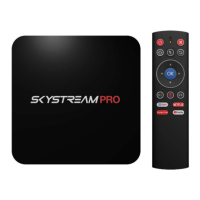
Back Button
The Back Button works just like the back button on your phone.
Want to jump back one spot in an app, just click it once. Want to
back out of an app with break neck speed? Press the back button
multiple times.
Direction Pad and OK Button
You can use the direction pad to navigate through the home screen
and apps. Pressing OK button will click on apps or items within apps.
V- & V+ = Volume Buttons
These are pretty self-explanatory, but we thought we would include
them to bring up a point. When using an Android TV Box you now
have to different volumes that work in tandem. Your TV will have its
own volume level and so will your SkyStream Pro. So if the volume
output is low, you can turn up the volume either on your TV or TV
Box. We recommend setting your TV volume first and then adjusting
with your airmouse as this will be the remote that you will be using
the most.
Microphone Button
The SkyStream Remote has a built in microphone and has voice
capabilities for the SkyStream Pro. In the same way you can talk to
your Android phone, you can do the same thing with our Android TV
Boxes. Simply click on the Google icon at the top left of the home
screen, press the voice button on the remote and tell Google what


 To Next Page
 Loading...