
 Need help?
Do you have a question about the SkyZone SKY03O and is the answer not in the manual?
Instructions for initial setup and operation of the FPV goggles.
Guide on how to search for channels using the receiver.
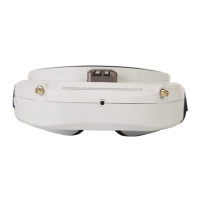
The SKYZONE SKY030 FPV Goggle is a sophisticated head-mounted display designed for immersive First-Person View (FPV) experiences. It integrates advanced wireless receiver technology and a high-quality DVR system, offering a comprehensive solution for FPV enthusiasts.
At its core, the SKY030 FPV Goggle features two 5.8GHz wireless receiver modules that operate in diversity mode. This design significantly enhances signal reception by automatically selecting the stronger signal from the two channels, thereby improving overall video stability and clarity. The receiver system is compatible with most conventional ISM 5.8GHz transmitters, supporting 6 bands and 48 channels, ensuring broad compatibility with various FPV setups.
A key component of the goggles is the integrated DVR system, which utilizes high-quality H.246 video compression technology. This allows for superior video screen restoration and efficient storage, supporting high-capacity memory cards up to 128GB (UHS-I U1). The DVR also boasts an automatic video recording function, simplifying the capture of flight footage.
The goggles incorporate a front camera with VGA resolution and good low-illuminance characteristics. This feature allows users to easily observe their surroundings without needing to remove the goggles, enhancing safety and convenience. The front camera can be quickly activated in any mode and is designed for temporary viewing, not for recording to the memory card or outputting via AV OUT. Its operation does not interfere with ongoing video recording.
Head tracking functionality is another prominent feature, enabling users to control camera pan and tilt movements on their drone by simply moving their head. The system requires an initialization period upon power-on, during which the goggles must be kept horizontal and stable. A "beep" sound confirms successful initialization. Users can reset the PPM signal to the center position with a short press of the TRACK button. The PPM channels are configurable, offering flexibility in control setups. Pan and Tilt tracking ranges are also adjustable, with default settings of 90 degrees for Pan and 90 degrees for Tilt, respectively. Pan and Tilt correction settings allow for individual compensation of center offsets, with adjustable levels. Additionally, PPM Reverse options provide flexibility in reversing channel directions for Pan, Tilt, or both.
The goggles support various input modes, including RF (Normal and Racing), AV IN, and HDMI IN. In HDMI IN mode, the wireless receiver and DVR modules are automatically turned off to conserve power. The system automatically recognizes and displays supported resolution formats. Similarly, in AV IN mode, the wireless receiver is turned off, and the system automatically switches between NTSC and PAL formats. The goggles also offer AV OUT functionality, outputting diversity-received audio and video signals. An earphone port is available for audio output, with the volume defaulting to minimum upon power-on to protect hearing.
An integrated fan serves a dual purpose: defogging the lenses and dissipating heat from within the product. The fan speed is adjustable across 16 levels in the system menu, and it can be started or stopped by pressing the POWER button.
For visual customization, the goggles feature an OLED display with adjustable luminance across 8 stages. An OLED screensaver function is included, which moves the image 10 pixels per minute to prevent screen burn-in.
Getting started with the SKY030 FPV Goggle involves a few simple steps. Users need to install the lenses, goggles, antennas, and memory cards. After connecting the camera to the transmitter and powering it on, the goggles are powered on by a long press of the power button for 3 seconds. Channel and frequency matching with the VTX is achieved by short pressing the BAND and CH buttons. The interpupillary distance (IPD) can be adjusted by sliding the IPD adjuster for optimal viewing comfort.
The channel search function is intuitive. A long press of the CH Search button brings up a menu, and a short press initiates an auto-search across 48 channels. The receiver then automatically tunes to the channel with the strongest signal, which is visually represented by a histogram. Manual channel selection is also possible using the LEFT or RIGHT buttons.
The RF Racing mode is specifically designed for racing scenarios, limiting operation to the eight channels of the Race band. In this mode, the CH button increases channels, while the BAND button decreases them, and channel search is restricted to the Race band.
Voltage calibration is available in the system menu, allowing users to calibrate the voltage reading on the OSD to match the actual loaded battery voltage, using a multi-meter for accuracy.
Button functions are clearly defined for various modes. The TRACK button activates head tracker reset and allows entry into the menu setting status with a long press, or switches between main menus. The CH button adjusts channels in RF mode and volume upwards in RF, AV IN, HDMI IN, and PLAYBACK modes, and selects menus upwards. The BAND button adjusts bands in RF mode and volume downwards in other modes, and selects menus downwards. The REC button initiates and stops video recording in RF and AV IN modes, acts as an OK button in menus, a left selection button in channel search, and a long press enters playback mode. The MODE button brings up a mode selection menu, and the CAMERA button quickly opens the front camera or, with a long press in RF mode, enters/exits the channel search menu.
Video recording offers several useful features. It's recommended to format the memory card upon first use. Recording is available in both RF and AV IN modes, with on-screen indicators showing recording status and time. Users can choose to record sound or only video. An automatic recording function can be enabled, which starts recording automatically when a video signal is detected after power-up. Cyclic recording prevents storage space waste by overwriting older recordings. Video files are automatically divided into multiple files, with adjustable lengths (5, 10, 20, or 30 minutes). A file repairing function automatically checks and repairs damaged video files upon entering playback mode, particularly useful in cases of sudden power disconnection during recording.
Playback mode is accessed by a long press of the REC button in RF or AV IN modes. The video screen is previewed directly, showing file names and recording times. Playback controls include Fast Forward/Fast Reverse (2X, 4X, 8X speeds), Play/Pause, and Stop/Return. Files can be deleted from the memory card during browsing. The goggles are designed to play only files recorded by themselves.
The LED light display window offers various lighting effects, configurable in the system menu, and can also be turned off.
The SKY030 FPV Goggle includes features that contribute to its longevity and ease of maintenance. The built-in fan not only aids in defogging but also helps dissipate internal heat, which is crucial for the electronic components.
The OLED screensaver function, which subtly moves the image across the display, is a passive maintenance feature designed to prevent permanent burn-in on the OLED screen, thereby extending its lifespan. This function cannot be turned off.
The OLED Sleep mode is a power-saving and screen-preserving feature. Users can set a sleep timer (1, 3, or 5 minutes). When activated, the goggles detect inactivity via the headtracker sensor. If the goggles remain still for the preset time, the OLED screen will turn off, while other functions (receiver, DVR, etc.) continue to operate. Movement detected by the sensor will wake the screen. This helps conserve battery life and prolong the OLED screen's operational life.
For memory card management, a "Format SD card" option is available in the system menu. This allows users to format the memory card directly from the goggles, ensuring optimal performance and resolving potential file system issues. Users are cautioned that formatting will delete all files.
A "Factory Settings" option in the system menu allows users to restore all function settings to their default state. This can be useful for troubleshooting or resetting customized settings without affecting files stored on the SD card.
The device's file repairing function for video recordings is a significant maintenance feature. In the event of sudden power loss during recording, which can lead to damaged files, the goggles automatically check and repair the last recorded file upon entering playback mode. This helps preserve valuable flight footage that might otherwise be lost.
The modular design, with separate components like antennas and memory cards, simplifies replacement or upgrades, contributing to the overall maintainability of the device.
 General
| Display Type | OLED |
|---|---|
| Refresh Rate | 60Hz |
| DVR | Yes |
| Connectivity | HDMI, USB |
| Lens Type | Aspherical |

 To Next Page