The Information Button (i)
Your SLENDERTONE unit stores information about current and previous sessions which can be accessed by
using the Information button. You can access this information while a programme is running. The
information is displayed for three seconds and then reverts back to the programme timer.
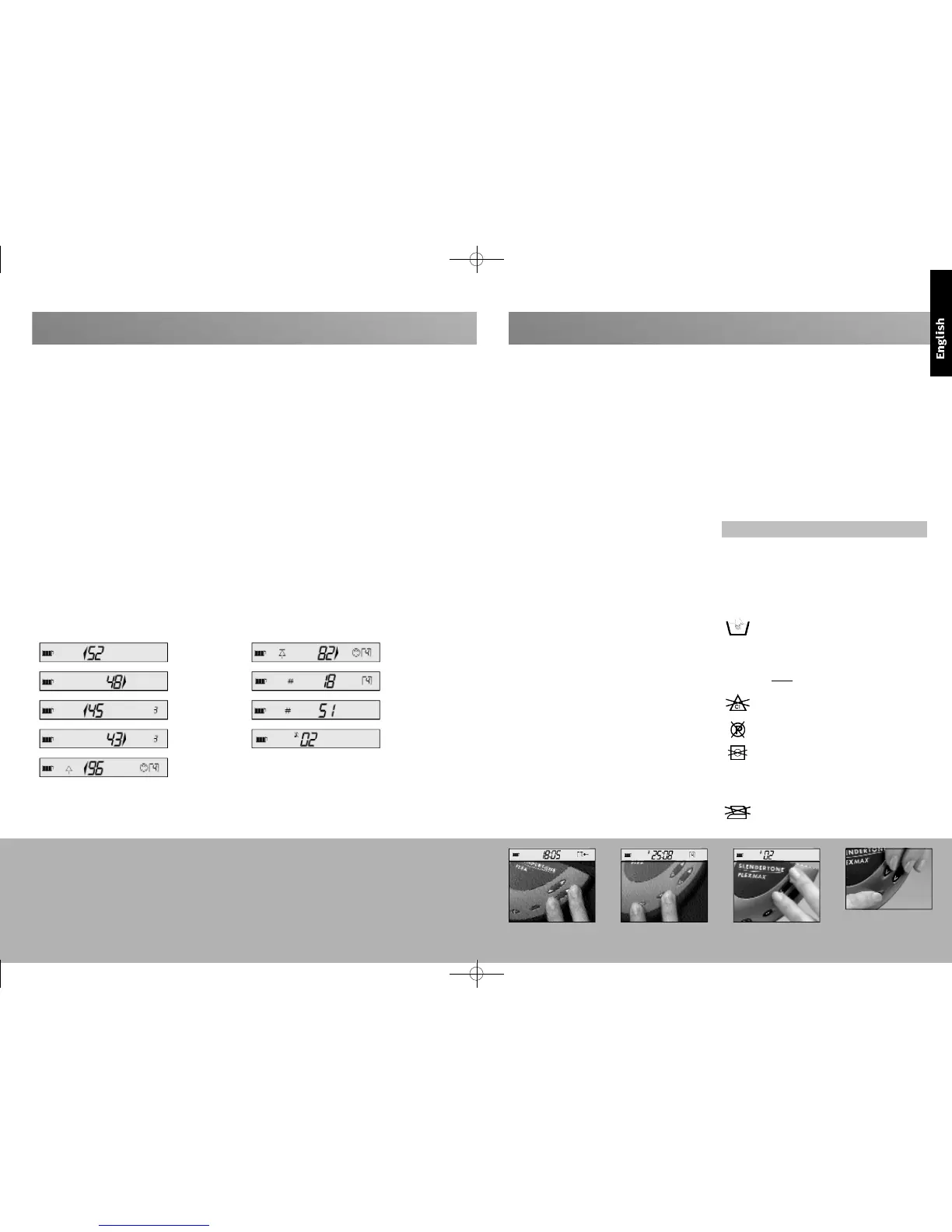
1 current intensity - left (fig. a)
Press the information button once to display the
intensity from the left side of the belt.
2 current intensity - right (fig. b)
Press twice to display the intensity from the
right side of the belt.
3. Average intensity - Left (fig. c):
Press three times to display the average
intensity used on the left side of your belt over
the past three sessions.
4. Average intensity - Right (fig. d):
Press four times to display the average intensity
used on the right side of your belt over the past
three sessions.
5. Highest intensity - Left (fig. e):
Press five times to display the highest intensity
ever reached on the left side of the belt.
6. Highest intensity - Right (fig. f):
Press six times to display the highest intensity
ever reached on the right side of the belt.
7. Sessions in current programme (fig. g):
Press seven times to show how many sessions
you have completed in the current programme,
a good way of knowing how soon the unit
will progress you to the next programme.
8. Number of sessions to date (fig. h):
Press eight times to display the number of
sessions you have completed to date across all
programmes. This is an ideal way of keeping
track of your progress.
9. Music selection (fig. i):
Press nine times to display the pair of tunes
which are currently set to play at the beginning
and the end of each session.
FIG
.
A
FIG. B
FIG
.
C
FIG
.
D
FIG
.
E
FIG
.
F
FIG. G
FIG
.
H
FIG
.
I
6
Product Guarantee
Should your unit develop a fault within two years of purc h a s e ,
SLENDERTONE
will undertake to replace or repair the unit or
any parts found to be defective with no charge for labour or
materials, provided the unit *:
• has been used for its intended purpose and in the
manner described in this instruction manual.
• has not been connected to an unsuitable power source.
• has not been subjected to misuse or neglect.
• has not been modified or repaired by anyone other than
an approved
SLENDERTONE
agent.
This guarantee complements existing national guarantee
obligations and does not affect your statutory rights as a
consumer.
* This excludes consumables (e.g. pads, belt etc.) when
subject to normal wear and tear
1 Intensity Keylock Function
If you find a comfortable intensity level, press the
upper and lower halves of the left intensity button
to lock that intensity (fig. a). The keylock function
also locks the pro g ramme button. This function only
remains active during the session in which it is
activated. Deactivate the keylock function by
performing the same action again. We recommend
that you use this function during the Ab Crunch
programmes in order to prevent any inadvertent
activation of the keys.
2 Mute Function
If you want to switch off your unit’s sound effects,
press the information button and the programme
button at the same time (fig. b). The mute function
remains active indefinitely unless manually changed.
D e a c t i v ate the mute function by performing the same
action again.
3 Error Messages
In the unlikely event of your unit developing a fault,
one of three error messages may appear. If E002
appears, switch your unit off and on again. This
should rectify the problem. If this message persists,
return your unit for repair. If the error message
E003 or E004 appears, your unit has developed an
internal fault and should be returned for repair.
4 Music Function
If you want to personalise your SLENDERTONE unit,
choose from the following range of paired tunes by
pressing the upper and lower halves of the right
intensity button until you find the paired tunes you
like (fig. c). The pairs of tunes are:
pair 01:
Beginning of session:
SLENDERTONE
Startup
End of session:
SLENDERTONE
Shutdown
pair 02:
Beginning of session: Reidy’s Opus
End of session: That’s It!
pair 03:
Beginning of session: William Tell Overture
End of session: Mexican Hat
pair 04:
Beginning of session: Jingle Bells
End of session: We Wish You A Merry Christmas
5 Rapid Intensity Increase
If you want to advance your intensity level quickly,
press the information button and the upper halves
of both intensity buttons (fig. d). This function is
only available on programmes 5-10.
You should never let your SLENDERTONE unit get wet,
but you may wipe it clean with a lightly dampened
cloth from time to time. The
SLENDERTONE
belt can be
washed, but you must first remove the unit and pads.
You must always follow the instructions on the label
when washing the belt.
Do not machine wash your belt. You should
always hand wash it in lukewarm water. T h i s
p ro t e c t s the internal wiring from damage in
the washing machine. It is recommended
that you take care even when hand washing
and never wring the belt to remove water.
Do not use any bleach when washing your
belt.
Do not dry clean your belt.
Do not tumble dry your belt. You should
always dry the belt on a flat surface. Do not
dry it over anything hot (e.g. a radiator) as
the belt contains plastic parts. You should
ensure the belt is completely dry before use.
Do not iron your belt.
Advanced Unit Features
Intensity Keylock Function Mute Function
fig. a fig. b
Music Function
fig. c
Rapid Intensity Increase
fig. d
Caring For Your Belt & Unit
7


 To Next Page
 Loading...