Arrow key & select number keys to edit.
Number 1 for choosing, in the meanwhile, can be used for punctuation options by
scrolling when messaging,
Push up to turn on the flashlight
Push down to turn off the flashlight
It can be set in advance and make four emergency calls and text messages.
Emergency situations:
When the SOS button is pressed, the phone will issue a loud warning sound and
automatically send messages to the setting SOS phone numbers.
Emergency call Number setting:
Scroll the Arrow key to phone book, press Green Button, and then scroll the Arrow key
to SOS number option to update the emergency call numbers. Enter the call number &
it can be up to 5 numbers.
Emergency call Text message setting:
Scroll the Arrow key to Messages, press Green Button, and then scroll the Arrow key to
Emergency SMS option to update the emergency call text massage.
START TO USE YOUR PHONE
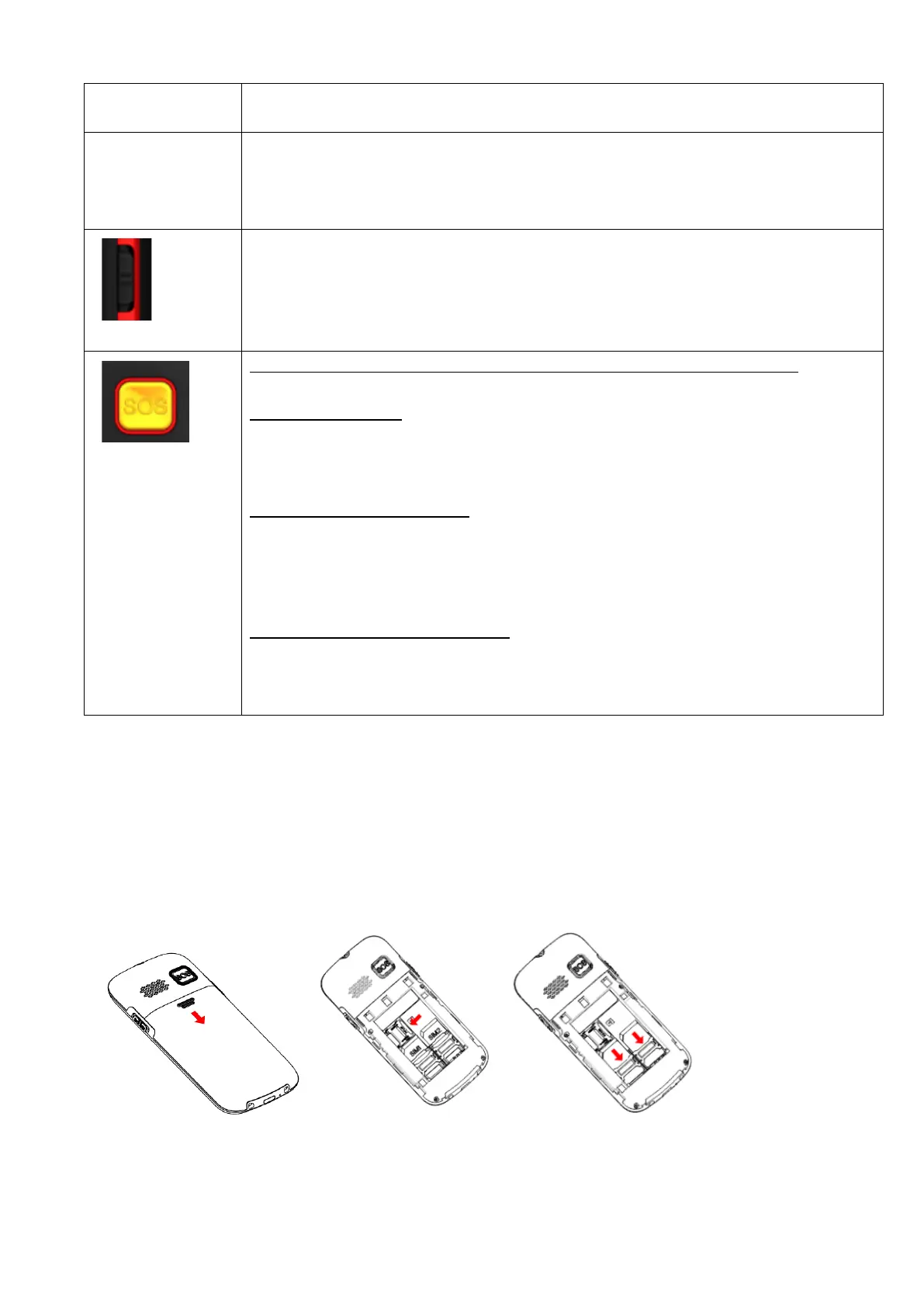
1. Insert the SIM card: remove the battery-cover, then put your SIM card in. if MICRO SIM : please use a
micro SIM CARD adaptor.
2. Insert the memory card (max. 4GB) : remove the battery-cover, place the memory card.
3. Then install the battery correctly (see illustration )


 To Next Page
 Loading...