77
Temporary temperature
modification
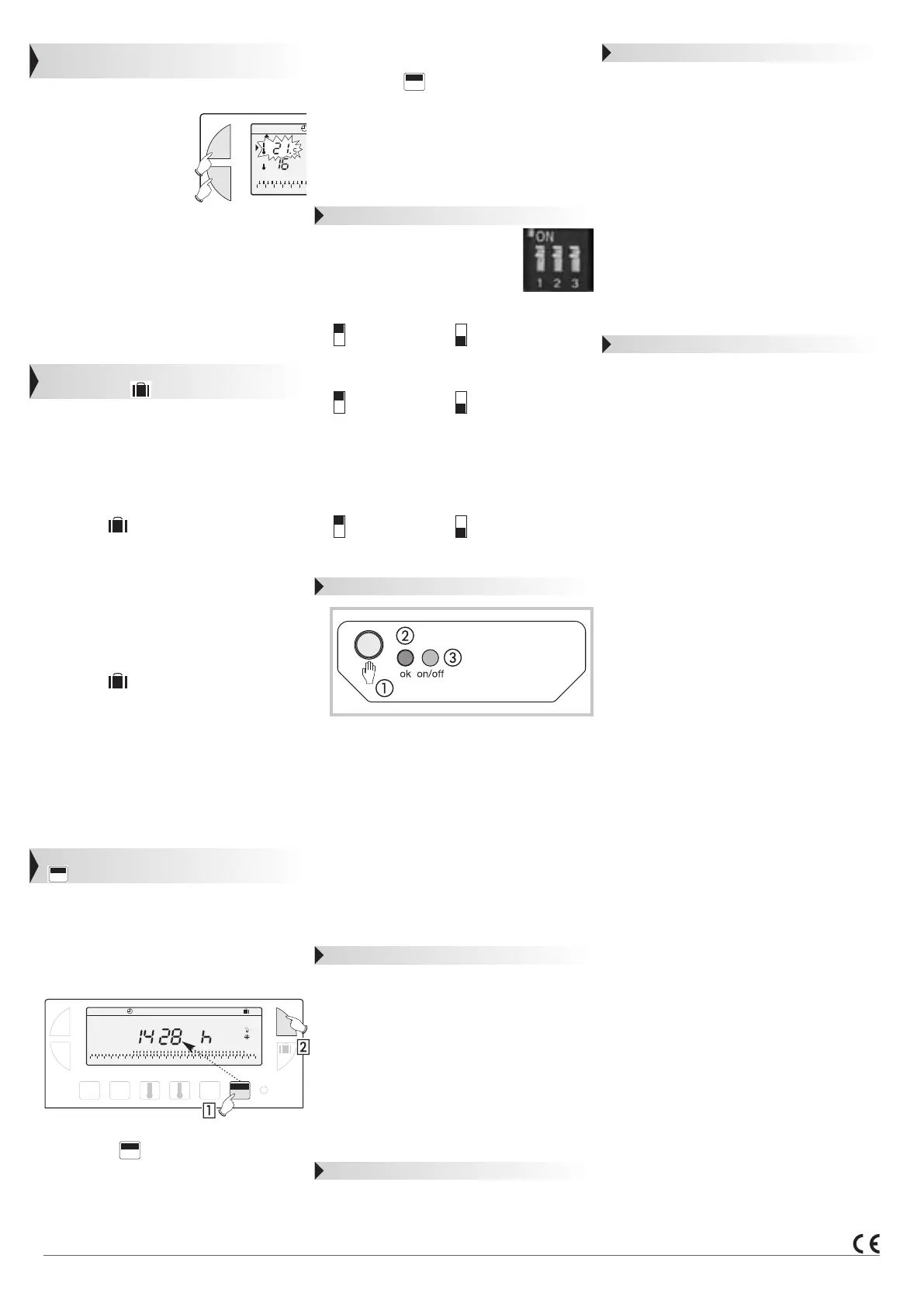
In automatic mode this very useful function allows
you to modify ambient temperature temporarily.
•
To increase the temperatu-
re, press the + button
(several times, if necessary).
•
To decrease the tempera-
ture press the - button
(several times, if necessary).
The current temperature level indicator (com-
fort or reduced) will begin flashing.
This modification ends with the next change in
programmed temperature.
To return to the initial programme press MODE
and re-position the pointer ▲ under Auto.
The current temperature level indicator (comfort
or reduced) will stop flashing when the temporary
modification comes to an end.
Prolonged absence mode
(holidays)
This mode protects your dwelling from freezing by
maintaining a minimum adjustable temperature in
your dwelling during your absences.
You can programme the length of your absence so
that the temperature rises for your return.
2 different settings are available for
maintaining temperature above frost level:
Permanent frost protection
• Press the button, the day 0I flickers.
• Press once the - button, the FORC display flickers.
• Validate with the OK button.
• Using +/- buttons, set the temperature level
desired during your absence.
• Validate with the OK button.
To cancel and return to Auto mode, press
MODE button.
Setting frost protection temperature for a
certain number of days
• Press the button, the day 0I flickers.
• Using +/- buttons, set the length of your absen-
ce in days (from 1 to 99 days). The current
day count as one.
• Validate with the OK button.
• Using +/- buttons, set the temperature level
desired during your absence.
• Validate with the OK button.
To cancel and return to Auto mode, press
MODE button.
Installation maintenance signal
This mode allows you either:
• to take steps for regular maintenance (change of
air conditioning filter, device cleaning).
• to compare your heating or air conditioning
consumption from one year to the next (by
comparing the number of running hours).
Counting running hours
Press the button.The display panel will
indicate the number of hours your burner, air
conditioning, ventilator-convector, etc. (depending
of the type of device controlled) has been
running from the moment the batteries were
inserted (by pressing once on + or - you return
the counter to zero.).
Press the MODE button to return in Auto mode.
0000
h
Auto Manu
¡c
+
-
012345
¡c
0 1 2 3 4 5 6 7 8 9 10 11 12 13 14 15 16 17 18 19 20 21 22 23 24
Auto Manu 1234567
+
-
OK
PROG
P1-P4
DAYS
1-7
MODE
0000
h
Res
timer
0000
h
Programming the regular servicing of your
installation
Press the button.
Set the number of running hours after which the
warning signal should flash using the +/- buttons.
Validate with the OK button ; the countdown
begins. The message timer will appear at the end
of the count-down warning you that servicing is
required.
Possible settings
Various settings can be made on
the back of the device (when it is
not mounted).
1- Selection of installation’s type
Heating Cooling
2- Selection of adjustment mode
On/Off Proportionnal
The proportionnal mode is to be set when using
floorheating (high inertia).
3-
Anti-locking function for the circulation
pump (activation of the pump for 1 minute
every 24 hours)
Anti-locking Anti-locking
function off function on
Configuration
In order to associate the transmitter with the
receiver:
• Press the receiver’s
pushbutton for more
than 3 seconds.
• The indicator OK
light will start flickering,
release the pushbutton.
The system is in configuration mode.
• Press the RESET button during 3 seconds of
the transmitter clock thermostat.
• The indicator OK
button will stop flickering,
at the end of 5 secondes.
The transmitter/receiver link is now established.
Reset
For clearing all transmission/reception links:
• Press the receiver’s pushbutton
for more
than 10 seconds.
• The indicator OK
light flickers slowly, then
more quickly.
• Press again the receiver’s pushbutton
more
than 3 seconds.
• The indicator OK
light stops flickering, all
links have been cleared.
The receiver returns to the Auto mode.
Priority setting
Manual control is provided for this product.
• Press shortly receiver’s
pushbutton (<3 sec).
Each press reverses output state.
Note : radio control retains priority.
0000
h
Troubleshootings
• The heating does not start:
- receiver’s power supply is cut off (OK
light is off). Check fuse and circuit breaker.
•
Receiver is outside of transmitter’s
range:
- move transmitter closer to receiver.
•
Receiver does not recognize transmitter’s
code:
- re-install receiver.
• The system does not start or does not
stop:
- the receiver or transmitter is disturbed by
radio transmission (radio ham,TV monitor,
cellular phone re-transmitter, etc.): attempt to
remove the source of disturbance.
In case of persistent problem,call on your electrician.
Technical specifications
Transmitter
Adjustment range for comfort temperature:
+5°C to +30°C
Adjustment range for reduced temperature:
+5°C to +30°C
Adjustment range for frost protection temperature:
+5°C to +30°C
Display range for ambient temperature:
0°C to +40°C
Static differential: < 0.3 K
Power: 2 standard LR6 alkaline batteries
(to supply the product and the radio transmission)
Operating range: 75 m from transmitter
to receiverin a free field
(operates over 3 building floors)
Transmission frequence: 433.92 MHz
Transmitter duty cycle: 10% IP:30
Operating temperature: 0°C to +40°C
Storage temperature: –20°C to +70°C
Hygrometry: 95% max.at 25°C
Dimensions: 115 x 82 x 34 mm
Degree of pollution: standard
Standards: EN 301-489-3
Receiver
Supply voltage : 230 V +10 % at -15 %
Minimum load: 12 V 100 mA
Output: 1 changeover contact free of potential
Switching capacity:
AC1: 16 A 250 V
Inductive: 3 A (cos ϕ = 0,6)
Radio frequency: 433.92 MHz
Degree of protection: IP43
Isolation class: II
Mechanical protection: IK04
Operating temperature: -10°C to +60°C
Storage temperature: -20°C to +70°C
Flexible capacity: 0,5 to 1,5 mm
2
Rigid capacity: 0,5 to 2,5 mm
2
Dimensions: 130 x 60 x 27 mm
Hygrometry: 90% max.at 20°C
Receiver class: 2
Standards: EN 60669-2-1
Standards: EN 300220-3,
EN 301-489-1 and EN 301-489-3.
Usable everywhere in Europe


 To Next Page
 Loading...