Air supply direction: bi-directional
Max. air volume: 2000 m³/h
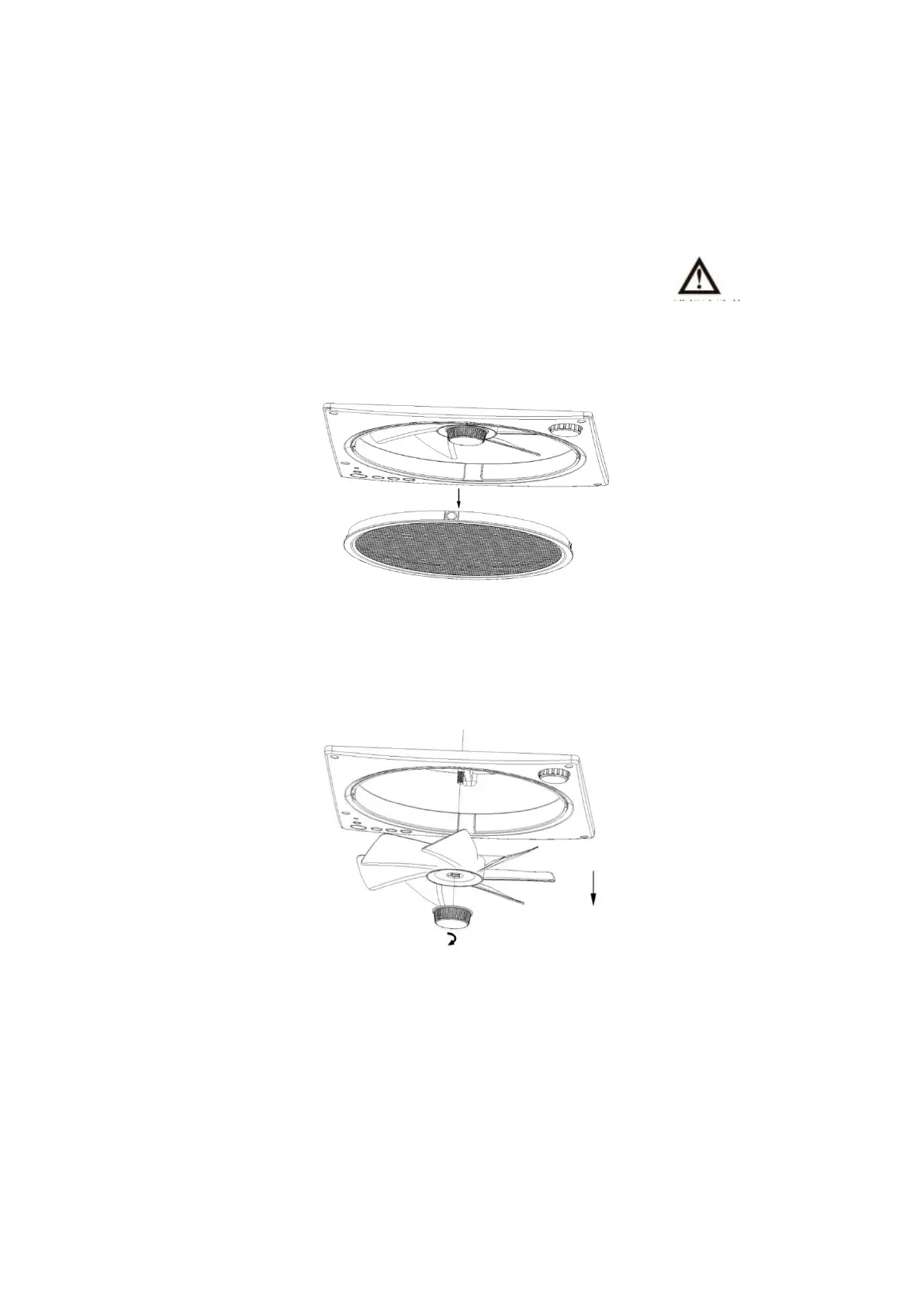
Parts replacement and cleaning
1. First, please make sure to disconnect the power supply. (Exclamation mark)
2. To remove the netting, remove the stainless steel netting from the ventilation fan panel
(see Figure 6-1), clean and dry it or replace it with a new one and put it back on.
3. To remove the fan blade, turn the knob cover counter-clockwise to remove it and then pull
off the fan blade section (see Figure 6-2). Clean and dry or replace the fan blade with a new
one before putting it back on.
** Please use soft cleaning tools such as sponges or brushes when cleaning the mosquito
screens and fan blades, it is not recommended to use hard cleaning tools such as wire balls as
they may damage the parts.
** Do not use cleaners with corrosive, volatile thinners.
** When putting the fan blade back on, press it into place against the slot and then tighten the
screw cap clockwise.
** Please align the magnet slot when putting the mosquito net back in place.


 To Next Page