
 Need help?
Do you have a question about the Small HD CINE 7 and is the answer not in the manual?
Connect power via L-Series battery or alternative source, then press the power button.
Supports video signals via HDMI up to 4Kp30 and SDI up to 1080p60.
Utilize four ¼"-20 mounting points to secure the monitor to a camera or rig.
Explains the general layout of the PageOS 4 interface for configuring tools and features.
Offers a zoomed-out perspective of configured pages for organization and naming.
Adjust a wide range of global monitor settings.
Provides access to commonly-used settings like Input, Volume, and Backlight.
Explains touch screen gestures like pinch to zoom and swipes for navigation.
Add new pages, tools, and activate them via the toolbar for custom workspaces.
Configure a source to display its image, enabling log conversions into HDR and SDR.
Assign and configure color space and curve transformations for HDR and SDR sources.
Select a backlight level for optimal contrast and viewability in different environments.
Ensures chrominance and luminance accuracy for critical color decisions.
Apply sharpening to the video data if desired.
Adjust the audio output level for the headphone jack and monitor speaker.
Enable upside-down mounting or mirroring for optimal viewing orientation.
Control how interlaced footage is displayed on the monitor.
Capture images for shot matching/thumbnails and review them in the gallery.
Configure zoom levels for detail checking and enable status data display.
Lock the touchscreen UI and change the internal menu language.
Enable or customize a backdrop image for when no signal is active.
Set a custom name for your monitor for easier recognition.
Setting the correct date and time ensures accurate timestamps on captured images.
Configure power-related options, such as auto recovery.
Save or load monitor configurations to an SD card for consistent settings.
Update firmware by inserting an SD card with a compatible update file.
Reset monitor settings to factory defaults, with options to clear registration/calibration.
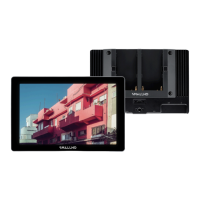
The SmallHD Cine 7 is a 7-inch on-camera HD monitor designed for cinematographers, offering a comprehensive suite of features for professional video production. Its primary function is to provide a high-quality, color-accurate display for monitoring footage in various shooting environments, including bright sunlight. The monitor is built to integrate seamlessly into a cinematographer's workflow, offering robust control over cinema cameras, advanced image analysis tools, and flexible power and mounting options.
One of the core usage features of the Cine 7 is its wide-gamut display, which ensures color accuracy crucial for critical color decisions during production. This is complemented by 4K and HDR compatibility, allowing users to monitor high-resolution and high-dynamic-range content with precision. The monitor boasts an impressive 1800 nits of brightness, making it highly viewable even in direct sunlight, a significant advantage for outdoor shoots.
The Cine 7's user interface is powered by PageOS 4, an intuitive operating system that allows for extensive customization. Users can configure and assign specific image analyzing tools and features to up to eight customizable pages. This page-based system streamlines the workflow by allowing quick access to desired tools without individually enabling or disabling features. The 'Pages View' provides a zoomed-out perspective of all configured pages, facilitating organization and naming for an efficient setup. Basic navigation is touch-screen based, similar to a smartphone, allowing users to pinch to zoom, swipe left and right between custom pages, and slide a finger down to view all preset pages. Swiping all the way left accesses a deep settings menu for calibration, profiles, and other advanced configurations.
Adding new pages is straightforward, allowing users to start from a fresh workspace, a template, or a specific utility. Tools can be added to any page by tapping the screen to reveal a toolbar and selecting the desired tool. Once a tool is activated, its custom settings can be adjusted via an arrow icon next to its name.
The monitor offers various settings to optimize its display and controls. Under "Settings: Display," users can adjust the backlight level to suit their viewing environment, ensuring maximum contrast and viewability. Calibration features guarantee chrominance and luminance accuracy, which is vital for maintaining consistent color across different monitors and ensuring that the on-screen image accurately reflects what the camera is capturing. Users can also apply sharpening to video data through the "Appearance" settings.
"Settings: Controls" provides options for audio and image manipulation. The volume can be adjusted for the headphone jack and monitor speaker. The "Image Rotate" feature allows for upside-down mounting and mirroring, which is useful when the monitor needs to face the subject. Interlace options control how interlaced footage is displayed.
For capturing and reviewing images, "Settings: Capture" includes an "Image Capture" tool that assists with shot matching and automatic thumbnail creation when recording. An SD card must be inserted for this function. The "Image Gallery" allows users to browse captured images on their removable media.
"Settings: Interface" offers further customization of the user experience. "Pixel Zoom" allows users to configure default zoom levels for quickly punching in on a particular shot. The "Status Display" can be enabled and configured to show monitoring-related data such as battery life and frames per second. A "UI Lock" feature allows users to lock the touchscreen by pressing and holding for five seconds, preventing accidental changes. The language of the internal menu system can also be changed.
"Settings: User" provides options for personalizing the monitor. A customizable "Backdrop" can be enabled for when no signal is active, allowing for personal or company branding. A "Monitor ID" can be set for easy recognition. "Date & Time" settings ensure accurate timestamps for captured images. "Power" options include auto-recovery features. "Profiles" allow users to save or load the entire monitor's configuration to an SD card, which is excellent for maintaining consistent settings across multiple monitors.
Under "Settings: System," firmware updates can be performed by inserting an SD card with a compatible update file. A "Factory Reset" option allows users to restore the monitor to its original factory settings, with the choice to clear registration and calibration data.
Connectivity options are robust, including two 3G SDI inputs (with the second doubling as a loop out), an HDMI input with an HDMI loop through, and a Sony L-Series dual battery bracket. Optional Gold Mount or V-Mount battery plate attachments provide additional power flexibility. The monitor supports video signals via HDMI up to 4Kp30 and via SDI up to 1080p60. Physical connections include a micro USB port, headphone jack, SD card slot, SDI input/output, HDMI input/output, Ethernet port, and a 10-34V DC, 2A barrel input. For mounting, there are four ¼"-20 mounting points located on the left side, right side, bottom, and rear of the monitor, allowing for secure attachment to a camera or rig.
Maintenance features are primarily software-based, focusing on keeping the device's performance optimal. Firmware updates ensure the monitor runs on the latest software, potentially introducing new features or improving existing ones. The ability to save and load profiles helps maintain consistent settings, which can be seen as a form of operational maintenance, reducing setup time and ensuring reliability across different units. The factory reset option provides a way to troubleshoot software issues or prepare the monitor for a new user by reverting to default settings.
In summary, the SmallHD Cine 7 is a professional-grade monitor designed to enhance the cinematography experience through its high-quality display, customizable PageOS 4 interface, extensive connectivity, and practical features for image analysis, capture, and power management. Its focus on color accuracy, brightness, and user-friendly operation makes it a valuable tool for demanding production environments.
 General
| Display Size | 7 inches |
|---|---|
| Resolution | 1920 x 1200 |
| Brightness | 1800 nits |
| Touchscreen | Yes |
| Display Type | IPS LCD |
| Contrast Ratio | 1000:1 |
| Viewing Angle | 160° |
| Inputs | HDMI, 3G-SDI |
| Outputs | 3G-SDI, HDMI |
| Weight | 1.26 lbs (0.57 kg) |

 To Next Page

