产品功能
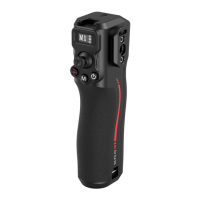
1.Joystick: Push the joystick up and down to control the gimbal's pitch axis
movement, and push the joystick left and right to control the gimbal's translation
axis movement. Joystick calibration method: [Press the trigger button three times
in a row, and keep pressing the fouh time. The calibration icon will be displayed
on the screen . Then the joystick will rotate more than 6 circles at the extreme
position and stop. The joystick will stay in the middle position for 20 seconds
without any operation, waiting for the calibration to complete. If the calibration
fails ,the calibration error will be displayed and recalibration is required. If the
calibration is successful, it will not be displayed.
2.Recording / Photographing Button: This button has two strokes. Pressing it lightly
(the rst stroke) controls the camera to autofocus, and pressing it hard
(the second stroke) controls the camera to sta recording. After recording stas,
the recording time is displayed. Pressing it again stops recording, and pressing it
hard and long controls the camera to take photos.
3.Mode switch (M key): Single-click to switch modes, double-click to enter / exit
veical shooting mode (RS 4 /RS 4 Pro does not have this function), triple-click to
enter/exit 360° rotation mode, long-press the M button to enter/release to exit
spos mode, and double-click the trigger button while long-pressing M to lock
(exit lock) spos mode.
4.Sleep mode: Single or double-click the power button to enter / exit sleep mode.
5.Display screen: Displays the current mode of the controller. The screen lights up
to indicate a normal connection.
6.Trigger button (return to center/lock ): Single click: install DJI LiDAR focus
rangender or Ronin image transmission and turn on, turn on or o ActiveTrack;
Double click: return the gimbal to center; Triple click: enter sele mode;
Long press: lock the gimbal's three axes; Long press the trigger button and click
the M button to lock or exit the lock gimbal (lock without pressing the trigger
button).
7.Scroll wheel: The default function is to control focus/zoom by wire. You can change
the settings on the touch screen of the DJI RS 2 / RS 3 Pro / RS 4 / RS 4 Pro
stabilizer. You can set it to focus motor, control focus/zoom by wire, adjust the
camera ISO, apeure, shutter speed, and control the roll axis, pan axis or pitch
axis. You can change the corresponding scroll wheel speed, smoothness, and
forward and reverse direction according to the settings on the touch screen;
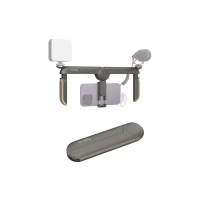
8.Slider: The side slider can be used to expand focus wheels, mobile phone holders,
monitors and other equipment.
9.D/S switch lever: used to switch and control DJI or Smallrig focus motor 4297


 To Next Page
 Loading...