SETTING
CAL
Knob1
456
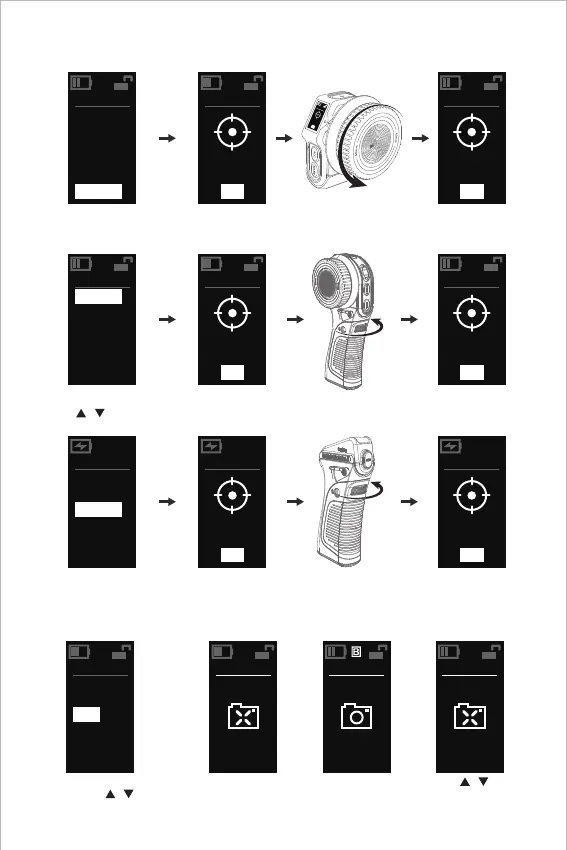
Wireless Handwheel Controller:
Press and hold SET,
Select K1-CAL for calibration. Click SET to enter
Turn the knob (K1)
to the end point
Click SET to complete the
calibration, so that "000"
or "999" will be shown.
Wireless Handwheel Controller:
Press and hold SET,
Select K2-CAL for calibration. Click SET to enter
Turn the knob (K2)
to the end point
Click SET to complete the
calibration, so that "000"
or "999" will be shown.
Click REC to enter
Turn the knob (K2)
to the end point
Click REC to complete the
calibration, so that "000"
or "999" will be shown.
7. BLE Connection
Camera Setting: BLE Setting → BLE Function → On Status → Click to Match.
7.1 Wireless Handwheel Controller BLE Setting:
Click SET
to start BLE
scanning
Scanning connection is
successful, and camera
confirms the matching
SETTING
LED
K1-DIR
BLE
SCREEN
K1-CAL
VER
SETTING
Scan...
SETTING
OFF
SETTING
Connect
Press and hold SET to enter / exit
the menu, click / to turn
pages, click SET to enter options
Click /
to turn o BLE
SETTING
LED
K1-DIR
K2-DIR
BLE
SCREEN
K1-CAL
SETTING
CAL
Knob 1
456
SETTING
CAL
Finished
000
SETTING
K2-CAL
VER
SETTING
CAL
Knob 2
636
SETTING
CAL
Finished
000
SETTING
K2-DIR
BLE
K2-CAL
VER
SETTING
CAL
Knob 2
636
SETTING
CAL
Finished
000
Electronic Controller Module: Press
and hold / simultaneously,
select K2-CAL for calibration.
11


 To Next Page