Lens Staing
Point
Lens Ending
Point
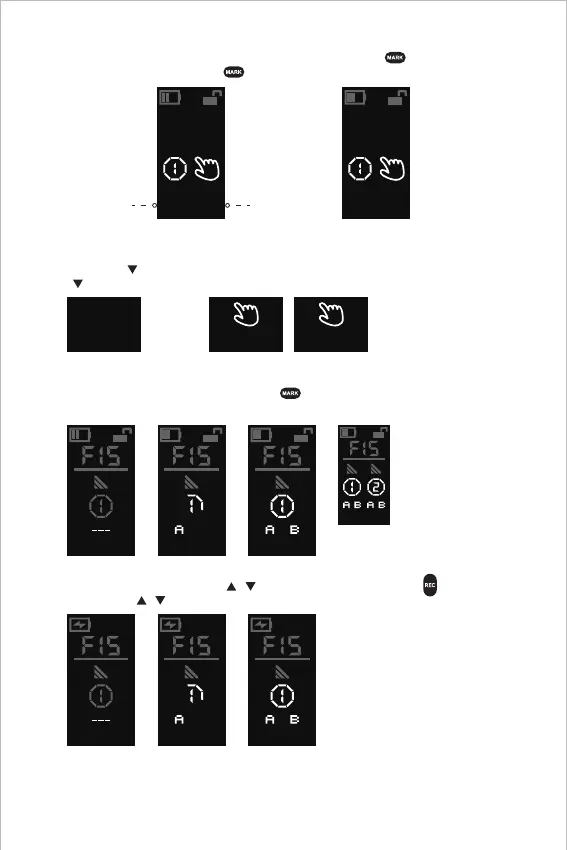
5. A-B Marks Setting
6. Reset Calibration
Method 2: Automatic lens calibration with Wireless Receiver Motor
The automatic lens calibration lasts for over 20s, or click MARK " " to switch to manual
mode automatically, Click MARK " " to confirm starting point and ending point.
It is required to reset and calibrate the Wireless Handwheel Controller and Wireless Handgrip when:
1. The knob is turned to the end point and the motor is reversed rapidly.
2. The knob is turned to the end point and the non "000" or "999" position information is shown.
CAL ?
3S
Method 1-2: Manual lens calibration with the Wireless Handwheel Controller
CAL
Manually
S E
CAL
Finished
S E
Press and hold to calibrate the lens automatically;
click to confirm starting point and ending point.
START END
[Note]
For double display mode,
click "MARK" and then
click "SET" to switch
between the Wireless
Handwheel Controller
and Wireless Handgrip.
Wireless Handwheel Controller: Click MARK " ", the dotted line jumps; then click A Mark
and B Mark for a customized limits; click again to cancel the A-B Marks.
999
Electronic Controller Module: Click / simultaneously and click REC " " to set A Mark
and B Mark; click / simultaneously to cancel the A-B Marks.
999
999 000
456
999 999456
10


 To Next Page