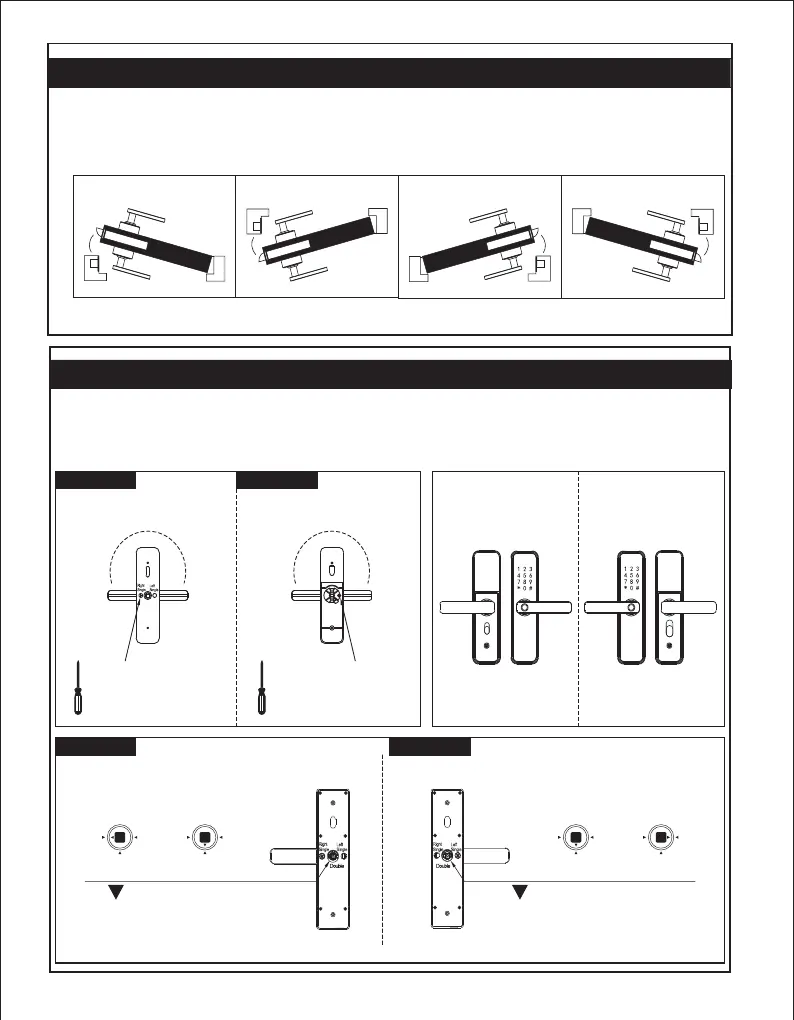
1.Door opening direction
(1) Right handle opening
(2) Left handle opening
Right inwards
Inside
Outside
Outside
Inside
Right outwards
Left outwardsLeft inwards
Outside
Inside
Outside
Inside
2.Shift the left and right handle opening
According to your needs to adjust the left and right handle opening by a screw driver to release screw,then
turn the handle 180 degree,then fix the screw.
Note:Do not unscrew the screw in the handle hole,if there is broken when you do that,you will not have any
warranty.
Right
Left
Right Opening Left Opening
Front lockFront lock
Double mortiseRight opening
Single mortise
The should turn to "Double mortise"
or turn to "Right opening single mortise"
according to different direction or mortise.
The should turn to "Double mortise"
or turn to "Left opening single mortise"
according to different direction or mortise.
Double mortise
Left opening
Single mortise
Front panel
Back panel
0
8
d
1
e
g
n
r
r
e
u
e
T
0
8
d
1
e
g
n
r
r
e
u
e
T
Release the screws with
a screw driver and fix the
screw after turn the handle
180 degree
Release the screws with
a screw driver and fix the
screw after turn the handle
180 degree


 To Next Page