42-159 Aug-10-2011
1. Select cooling cycle rate
The FA setting is used to produce shorter cooling cycles. The SL
setting produces a longer cooling cycle. Both settings produce very accurate
temperature control and can be set to your personal preference. FA cycles the
system at a 0.5ºF (0.5ºC) differential, and SL cycles the system at 1.5ºF (1.5ºC).
2. Select heating cycle rate
The FA setting is used to produce shorter heating cycles. The SL
setting produces a longer heating cycle. Both settings produce very accurate
temperature control and can be set to your personal preference. FA cycles the
system at a 0.5ºF (0.5ºC) differential, and SL cycles the system at 1.5ºF (1.5ºC).
3. Select system heating type
Users can select the system heating type according to their heating system.
Select 0 for gas, oil, or electric heating systems. Select 1 for a heat pump heating
system.
4. Select display backlight
The display backlight improves display contrast in low lighting
conditions. Select 1 for NO backlight display. Select 2 for the backlight to come on
for approximately 30 seconds when any button of the thermostat is touched.
Select 3 for the backlight to remain on continuously.
NOTE: When operated from batteries (No “C” terminal connection), the LCD
display backlight options are limited to option 1 (disabled) or option 2 (30 second
illumination after each button press).
5. Select filter replacement run time
The thermostat will display the Filter Alarm after a set time of
operation. This is a reminder to change or clean your air filter. This time can be
set from 0 to 12 months in 1 month increments. Selection of 00 WILL CANCEL
THIS FEATURE. When Filter Alarm is displayed, you can clear it by pressing the
"F"
button. (To enter filter program) and then hold the ▲ and ▼ buttons. This
resets the timer and starts counting the days until the next filter change.
6. Select ºF or ºC readout
Changes the display readout to Centigrade or Fahrenheit as required.
7. Select temperature recalibration
This feature allows you to adjust the displayed room temperature up to
4º higher or lower. Your thermostat can be accurately calibrated to match your
previous thermostat. The current or adjusted room temperature will be displayed
on the display.
8. Select compressor lockout delay
To protect the compressor from short cycling, you can select
compressor off-time cycle between 0 or 5 minutes. When the thermostat
compressor time delay occurs, the Cool On or Heat On display will flash during
compressor lockout.
-8-
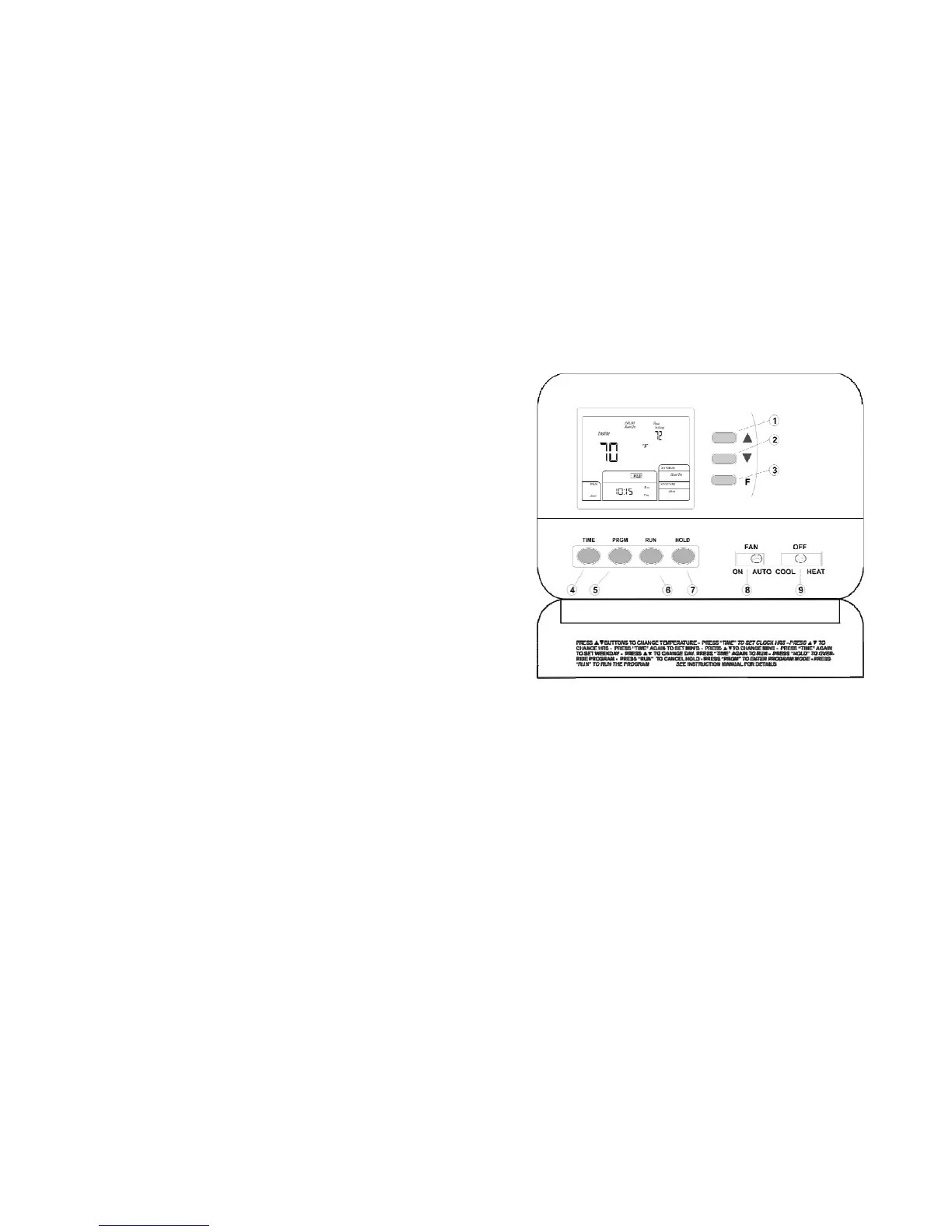
Thermostat Buttons and Switches
(1) and (2) Raises or lowers the temperature setting and selects options in the
configuration menu.
(3) Inquiry button for count back time of filter alarm
(4) Time set Button
(5) Program Set button
(6) Program RUN button
(7) Temperature HOLD button
(8) Fan Control Switch (AUTO/ON)
(9) System Control Switch (COOL/OFF/HEAT)
-13-












 To Next Page