5
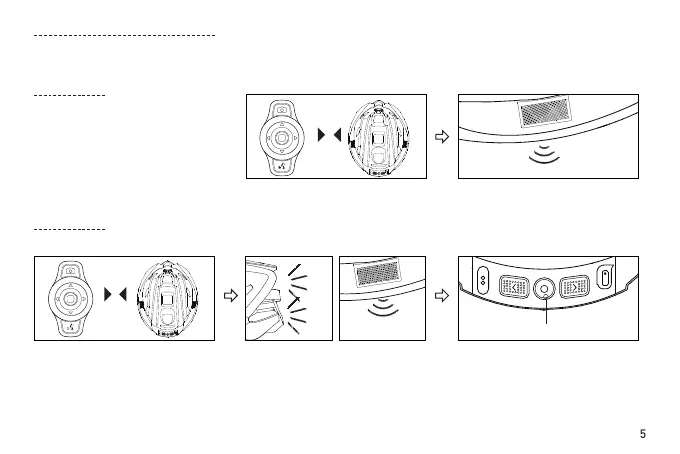
Two "beeps"
"
□
" function button
Turn on the device, which should
be within 5 meters of the helmet.
It will automatically connect the
helmet.
Place a device that is already ON
near the helmet's main control.
After the connection is established, it
will be conrmed with two "beeps".
(The helmets without Bluetooth
speakers could not hear such voice
prompts. Please check the taillight to see
if the helmet is connected successfully.)
When the warming light flashes
and the helmet speakers emit two
"beeps", it indicates that there is a
device nearby requiring connection
to the helmet.
(The helmets without
Bluetooth speakers could not hear
such voice prompts.)
Connecting for the rst time or switching devices
(Please refer to specic functions of the helmet when using the
remote controller keys.)
≤5m
1. Connecting for the rst time
One helmet can be connected to up to three Smart4u-authorized devices at the same time. After the handlebar
remote control is connected, press the "left" or "right" button to control the helmet’s corresponding indicator light.
2. Replacing device
Press the "
□
" button on the helmet
within 10 seconds after you hear
the beeps and conrm connection
to the device.When pressing the
arrow left or right key on the bling
jet remote, the right or left turning
signal appears.
Two "beeps"


 To Next Page
 Loading...