Need help?
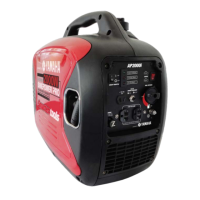
Do you have a question about the Smarter tools AP-2000iQ and is the answer not in the manual?
Defines symbols for warnings (injury/death) and cautions (equipment damage).
Explains the use of notes for providing helpful information.
Carbon Monoxide is an odorless, colorless gas from exhaust that can cause unconsciousness and death.
Product requires fuel and oil. Handle gasoline safely as it is flammable and explosive.
Engine and exhaust system parts get very hot and can cause burns. Handle with care.
Keep work area clean, well-lit, and avoid explosive atmospheres. Keep bystanders away.
Avoid chemical contact, use hearing protection, use approved extension cords.
Check oil level before starting. The Oil Alert System stops the engine if oil is low.
Use unleaded gasoline only. Refuel in a well-ventilated area with the engine stopped. Avoid overfilling.
Check air cleaner element for cleanliness and condition. Do not run engine without it.
Follow steps to start the engine. Ensure appliances are disconnected and generator is on a level surface.
Engine speed adjusts automatically to load. Use OFF position for large start-up demands or high loads.
Be sure to ground the generator when connected equipment is grounded.
Do not exceed rated power, keep equipment dry, avoid wet hands, do not connect/disconnect in water.
Avoid touching energized parts, use outdoor extension cords, never backfeed into building wiring.
Connect appliances after starting. Monitor output (green) and overload (red) LEDs. Avoid substantial overloading.
Connect charging cable to generator first, then battery. Disconnect battery first. Follow polarity.
Automatically shuts off DC circuit if overloaded or improperly connected.
Stop engine, disconnect black lead, disconnect red lead, disconnect from generator.
Prevents engine damage by automatically shutting down engine if oil level is critically low.
Turn fuel switch and ignition switch to OFF.
Unplug cables, turn fuel petcock OFF, turn ignition switch OFF.
Handle with care, secure upright, allow to cool before loading, do not lay on side.
Do not pair more than 2 generators. Use only the specified parallel cable. Do not disconnect cable while running.
Ensure generators are ready, connections secure, start generators, connect to parallel outlet only.
Disconnect items, turn off generators, then disconnect parallel cables.
Table outlining service items (oil, air cleaner, spark plug) and their intervals based on time or hours.
Drain warm oil. Refill with recommended oil and check level. Dispose of used oil responsibly.
Clean or replace the air cleaner element as needed to prevent carburetor malfunction.
Wash filter in solvent, soak in oil, squeeze, and reinstall.
Inspect, clean, and gap spark plug to spec (0.60-0.70mm). Install carefully.
Install spark plug carefully, tighten to spec. Reinstall cover.
Store upright in a dry area, away from heat, sparks, flame, and children/pets.
Drain fuel tank and carburetor. Change engine oil. Add oil to cylinder.
Checks fuel, petcock/ignition, oil level, and spark plug for starting problems.
Register warranty with proof of purchase. 3-year mechanical/electrical warranty (90 days commercial).
Contact Smarter Tools for troubleshooting. Do not return to place of purchase without authorization.
Excludes normal wear, misuse, accident, improper maintenance, and cosmetic defects.
Excludes reconditioned items, cosmetic defects, wear items, accessories, acts of God, non-original parts.
Disclaims implied warranties and consequential damages. States legal rights may vary by state.
Explains emission control warranty for SORE engines in California.
2013 SORE engines warranted for three years for emissions-related parts.
Owner responsible for maintenance, presenting engine for repair, and avoiding abuse/neglect.
Lists warranted parts including fuel metering, air induction, ignition, exhaust gas recirculation, air injection, catalyst systems.
Yamaha will repair/replace warranted parts. Owner must perform maintenance and avoid misuse.
Explains Smarter Tools' emissions warranty for equipment in California.
Emissions control system warranted for two years.
Warranty period two years. Covers defects causing non-conformity. Repair/replace at warranty station.
Lists covered parts for evaporative emission control, including fuel cap and fuel tank for engines <= 80cc.
 General
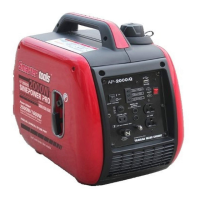
| Rated Watts | 1600W |
|---|---|
| Starting Watts | 2000W |
| Fuel Type | Gasoline |
| Engine Displacement | 79.7 cc |
| Weight | 47 lbs |
| Engine Type | 4-stroke OHV |
| Starting System | Recoil |
| Rated AC Output | 1600W |
| Max AC Output | 2000W |
| Voltage | 120V |
| Frequency | 60Hz |
| Outlets | 2x 120V 20A, 1x 12V DC |
| DC Output | 12V |
| Fuel Tank Capacity | 1.06 gallons |
| Dimensions (L x W x H) | 11.4 x 17.9 inches |

 To Next Page