34
©2012 Smarter Tools, Inc. All Rights Reserved
Owner’s Manual
Warranty Identification
_________________________________________________________________________________________________
To assist in accurately determining whether your Smarter Tools product is still covered by manufacturer’s warranty and to
identify your product properly should you need to contact customer service an Hour Meter and Identification Plate have
been installed.
Hour Meter
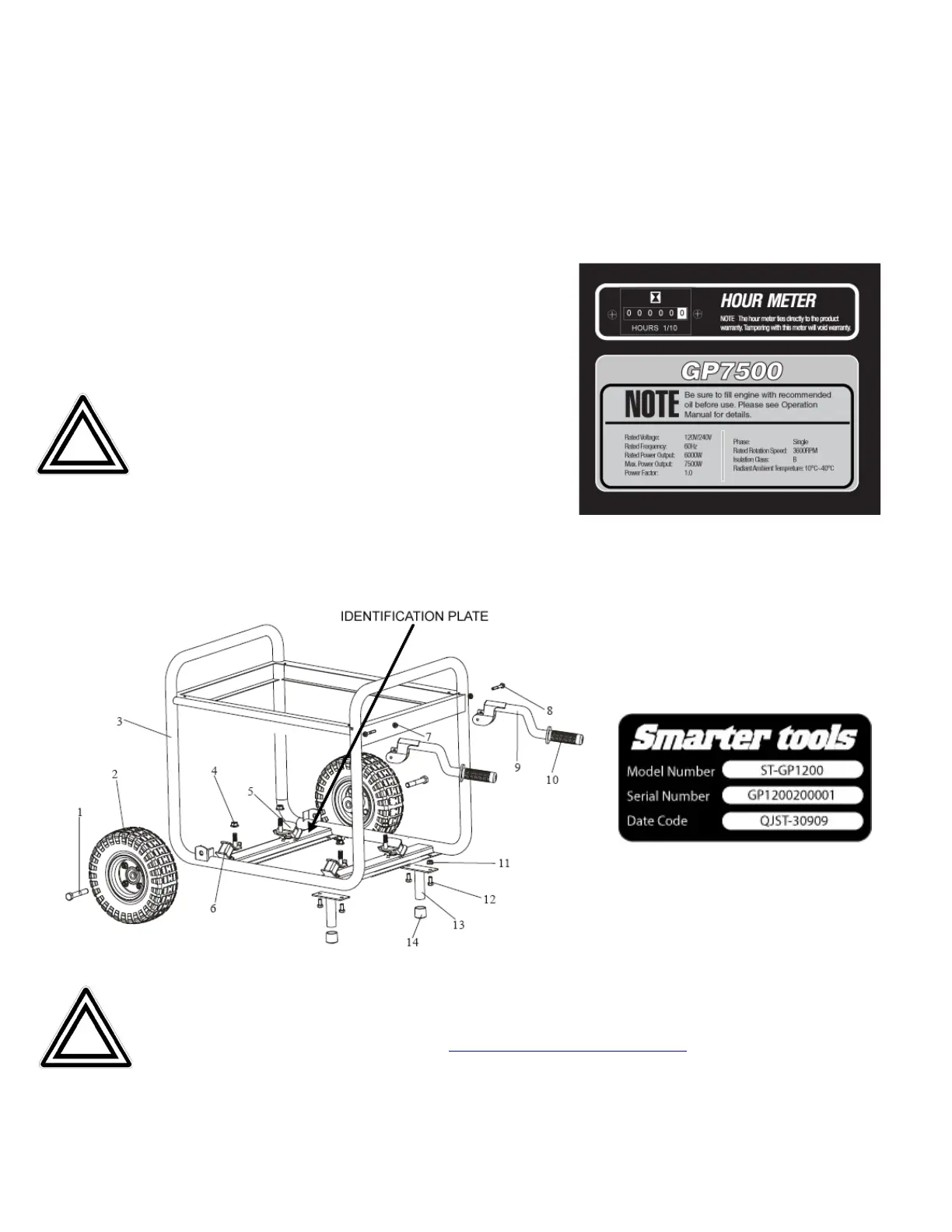
The product’s Hour Meter can be found on the front control panel to the
right of the power switch and just above the model specifications.
See figure.
Note: The Hour Meter is tied directly to the product
warranty. Attempting to disable or otherwise tamper with the
Hour Meter will VOID the manufacturer’s warranty.
Identification Plate
The product’s Identification Plate can be found on the lower-frame cross arm just behind the air filter. See figure below.
Note: Properly registering your product with Smarter Tools is the only way to ensure that your product will be
eligible for warranty replacement or repair should an unforeseen event cause the Identification Plate to be
unreadable. Register your product online at
www.usesmartertools.com/register or by mailing in your warranty
registration card within 14 days or product purchase.


 To Next Page