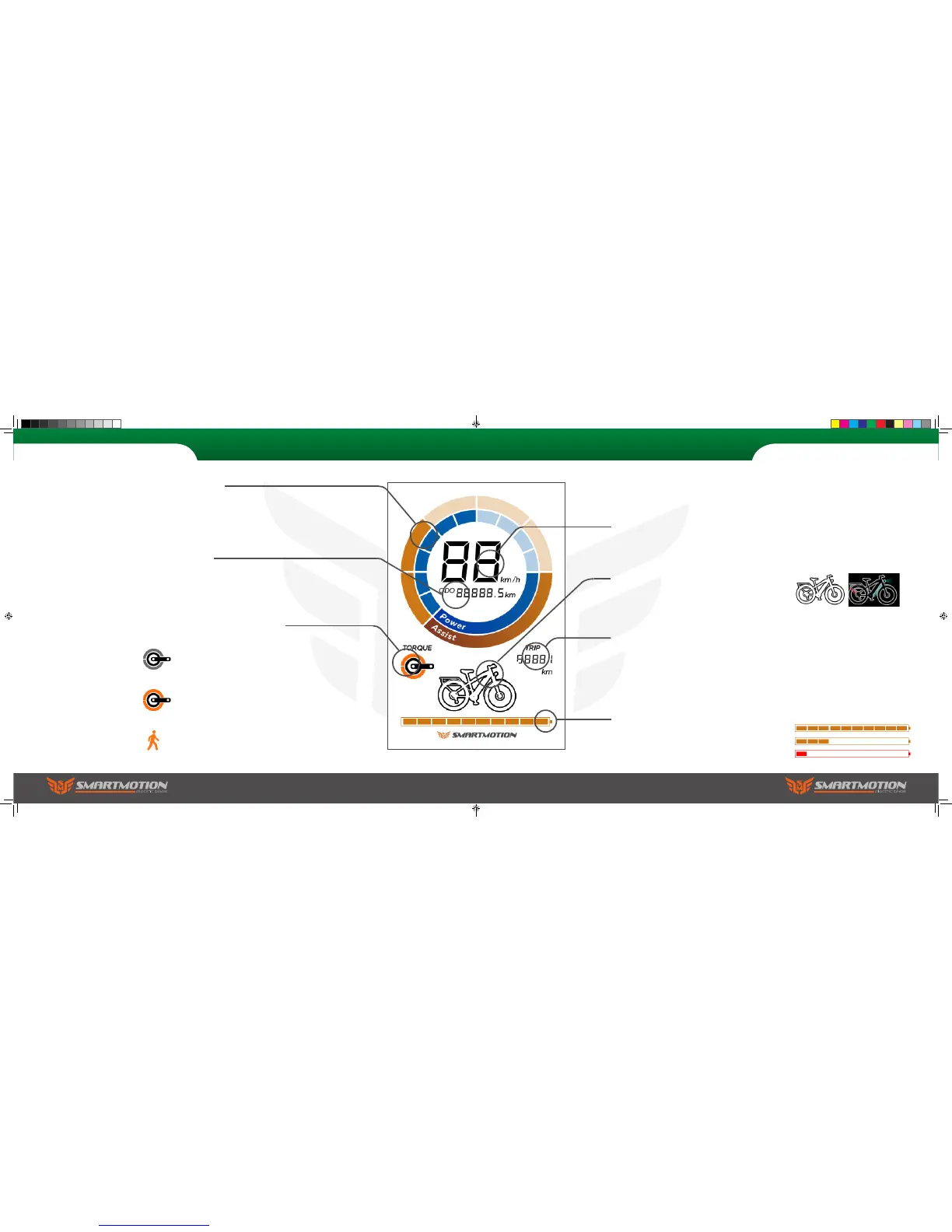
Battery Indicator
When the battery is full all ten battery segments
show. When the battery is low the bars will turn
red. The voltage will drop while the battery is
under load (motor running).
Lights
When the lights are off the bike icon remains
black. Once lights are turned on the icon turns
blue.
Speedometer
Large display of your current speed.
Trip Meter
Displays the distance you have travelled from
when you last tripped the meter.
Lights on
Lights off
Odometer
Displays the total distance the bike has
travelled.
Cadence/Torque/Walk-along
An icon will be displayed depending what mode
of assist.
Cadence measures your pedal rotation, but not
pressure. Use this mode for the easiest ride.
Torque mode measures your pedal pressure
and multiplies the output.
Walk-along will allow you to walk with the
bike with a small amount of assistance.
Power/Assist
The outer ring shows the level of assist
you have chosen.
The inner ring displays the real time
power usage.
8. LCD Display Panel 8. LCD Display Panel
Sports user manual.indd 24-25 7/15/2016 5:00:14 PM



 To Next Page