18 / 24 EN
Refrigerator/User Manual
C
Figures in this user manual are schematic and may not match the product
exactly. If the subject parts are not included in the product you have
purchased, then those parts are valid for other models.
6 Operating the product
2
3
4
6
5
7
8
9
1*
Read the “Safety Instructions” section first!
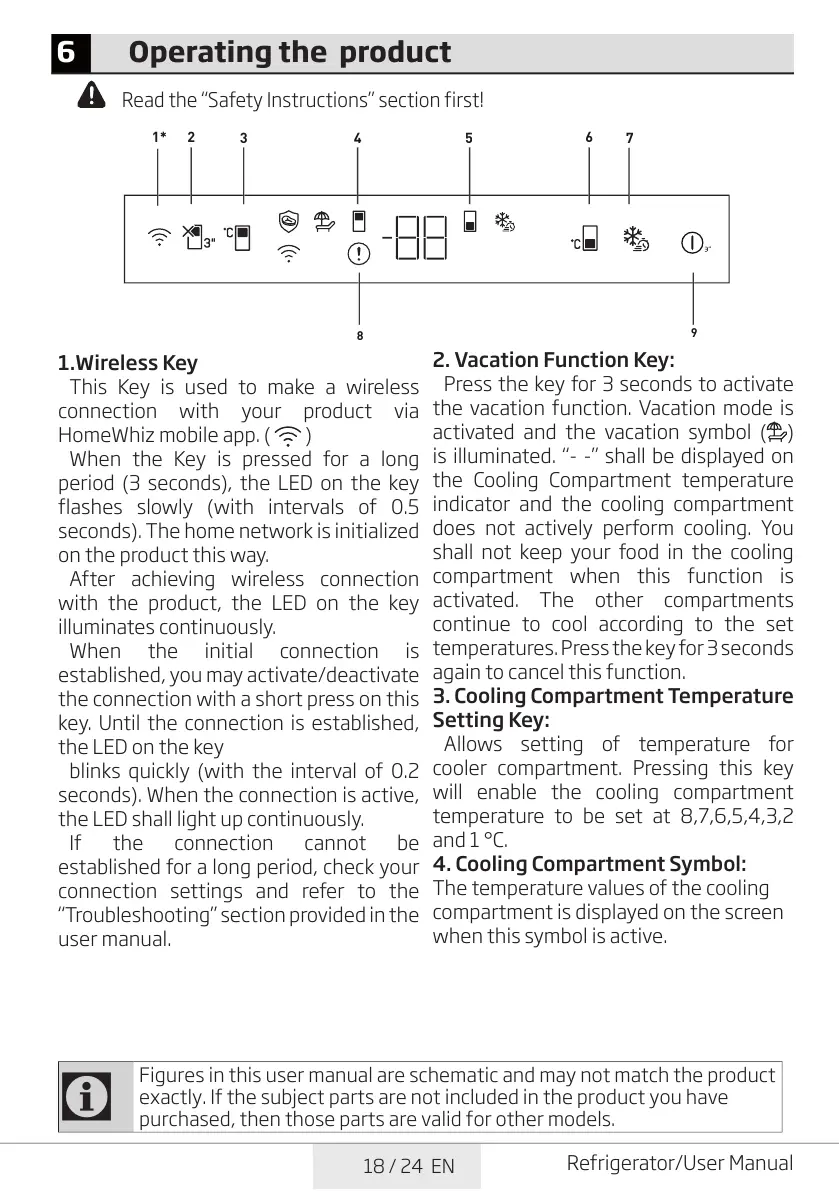
1.Wireless Key
This Key is used to make a wireless
connection with your product via
HomeWhiz mobile app. ( )
When the Key is pressed for a long
period (3 seconds), the LED on the key
flashes slowly (with intervals of 0.5
seconds). The home network is initialized
on the product this way.
After achieving wireless connection
with the product, the LED on the key
illuminates continuously.
When the initial connection is
established, you may activate/deactivate
the connection with a short press on this
key. Until the connection is established,
the LED on the key
blinks quickly (with the interval of 0.2
seconds). When the connection is active,
the LED shall light up continuously.
If the connection cannot be
established for a long period, check your
connection settings and refer to the
“Troubleshooting” section provided in the
user manual.
2. Vacation Function Key:
Press the key for 3 seconds to activate
the vacation function. Vacation mode is
activated and the vacation symbol ( )
is illuminated. “- -” shall be displayed on
the Cooling Compartment temperature
indicator and the cooling compartment
does not actively perform cooling. You
shall not keep your food in the cooling
compartment when this function is
activated. The other compartments
continue to cool according to the set
temperatures. Press the key for 3 seconds
again to cancel this function.
3. Cooling Compartment Temperature
Setting Key:
Allows setting of temperature for
cooler compartment. Pressing this key
will enable the cooling compartment
temperature to be set at 8,7,6,5,4,3,2
and 1 °C.
4. Cooling Compartment Symbol:
The temperature values of the cooling
compartment is displayed on the screen
when this symbol is active.


 To Next Page