12
Use
Various recipes can be selected for each
food category in the Chef menu.
The recipes have been designed
by Smeg chefs to prepare the
most popular dishes in less time.
By selecting the type and weight
of the dish, the appliance selects
the most suitable function, time
and temperature.
Small variations in time
are possible according to
the ingredients or cooking
accessories used, as well as the
degree of browning required.
We recommend that you always
check the food at the end of the
preset cooking time.
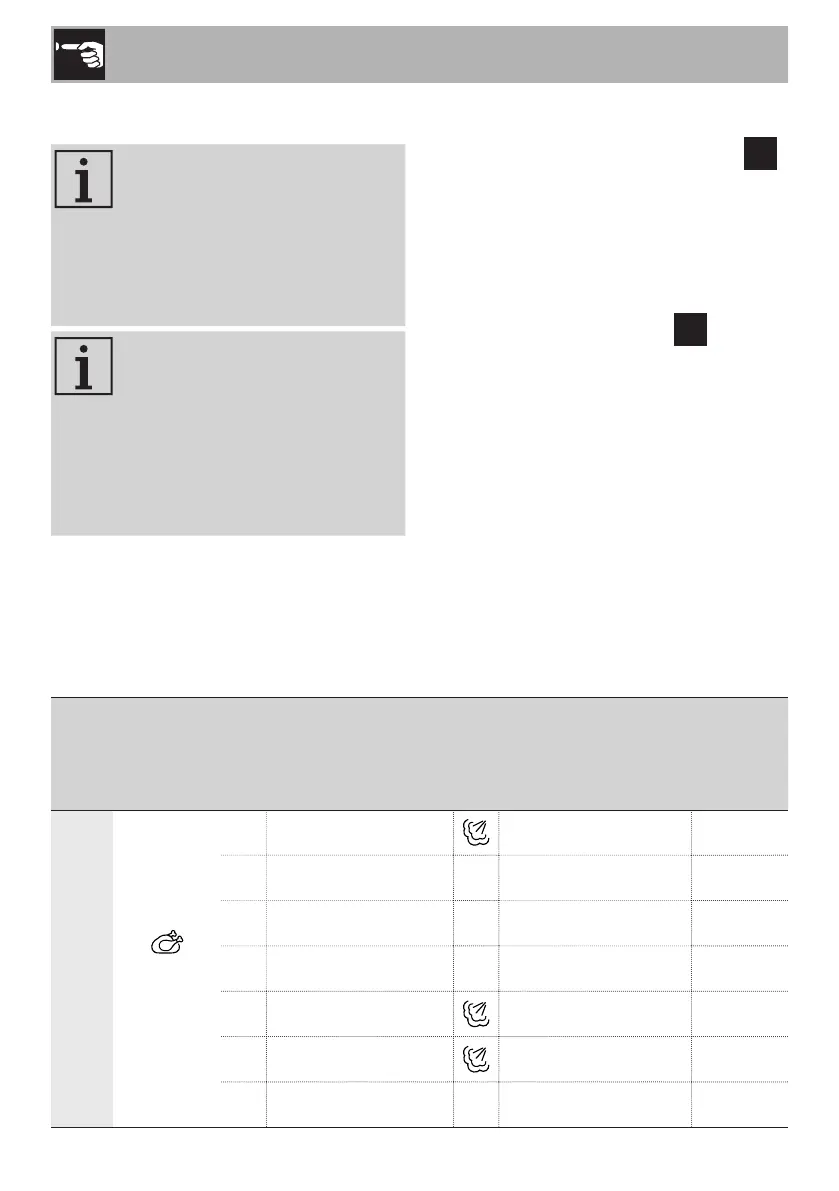
Menu Category Recipes Accessory
Shelf
indicated
from the
bottom
upwards
CHEF
Meat and
poultry
P01
Pork spare ribs Enamelled tray 1
P02 Pork sausages Perforated tray 2
P03 Roast pork
Enamelled tray 1
P04 Roast beef Enamelled tray 1
P05 Duck stew, in pieces Enamelled tray 1
P06
Whole roast chicken
Enamelled tray 1
P07 Chicken nuggets Perforated tray 1
1) Select the menu and the food category.
2) Turn the right knob to set the required
recipe. The recipe indicator
P
flashes.
3) If you do not wish to modify the cooking
settings, start cooking using the START/
STOP button.
4) If you wish to change the recipe once
cooking has already started:
• Press the SET button. The
P
indicator
flashes.
• Turn the right knob to select a new
recipe.
• Confirm using the START/STOP
button or wait 5 seconds for automatic
confirmation.



 To Next Page