User instructions
39
3. Description of the controls
3.1 Front panel
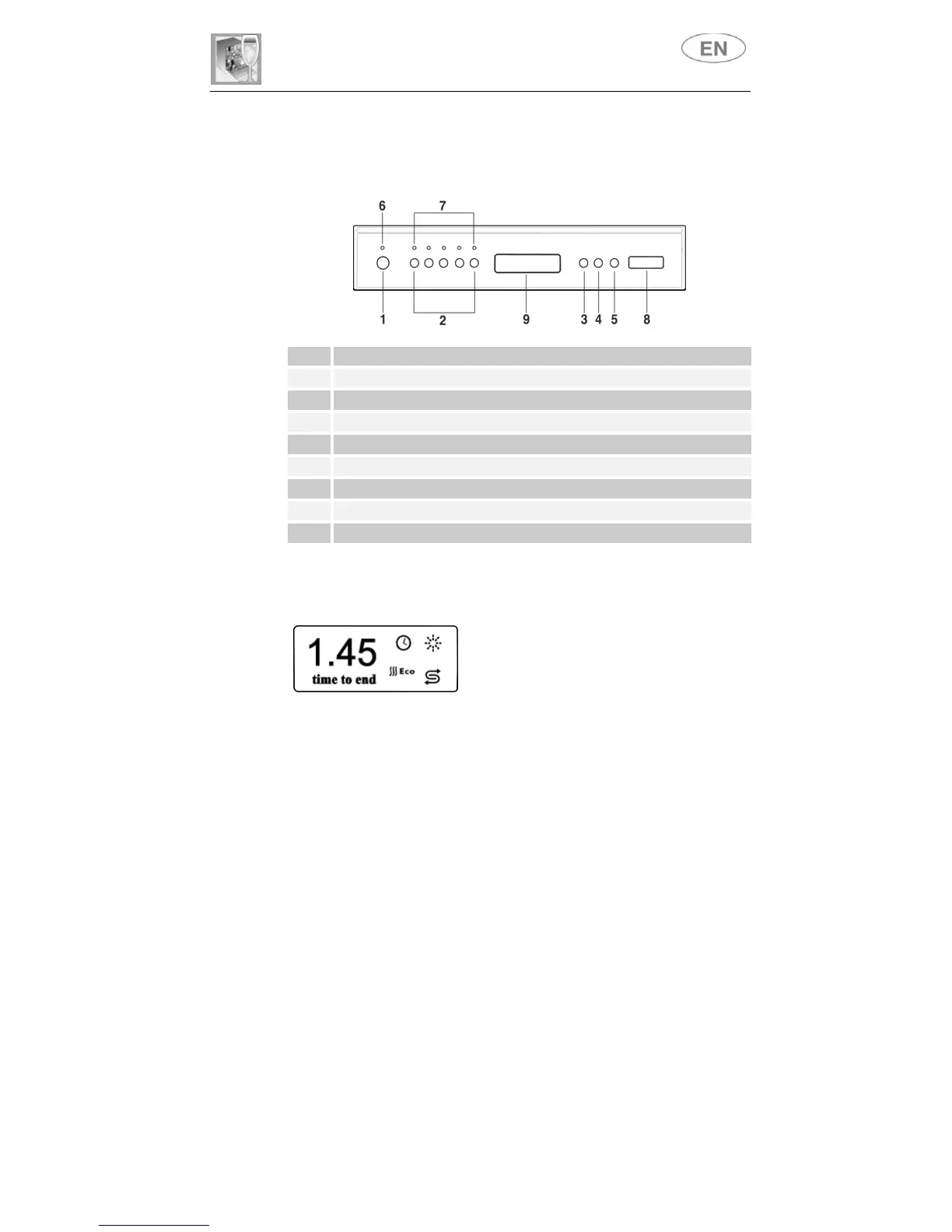
All the dishwasher controls are grouped on the front panel.
1 ON/OFF
BUTTON
2 SELECTION PROGRAM
BUTTONS
(P1…P5)
3 ECO DRYING
CYCLE
BUTTON
4 DELAY PROGRAM
BUTTON
5 START/STOP
BUTTON
6 POWER ON
LIGHT
7 PROGRAM PHASE
INDICATOR LIGHTS
8
INFORM AT ION
DISPLAY
9
RECESSED DOOR HANDLE
3.2 Information display
The dishwasher is equipped with a practical
DISPLAY
which provides information on the
programmed dishwasher functions.
LIGHTING
Pressing the
ON/OFF
button
(1)
will start the dishwasher and will lit up
the dishwasher pilot light
(6)
. After approximately
3 second
from this
operation the
DISPLAY (8)
will be turned on with a visualization that will
depend upon the state of the dishwasher.



 To Next Page