84
POWER SETTING APPLICATION
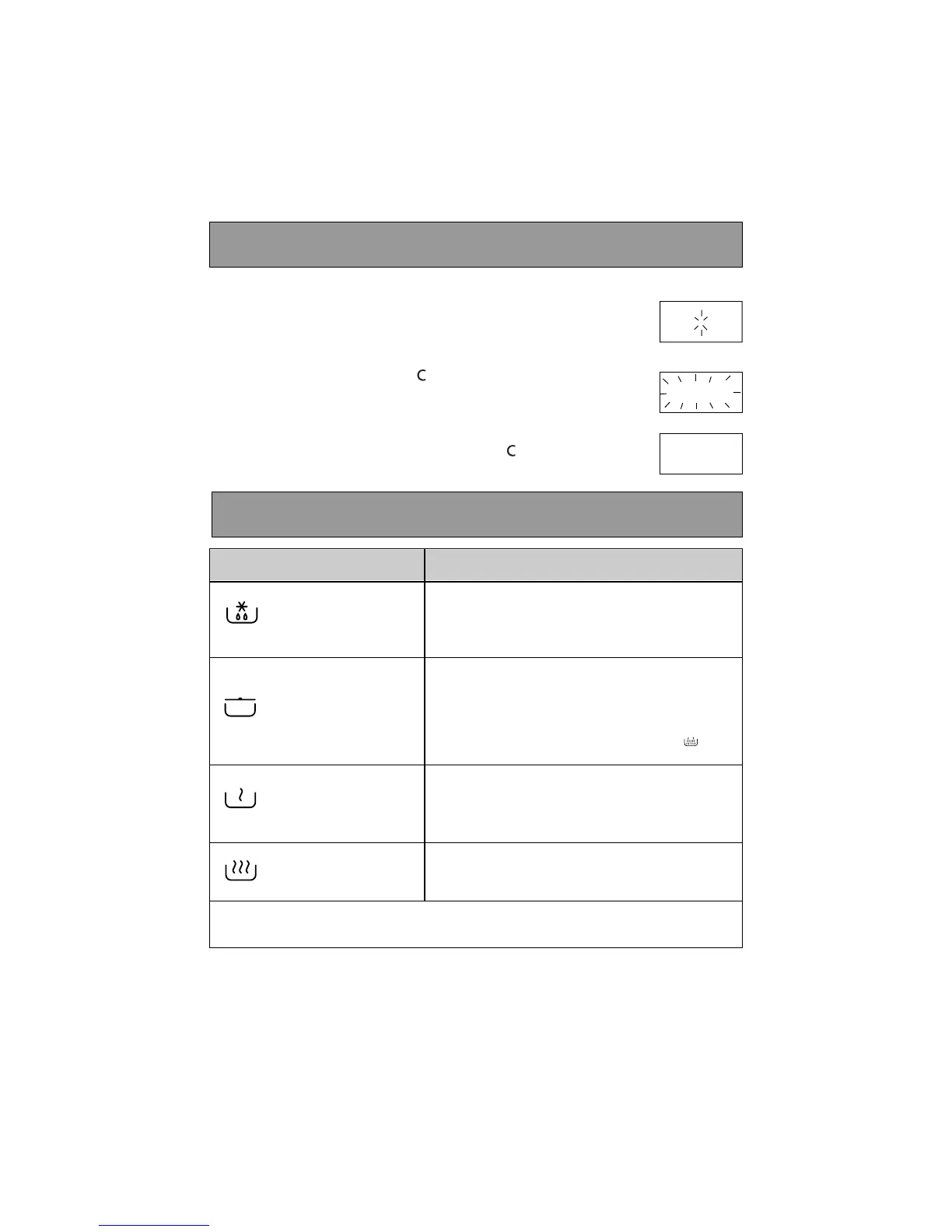
Setting the clock
After first plugging in your microwave oven or after a power outage,
the clock reads 00:00 and the two dots flash.
To set the clock :
- Press the PAUSE / CANCEL key for 5 seconds.
"
0000::0000
" flashes
,
and a tone sounds requesting the hour be set.
- Turn the selector knob to display the correct time.
- Validate by pressing the PAUSE / CANCEL key .
Your clock is set.
Microwave power settings
DEFROST
To defrost all frozen food or to top off cooking
of delicate dishes or to cook very slowly.
SIMMER
To cook fish and poultry. To finish programmes
begun with the HIGHCOOK power setting,
for instance beans, lentils, or dairy products.
(This power setting is available when you pro-
gramme the function using the mode key ).
HEAT
To heat up all liquids and all fresh or frozen
pre-cooked dishes.
HIGH COOK
To cook vegetables and soup.
Microwave output power : 900 W
00 00 :: 00 00
11 22 :: 00 00
00 00 :: 00 00


 To Next Page