EasyManua.ls Logo

Smeg GW4060 - User Manual

Smeg GW4060
86 pages
Print Icon
To Next Page IconTo Next Page
Loading...
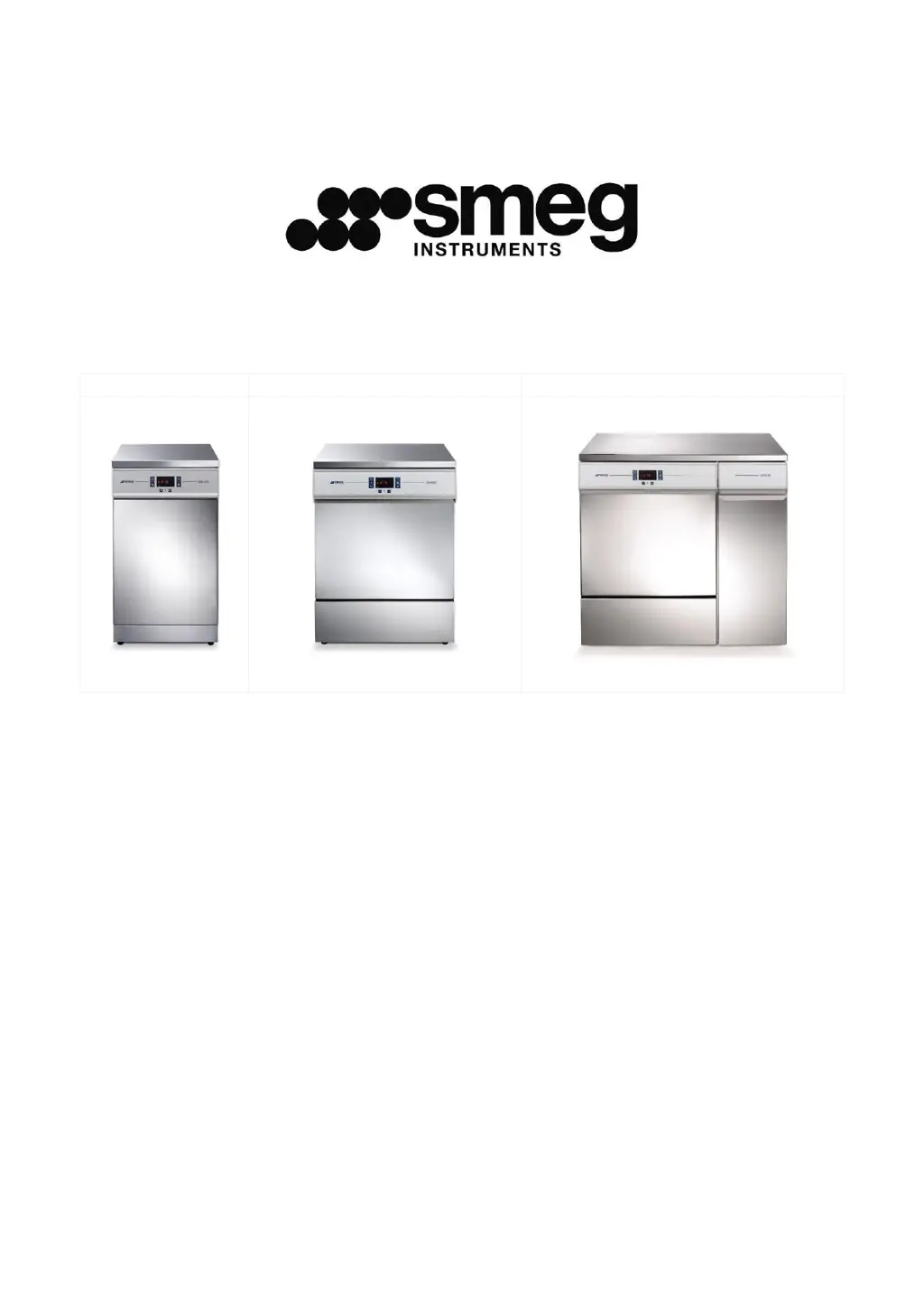
GW2145
GW1160, GW4060
GW4190
GW2145 - GW1160
GW4060 - GW4190
GLASSWARE WASHER
USER MANUAL

Table of Contents

Other manuals for Smeg GW4060

Questions and Answers

Summary

INTRODUCTION

GW FAMILY - INTENDED USE

Describes the intended use of the GW glassware washer family.

DEFINITION: RESPONSIBLE AUTHORITY

Defines the 'Responsible Authority' in relation to the device.

WASHING TROLLEYS AND ACCESSORIES

Details available washing trolleys and accessories for the appliance.

Smeg WD-PRINTE printer

Information on the Smeg WD-PRINTE printer accessory.

Smeg WD-PRINT9 Printer

Information on the Smeg WD-PRINT9 printer accessory.

PERISTALTIC PUMP P3

Information on the optional P3 peristaltic pump for GW series.

LIST OF MODELS

Presents a configuration chart for all available GW models.

KEY TO SYMBOLS

SYMBOLS USED IN MANUAL AND ON APPLIANCE

Explains symbols used in the manual and on the appliance for safety and operation.

GENERAL WARNINGS

ACCESSING AFTER INCOMPLETE CYCLE

Safety precautions when accessing the device after an interrupted cycle.

DOOR OPENING

Guidance on opening the appliance door.

MANUAL DOOR RELEASE PROCEDURE

Procedure for manual door release in case of malfunction or power failure.

GW4190 SIDE CABINET ACCESS

How to open the side cabinet on GW4190 series for component access.

CONTROLS AND PROGRAMS

CONTROL PANEL OVERVIEW

Describes the layout and function of the appliance's control panel.

DETAILED CONTROL DESCRIPTIONS

Provides in-depth explanations of each control button and its function.

AO PARAMETER DISPLAY

Explains the AO parameter display for thermal disinfection monitoring.

INDICATOR LEDS - INTRODUCTION

Introduction to the appliance's indicator LEDs.

INDICATOR LEDS - DETAILED EXPLANATION

Detailed explanation of the appliance's indicator LEDs.

SELECTING THE WASHING PROGRAMME

Step-by-step guide on how to select and start a washing program.

BRIEF TABLE OF THE PROGRAMS INSTALLED

Brief overview of the installed washing programs and their typical uses.

RESINS - SOFTENER, REGENERATION AND WASHING PHASE

Details the function of the integrated water softener and resin regeneration.

DRYING PHASE - Only for GW4060, GW4190 series

Explains the drying phase, its adjustment, and standard structure.

CUSTOM PROGRAMS RECORD TEMPLATE

Information on creating and modifying custom washing programs.

AO THERMAL DISINFECTION PARAMETER

Explains the AO parameter and its calculation for thermal disinfection.

PREPARING THE LOAD FOR WASHING AND DISINFECTION

Guidelines for correct loading of glassware for optimal washing results.

END OF CYCLE

Describes cycle end status, automatic opening, and interrupting a program.

INTERRUPTING A PROGRAM IN EXECUTION

Procedure for interrupting a running program.

PROGRAM SPECIAL OPTIONS

Details special program options like delayed start and demi water disabling.

DELAYED START - Setting the hours

How to set the delayed start function for washing programs.

DELAYED START - Starting the program and display

How to start a program with a delayed start setting.

TEMPORARY DISABLING OF DEMI WATER

How to temporarily disable the demineralised water function.

Deleting Delayed start - No Demi settings

Procedure for deleting delayed start or demi water disabling settings.

RESET PROCEDURE

Instructions for performing a reset cycle to resolve anomalies or alarms.

PRINTING THE CYCLE AND APPLIANCE PARAMETERS

How to force printing of last cycle data or setup parameters.

SETUP MODE - FUNCTIONS

ACCESSING THE SETUP MODE; ENTERING THE PASSWORD

Procedure to access the appliance setup mode using a password.

ACCESS AND PARAMETER MODIFICATION

Steps for displaying and modifying appliance parameters.

SET PARAMETERS

Details the user-configurable parameters for appliance settings.

APPLIANCE DATA STORAGE, OVERWRITING, “Set -b

Information on appliance data storage, overwriting, and memory management.

CLOC - DATE AND TIME PARAMETERS

Procedure for setting the appliance's current date and time.

SETTING THE PrEn PROGRAM ENABLING FUNCTION

How to enable/disable specific washing programs for display.

INSTALLATION INSTRUCTIONS

USE OF THE WATER SOFTENER

Guidance on using the water softener and adding regenerating salt.

USING DETERGENT AND NEUTRALISING AGENT

Instructions for using detergent dispensing devices and agents.

LIQUID DETERGENT INTAKE SYSTEM

Details the standard and optional liquid detergent intake systems.

DETERGENT LEVEL SENSORS - OPTIONAL

Information on the optional detergent level sensor accessory.

USING THE DETERGENT DISPENSER - GW SERIES ONLY

How to use the DD powder detergent dispenser on the inner door.

RECOMMENDED DETERGENTS

List of recommended detergents for optimal washing results.

GENERAL PRECAUTIONS FOR DETERGENTS

Safety precautions and handling guidelines for detergents.

ALARMS AND WARNING MESSAGES

ALARM INTERPRETATION AND SYMBOLS

Explains alarm messages, warning symbols, and their meanings.

HOW TO DEAL WITH ALARMS - READ CAREFULLY

Procedures for handling and resolving appliance alarms.

CLEANING AND MAINTENANCE

CLEANING THE DEVICE AND ITS PARTS

General instructions for cleaning the appliance's external and internal parts.

GW2145 - filter elements

Instructions for cleaning filter elements specific to the GW2145 model.

GW1160 - GW4060 - GW4190 - filter elements

Instructions for cleaning filter elements for GW1160, GW4060, GW4190 models.

IF THE DEVICE IS TO BE LEFT UNUSED

Recommendations for leaving the appliance unused for extended periods.

REUSING THE DEVICE AFTER A PERIOD OUT OF USE

Procedure for safely reusing the appliance after a period of inactivity.

TROUBLESHOOTING

Guides users through common faults and their solutions.

ROUTINE INSPECTIONS AND MAINTENANCE

DAILY

Daily inspection tasks for detergent levels and spray arms.

WEEKLY

Weekly cleaning tasks and program execution for maintenance.

EVERY SIX MONTHS

Inspection of water solenoid valve intake filters and pump hoses.

EVERY YEAR

Annual appliance checks and service by authorised personnel.

TECHNICAL DATA

PRODUCT DIMENSIONS - MEASUREMENTS IN MM

GW2145

External dimensions and weight specifications for the GW2145 model.

GW1160, GW4060 SERIES

External dimensions and weight for GW1160 and GW4060 models.

GW4190 SERIES

External dimensions and weight specifications for the GW4190 model.

POSITIONING THE APPLIANCE

ELECTRICAL SYSTEM REQUIREMENTS

GW2145 - POWER SUPPLY CABLE AND DISCONNECTION DEVICE

Specifics on the power supply cable and disconnection device for GW2145.

GW1160, GW4060, GW4190 - POWER SUPPLY CABLE AND DISCONNECTION DEVICE

Details power supply cable and disconnection for GW1160/GW4060/GW4190.

WATER CONNECTION FITTINGS

WATER INTAKE CONNECTION

Information on connecting mains and demineralised water hoses.

WATER SUPPLY TAP POSITION

Recommended positioning for water supply taps.

WATER SUPPLY SYSTEM REQUIREMENTS

Requirements for water supply pressure, temperature, and hardness.

PAD ACCESSORY FOR UNPRESSURISED DEMI WATER

Details on installing the PAD accessory for demineralised water.

WATER DRAIN

Specifications for appliance drain hose connections and height requirements.

DATA CONNECTION

Summary

INTRODUCTION

GW FAMILY - INTENDED USE

Describes the intended use of the GW glassware washer family.

DEFINITION: RESPONSIBLE AUTHORITY

Defines the 'Responsible Authority' in relation to the device.

WASHING TROLLEYS AND ACCESSORIES

Details available washing trolleys and accessories for the appliance.

Smeg WD-PRINTE printer

Information on the Smeg WD-PRINTE printer accessory.

Smeg WD-PRINT9 Printer

Information on the Smeg WD-PRINT9 printer accessory.

PERISTALTIC PUMP P3

Information on the optional P3 peristaltic pump for GW series.

LIST OF MODELS

Presents a configuration chart for all available GW models.

KEY TO SYMBOLS

SYMBOLS USED IN MANUAL AND ON APPLIANCE

Explains symbols used in the manual and on the appliance for safety and operation.

GENERAL WARNINGS

ACCESSING AFTER INCOMPLETE CYCLE

Safety precautions when accessing the device after an interrupted cycle.

DOOR OPENING

Guidance on opening the appliance door.

MANUAL DOOR RELEASE PROCEDURE

Procedure for manual door release in case of malfunction or power failure.

GW4190 SIDE CABINET ACCESS

How to open the side cabinet on GW4190 series for component access.

CONTROLS AND PROGRAMS

CONTROL PANEL OVERVIEW

Describes the layout and function of the appliance's control panel.

DETAILED CONTROL DESCRIPTIONS

Provides in-depth explanations of each control button and its function.

AO PARAMETER DISPLAY

Explains the AO parameter display for thermal disinfection monitoring.

INDICATOR LEDS - INTRODUCTION

Introduction to the appliance's indicator LEDs.

INDICATOR LEDS - DETAILED EXPLANATION

Detailed explanation of the appliance's indicator LEDs.

SELECTING THE WASHING PROGRAMME

Step-by-step guide on how to select and start a washing program.

BRIEF TABLE OF THE PROGRAMS INSTALLED

Brief overview of the installed washing programs and their typical uses.

RESINS - SOFTENER, REGENERATION AND WASHING PHASE

Details the function of the integrated water softener and resin regeneration.

DRYING PHASE - Only for GW4060, GW4190 series

Explains the drying phase, its adjustment, and standard structure.

CUSTOM PROGRAMS RECORD TEMPLATE

Information on creating and modifying custom washing programs.

AO THERMAL DISINFECTION PARAMETER

Explains the AO parameter and its calculation for thermal disinfection.

PREPARING THE LOAD FOR WASHING AND DISINFECTION

Guidelines for correct loading of glassware for optimal washing results.

END OF CYCLE

Describes cycle end status, automatic opening, and interrupting a program.

INTERRUPTING A PROGRAM IN EXECUTION

Procedure for interrupting a running program.

PROGRAM SPECIAL OPTIONS

Details special program options like delayed start and demi water disabling.

DELAYED START - Setting the hours

How to set the delayed start function for washing programs.

DELAYED START - Starting the program and display

How to start a program with a delayed start setting.

TEMPORARY DISABLING OF DEMI WATER

How to temporarily disable the demineralised water function.

Deleting Delayed start - No Demi settings

Procedure for deleting delayed start or demi water disabling settings.

RESET PROCEDURE

Instructions for performing a reset cycle to resolve anomalies or alarms.

PRINTING THE CYCLE AND APPLIANCE PARAMETERS

How to force printing of last cycle data or setup parameters.

SETUP MODE - FUNCTIONS

ACCESSING THE SETUP MODE; ENTERING THE PASSWORD

Procedure to access the appliance setup mode using a password.

ACCESS AND PARAMETER MODIFICATION

Steps for displaying and modifying appliance parameters.

SET PARAMETERS

Details the user-configurable parameters for appliance settings.

APPLIANCE DATA STORAGE, OVERWRITING, “Set -b

Information on appliance data storage, overwriting, and memory management.

CLOC - DATE AND TIME PARAMETERS

Procedure for setting the appliance's current date and time.

SETTING THE PrEn PROGRAM ENABLING FUNCTION

How to enable/disable specific washing programs for display.

INSTALLATION INSTRUCTIONS

USE OF THE WATER SOFTENER

Guidance on using the water softener and adding regenerating salt.

USING DETERGENT AND NEUTRALISING AGENT

Instructions for using detergent dispensing devices and agents.

LIQUID DETERGENT INTAKE SYSTEM

Details the standard and optional liquid detergent intake systems.

DETERGENT LEVEL SENSORS - OPTIONAL

Information on the optional detergent level sensor accessory.

USING THE DETERGENT DISPENSER - GW SERIES ONLY

How to use the DD powder detergent dispenser on the inner door.

RECOMMENDED DETERGENTS

List of recommended detergents for optimal washing results.

GENERAL PRECAUTIONS FOR DETERGENTS

Safety precautions and handling guidelines for detergents.

ALARMS AND WARNING MESSAGES

ALARM INTERPRETATION AND SYMBOLS

Explains alarm messages, warning symbols, and their meanings.

HOW TO DEAL WITH ALARMS - READ CAREFULLY

Procedures for handling and resolving appliance alarms.

CLEANING AND MAINTENANCE

CLEANING THE DEVICE AND ITS PARTS

General instructions for cleaning the appliance's external and internal parts.

GW2145 - filter elements

Instructions for cleaning filter elements specific to the GW2145 model.

GW1160 - GW4060 - GW4190 - filter elements

Instructions for cleaning filter elements for GW1160, GW4060, GW4190 models.

IF THE DEVICE IS TO BE LEFT UNUSED

Recommendations for leaving the appliance unused for extended periods.

REUSING THE DEVICE AFTER A PERIOD OUT OF USE

Procedure for safely reusing the appliance after a period of inactivity.

TROUBLESHOOTING

Guides users through common faults and their solutions.

ROUTINE INSPECTIONS AND MAINTENANCE

DAILY

Daily inspection tasks for detergent levels and spray arms.

WEEKLY

Weekly cleaning tasks and program execution for maintenance.

EVERY SIX MONTHS

Inspection of water solenoid valve intake filters and pump hoses.

EVERY YEAR

Annual appliance checks and service by authorised personnel.

TECHNICAL DATA

PRODUCT DIMENSIONS - MEASUREMENTS IN MM

GW2145

External dimensions and weight specifications for the GW2145 model.

GW1160, GW4060 SERIES

External dimensions and weight for GW1160 and GW4060 models.

GW4190 SERIES

External dimensions and weight specifications for the GW4190 model.

POSITIONING THE APPLIANCE

ELECTRICAL SYSTEM REQUIREMENTS

GW2145 - POWER SUPPLY CABLE AND DISCONNECTION DEVICE

Specifics on the power supply cable and disconnection device for GW2145.

GW1160, GW4060, GW4190 - POWER SUPPLY CABLE AND DISCONNECTION DEVICE

Details power supply cable and disconnection for GW1160/GW4060/GW4190.

WATER CONNECTION FITTINGS

WATER INTAKE CONNECTION

Information on connecting mains and demineralised water hoses.

WATER SUPPLY TAP POSITION

Recommended positioning for water supply taps.

WATER SUPPLY SYSTEM REQUIREMENTS

Requirements for water supply pressure, temperature, and hardness.

PAD ACCESSORY FOR UNPRESSURISED DEMI WATER

Details on installing the PAD accessory for demineralised water.

WATER DRAIN

Specifications for appliance drain hose connections and height requirements.

DATA CONNECTION

Smeg GW4060 Specifications

General IconGeneral
BrandSmeg
ModelGW4060
CategoryWasher
LanguageEnglish

Related product manuals