32
Controls Description
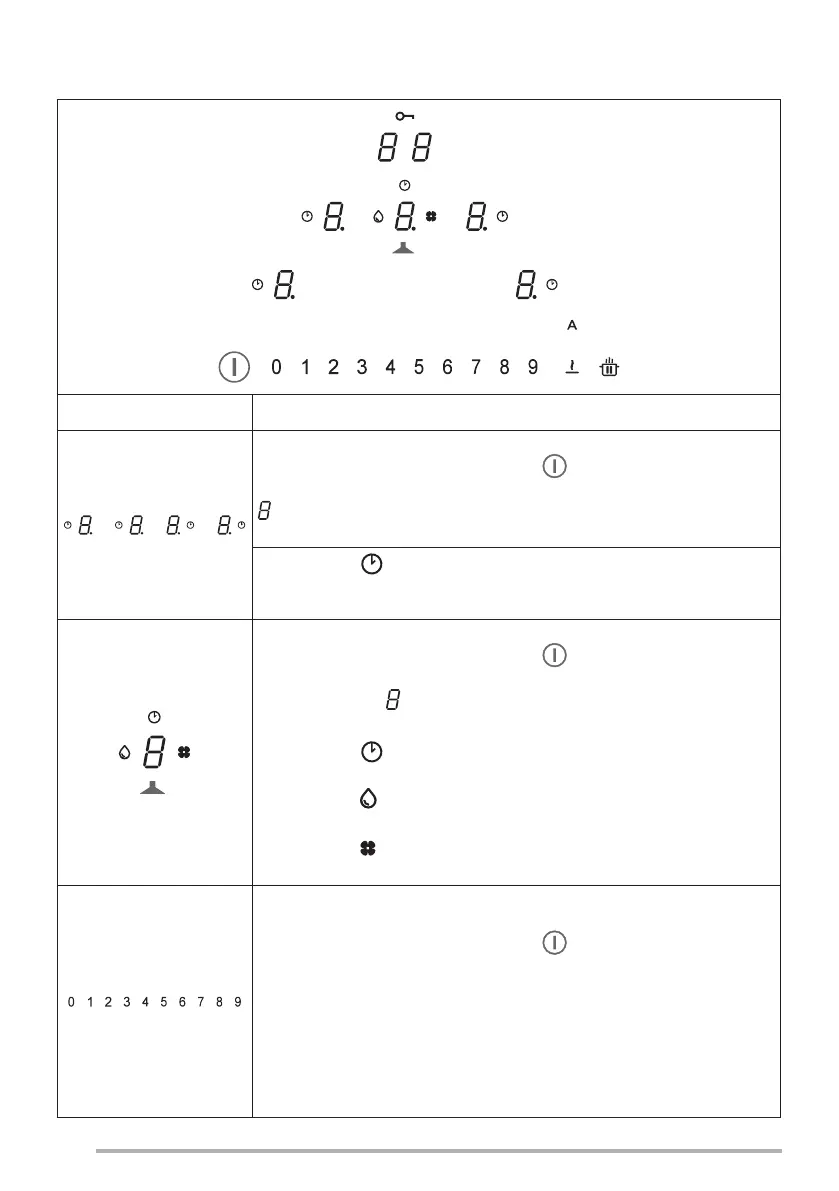
Selecting cooking area controls
Press and hold the On/O button for 2 seconds.
The cooking areas are activated by pressing on the Digit
for the reference area. The corresponding Digit lights up
brightly to conrm the operation.
The symbol indicates that the timer corresponding to
the selected area is active (see the function “Cooking area
Timers").
Selecting suction hood controls
Press and hold the On/O button for 2 seconds.
The hood controls can be selected by pressing on the
reference Digit . The corresponding Digit lights up brightly to
conrm the operation.
The symbol indicates that the timer corresponding to the
hood functions is active.
The symbol indicates maintenance/cleaning of the grease
lter after 100 hours of use.
The symbol indicates maintenance of the activated
charcoal (odour) lter after 200 hours of use.
Selecting the cooking area power and/or suction hood
speed
Press and hold the On/O button for 2 seconds.
Select the Hood Digit or the Digit for one of the 4 cooking
areas.
The power of the cooking areas or the speed of the suction
hood can be increased or decreased by pressing the required
value directly, or by sliding your nger (from right to left
or vice versa) according to whether the set value is to be
increased or decreased.
7.2 Controls


 To Next Page