User instructions
13
3.2 Washing programs
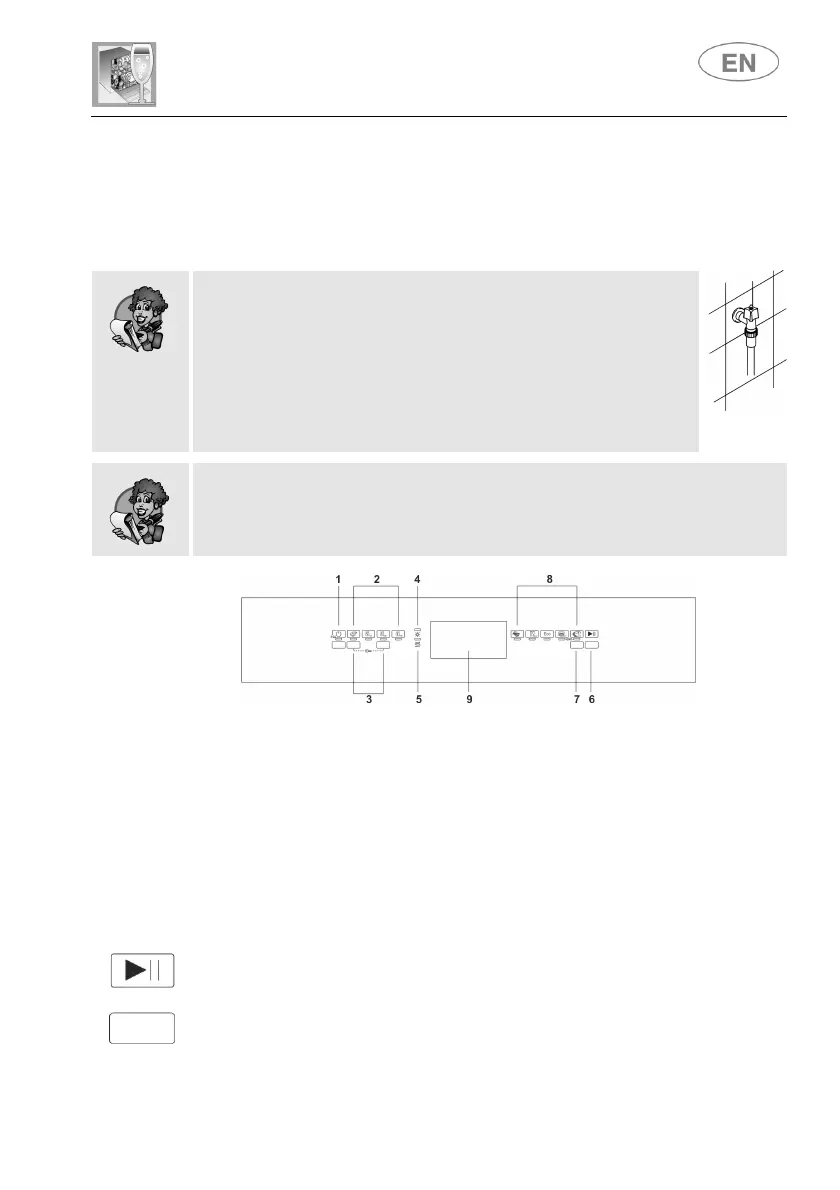
The dishwasher is equipped with a control panel, described in chapter "3.
Description of the controls", from which it is possible to carry out all the
power switch-on, switch-off and programming operations.
Before starting a washing program make sure that:
The water supply tap is open.
The correct amount of detergent has been added to the
dispenser.
The baskets have been correctly loaded.
The spray arms are able to rotate freely and without
obstruction.
The dishwasher door is securely closed.
Warning:
during the initial phase of the washing program, the operation of sprayers
is not perceived because they start rotating about 5 minutes after the start.
This is the normal operation of the washing cycle.
When the ON/OFF button (1) is pressed, the dishwasher switches on.
The indicator lights will display the dishwasher's "status".
Programming operations are only possible with the door closed.
As long as the door is open, the PROGRAMS (8) lights remain off.
Press the PROGRAM SELECTION button (7) several times until the light of
the program required comes on.
To start the dishwasher, press the START/PAUSE button (6) for a few
seconds, until the light of the selected program starts to flash (confirmation
beep).
The light will flash as long as the program is in progress, to indicate that it
is being performed.



 To Next Page