OPERATION
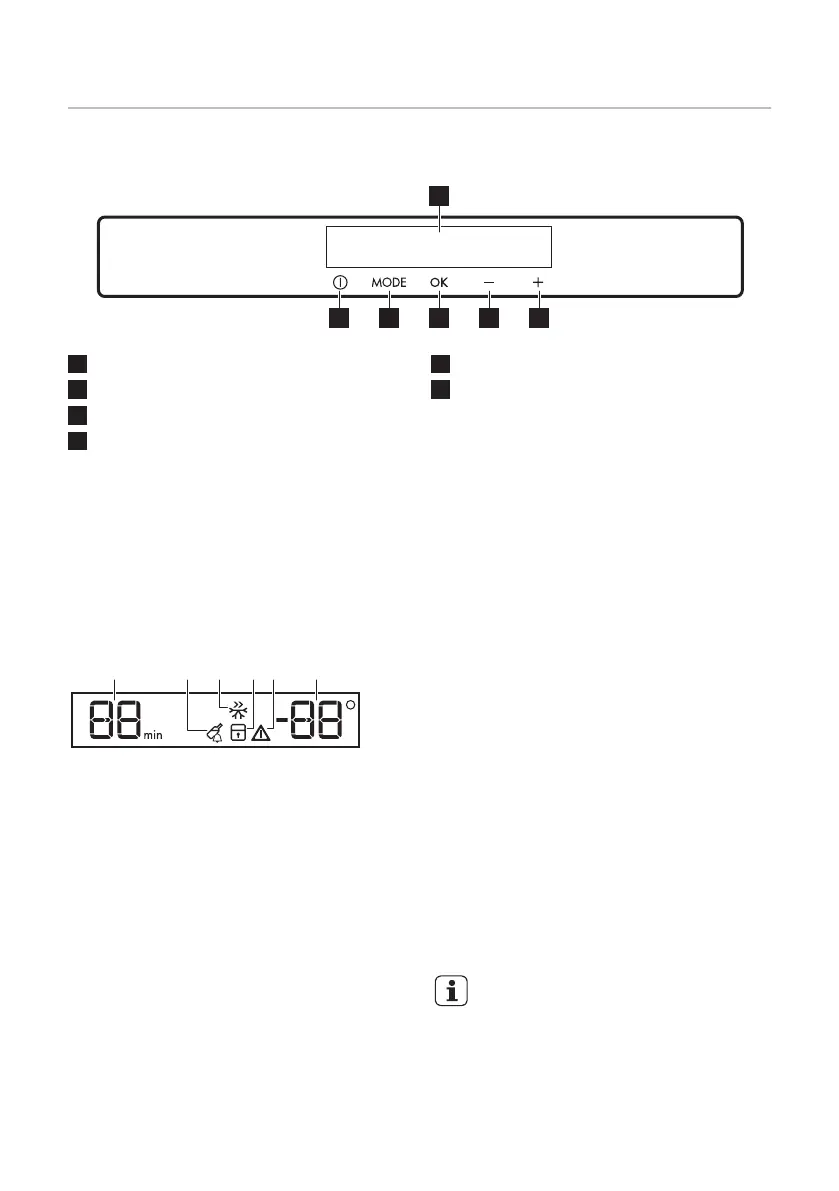
Control Panel
1
Display
2
Temperature warmer button
3
Temperature colder button
4
OK
5
Mode
6
ON/OFF
It is possible to change predefined sound of
buttons to a loudly one by pressing
together Mode and temperature colder
button for some seconds. Change is
reversible.
Display
A) Timer function
B)
DrinksChill function
C)
FastFreeze function
D)
ChildLock function
E)
Alarm indicator
F)
Temperature indicator
Switching on
1.
Connect the mains plug to the power
socket.
2.
Press the appliance ON/OFF if the
display is off.
The alarm buzzer could operate after few
seconds.
The temperature indicators show the set
default temperature.
To reset the alarm refer to "High
temperature alarm".
To select a different set temperature refer to
"Temperature regulation".
If "dEMo" appears on the display, refer to
"What to do if..." chapter.
Switching off
1. Press the appliance ON/OFF button for
5 seconds.
The display switches off.
2. Disconnect the mains plug from the
power socket.
Temperature regulation
Set the temperature of the appliance by
pressing the temperature regulator.
Default set temperature:
• -18°C for the freezer .
The temperature indicators show the set
temperature.
The set temperature will be
reached within 24 hours.
After a power failure the set
temperature remains stored.
21


 To Next Page