EasyManua.ls Logo

Smiths Level 1 DSTA-40 - Page 12

Smiths Level 1 DSTA-40
20 pages
Print Icon
To Next Page IconTo Next Page
To Previous Page IconTo Previous Page
Loading...
DSTA-40
TEMP
CHECK
Thermometer
Operator's
Manual
5
If
the
Over
Temperature
Alarm
activates:
e
Turn
OFF
the
H-1200
Fluid
Warmer
¢
Unplug
from
the
power
outlet
*
Remove
the
TEMP
CHECK
Thermometer
e
Verification
is
complete.
6
If
the
Over
Temperature Alarm
does
not
activate,
go
to
Step
10:
Calibrate
Over
Temperature
Alarm
Activation
Point.
Step
10:
Calibrate
Over
Temperature
Alarm
Activation
Point
WARNINGS
Exercise
extreme
caution
when
rear
panel
is
removed
and
line
voltage
is
exposed.
CAUTIONS
¢
Avoid
contact
with
any
internal
components
not
specified
in
this
procedure.
¢
Support
the
H-1200
Fluid
Warmer
while
the
back
is
removed.
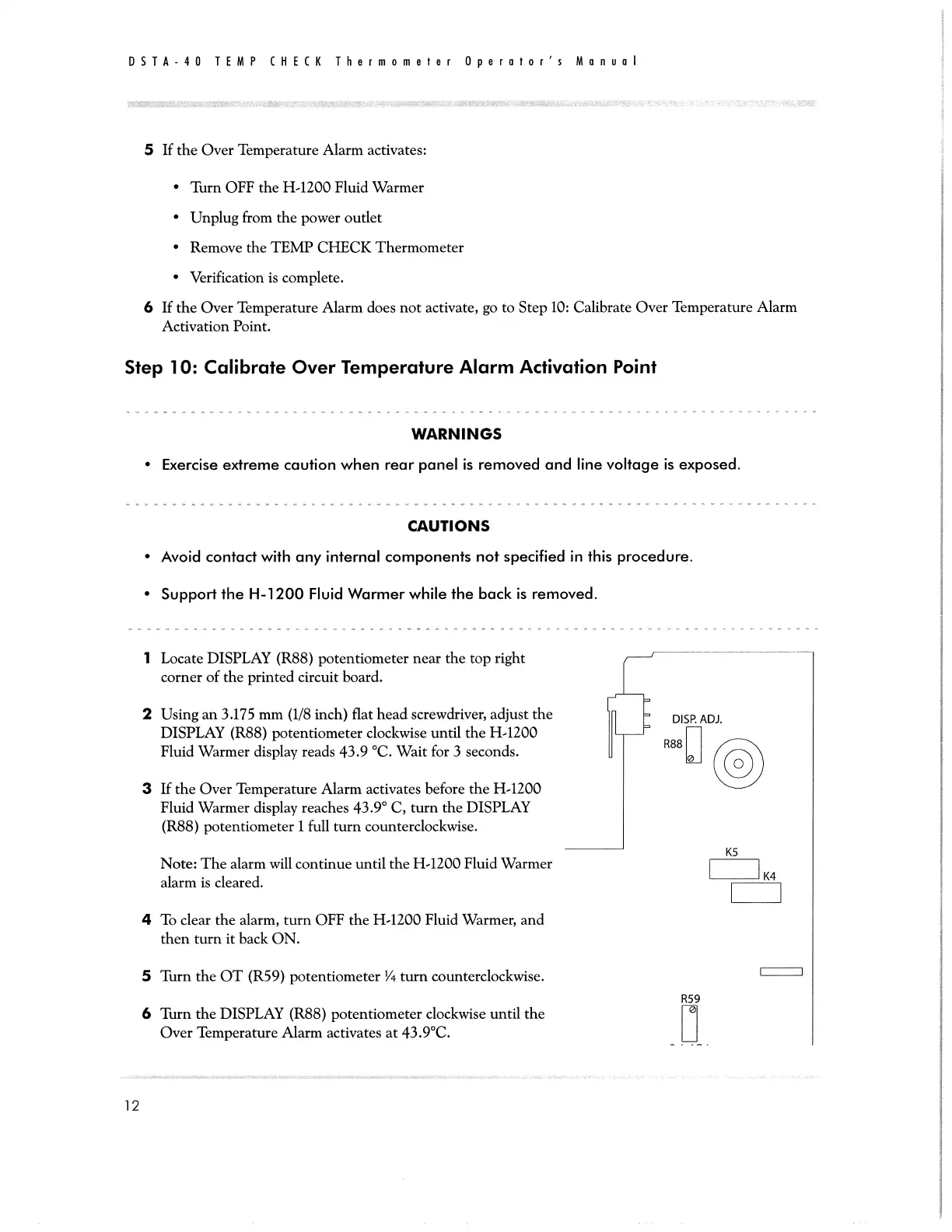
1
Locate
DISPLAY
(R88)
potentiometer
near
the
top
right
corner
of
the
printed
circuit
board.
2
Using
an
3.175
mm
(1/8
inch)
flat
head
screwdriver,
adjust
the
>
DISPADI
DISPLAY
(R88)
potentiometer
clockwise
until
the
H-1200
Fluid
Warmer
display
reads
43.9
°C.
Wait
for
3
seconds.
ο
|
3
If
the
Over
Temperature Alarm
activates
before
the
H-1200
Fluid
Warmer
display
reaches
43.9°
C,
turn
the
DISPLAY
(R88)
potentiometer
1
full
turn
counterclockwise.
Note:
The
alarm
will
continue
until
the
H-1200
Fluid
Warmer
|
|
4
alarm
is
cleared.
|
|
4
To
clear
the
alarm,
turn
OFF
the
H-1200
Fluid
Warmer,
and
then
turn
it
back
ON.
5
Turn
the
OT
(R59)
potentiometer
%
turn
counterclockwise.
-一
R59
6
Turn
the
DISPLAY
(R88)
potentiometer
clockwise
until
the
Over
Temperature
Alarm
activates
at
43.9°C.
12