EasyManua.ls Logo

Smiths Level 1 DSTA-40 - Page 11

Smiths Level 1 DSTA-40
20 pages
Print Icon
To Next Page IconTo Next Page
To Previous Page IconTo Previous Page
Loading...
DSTA-40
TEMP
CHECK
Thermometer
Operator’s
Manual
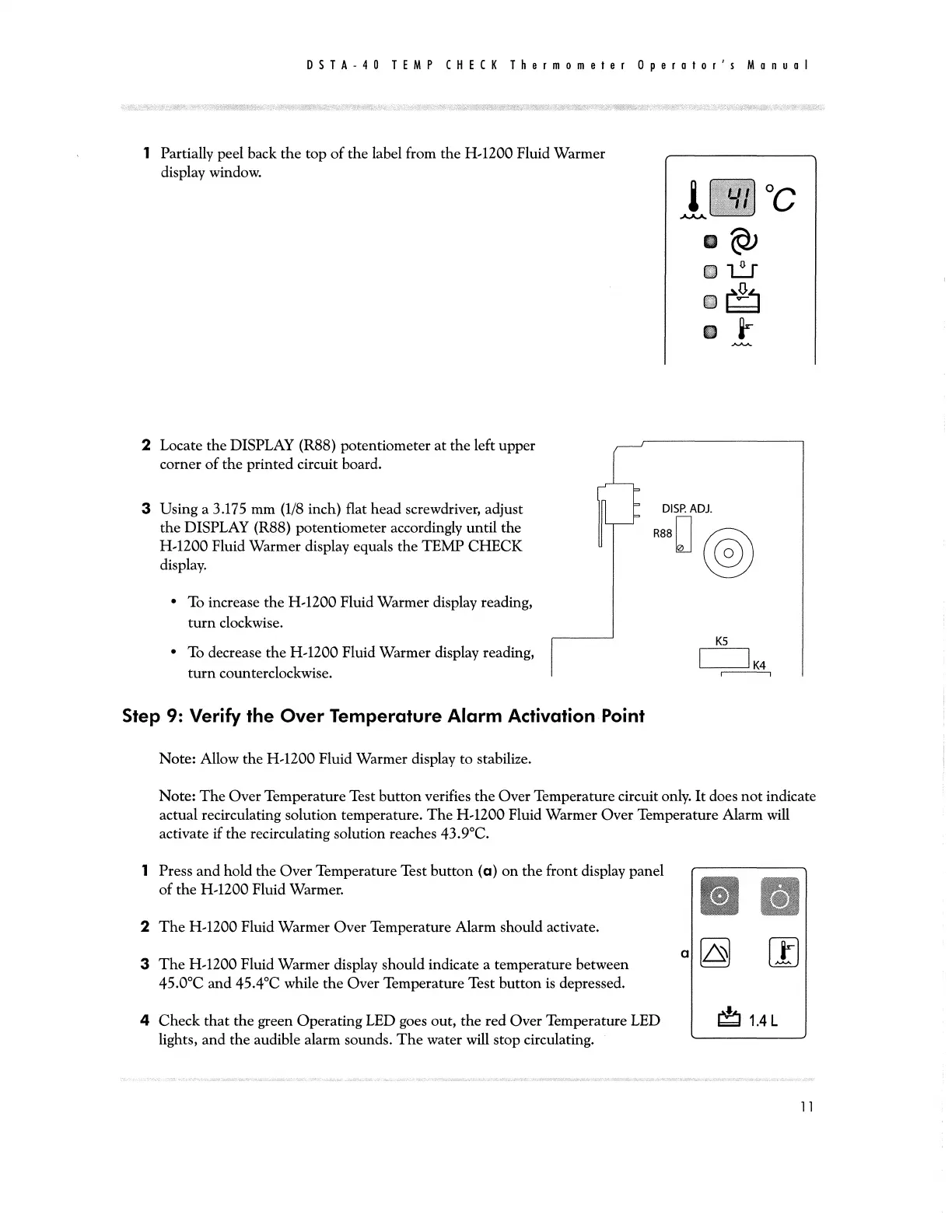
1
Partially
peel
back
the
top
of
the
label
from
the
H-1200
Fluid
Warmer
-
display
window.
2
Locate
the
DISPLAY
(R88)
potentiometer
at
the
left
upper
corner
of
the
printed
circuit
board.
3
Using
a
3.175
mm
(1/8
inch)
flat
head
screwdriver,
adjust
|
DISP
ADJ
the
DISPLAY
(R88)
potentiometer
accordingly
until
the
R88
H-1200
Fluid
Warmer
display
eguals
the
TEMP
CHECK
©
display.
(©)
+
To
increase
the
H-1200
Fluid
Warmer
display
reading,
turn
clockwise.
K5
‘To
decrease
the
H-1200
Fluid
Warmer
display
reading,
|
|
|
K4
turn
counterclockwise.
Step
9:
Verify
the
Over
Temperature
Alarm
Activation
Point
Note:
Allow
the
H-1200
Fluid
Warmer
display
to
stabilize.
Note:
The
Over
Temperature
Test
button
verifies
the
Over
Temperature
circuit
only.
It
does
not
indicate
actual
recirculating
solution
temperature.
The
H-1200
Fluid
Warmer
Over
Temperature
Alarm
will
activate
if
the
recirculating
solution
reaches
43.9°C.
1
Press
and
hold
the
Over
Temperature
Test
button
(a)
on
the
front
display
panel
y
of
the
H-1200
Fluid
Warmer.
NN
2
The
H-1200
Fluid
Warmer
Over
Temperature
Alarm
should
activate.
D
|=
3
The
H-1200
Fluid
Warmer
display
should
indicate
a
temperature
between
45.0°C
and
45.4°C
while
the
Over
Temperature
Test
button
is
depressed.
y
4
Check
that
the
green
Operating
LED
goes
out,
the
red
Over
Temperature
LED
ES
14L
lights,
and
the
audible
alarm
sounds.
The
water
will
stop
circulating.
|