EasyManua.ls Logo

SMJ EMT707PA - User Manual

SMJ EMT707PA
6 pages
Print Icon
To Next Page IconTo Next Page
Loading...
44121045.doc Page 1 of 6
Instruction Manual for
Programmable Digital Timer
Item No. EMT707PA
A. Functions
1. The Programmable Digital Timer (hereinafter refer as “Timer”) can preset specific on/off time
of your home electrical appliances, e.g. using in coffee machine, lamps. It is ideal for energy
saving and home security.
2. The countdown function can switch on/off your appliance on your pre-set time and random
functions allows you to switch on and off the appliance in irregular time, it is not only ideal for
home automation, also prevent burglary during your absence.
3. The LCD displays program setting status and real time.
4. With maximum 98 on/off programs per week .
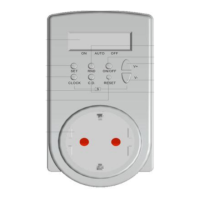
B. Diagram & Descriptions
No.
Description
Functions
1
LCD Display
Shows time and program setting.
2
CLOCK Button
- Return to real time display when in program setting
- Press and hold to interchange between 24 hours to 12 hours display
- press together with ▼-Button to change to Summer Time
3
CD Button
Press the button to start/stop countdown program when it is in AUTO
status and when Timer is plugged into AC socket
4
RND Button
Press the button to start/stop random program when it is in AUTO status
and Timer is plugged into AC socket
5
On/Off Button
Change the setting mode to ON, ATUO or OFF. When press the button
each time, the horizontal line in the LCD moves to
ONAUTOOFF which were silk printed on the Timer
6
SET Button
Press and hold to start setting time and week and to confirm setting
7
Button
Press the button to reduce the time, week or program group
8
+ Button
Press the button to increase the time, week or program group
9
S Printing
Press CLOCK Button and ▼- Button at the same time to change to
Summer Time. Time display adds one hour automatically and “S” are
shown on the LCD.
10
R Button
Press and hold to reset all the programs
11
Socket & Plug
Connect your appliance to the socket and plug the timer to the wall AC
socket to get power
Question and Answer IconNeed help?

Do you have a question about the SMJ EMT707PA and is the answer not in the manual?

Summary

Programmable Digital Timer Functions

Programmable Timer Features

Preset on/off times for appliances, ideal for energy saving and security.

Countdown and Random Functions

Allows timed on/off switching and irregular operation for automation and security.

LCD Display Functionality

Displays program setting status and real time.

Diagram and Component Descriptions

LCD Display

Shows time and program setting status.

CLOCK Button

Returns to real time display and toggles 12/24 hour format.

CD Button

Starts or stops the countdown program when in AUTO status.

RND Button

Starts or stops the random program when in AUTO status.

On;Off Button

Changes the setting mode between ON, AUTO, and OFF.

SET Button

Initiates and confirms time and week settings.

Navigation Buttons (▲;▼)

Adjusts time, week, or program group settings.

S Printing Button

Activates Summer Time, adding one hour to the display.

R Button

Resets all programs and settings on the timer.

Socket & Plug

Interface for connecting the appliance and powering the timer.

Time Display Modes

12-Hour Time Format

Displays time from 11:59 to 12:00 with AM or PM indicators.

24-Hour Time Format

Displays time from 00:00 to 23:59 without AM/PM.

Switching Between Time Displays

Press CLOCK Button to toggle between 12-hour and 24-hour display modes.

Week and Time Setting Procedures

Week Setting Procedure

Sets the day of the week for program scheduling.

Current Time Setting

Configures the timer's current hour and minute accurately.

Summer Time Adjustment

Enables or disables the automatic one-hour adjustment for summer time.

Program and Countdown Settings

Selecting Program Groups

Choose from 14 program groups and set ON/OFF status.

Defining Program Days

Specifies which days of the week a program should be active.

Setting Program Times

Configures the specific ON and OFF times for each program.

Modifying Existing Programs

Procedure to edit or replace previously saved program settings.

Countdown Mode Activation

Sets the timer for a countdown to turn the appliance ON or OFF.

Setting Countdown Duration

Configures the countdown interval in hours, minutes, and seconds.

Initiating Countdown Function

Starts the countdown sequence using the CD Button.

Random Operation Settings

Random Functionality

Irregularly switches the appliance ON/OFF for security or automation.

Configuring Random Intervals

Sets minimum and maximum times for power OFF and ON periods.

Activating Random Mode

Starts the random switching pattern using the RND Button.

Override, Connections, and Safety

Manual Override Options

Select ON, AUTO, or OFF to override or resume preset programs.

Function Interaction Notes

Details on how countdown/random functions interact with auto settings.

Connecting the Timer

Steps to connect an appliance and power to the timer.

General Safety Advice

Important instructions for safe operation, handling, and battery replacement.

Electric Shock Hazards

Precautions to avoid electric shock, including usage in wet locations.

Fire Hazard Warnings

Guidance on avoiding fire risks, like using with heating elements or exceeding ratings.

Electrical and IP Ratings

Details current, maximum power, and Ingress Protection rating.

Timer Specifications

Working Temperature Range

Specifies the operational temperature range for the timer.

Time Setting Interval

Defines the minimum increment for setting time values.
SMJ EMT707PA Specifications

General IconGeneral
BrandSMJ
ModelEMT707PA
CategoryTimer
LanguageEnglish

Related product manuals