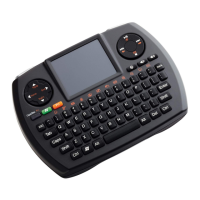
Need help?
Do you have a question about the SMK-Link Versapoint VP6610 and is the answer not in the manual?
The device meets general RF exposure requirements and can be used in portable conditions.
Contact details for SMK-Link Electronics Corporation for product support.
Hardware and operating system requirements for the VP6610 wireless desktop suite.
List of all items included in the VP6610 wireless desktop suite package.
Instructions for installing batteries and powering on the VP6610 wireless keyboard.
Statement of compliance with European Council Directive 1999/5/EC.
Details of FCC testing and compliance for the VP6610 wireless desktop suite.
Steps to correct harmful interference to radio or television reception.
Instructions for installing batteries and powering on the VP6610 wireless mouse.
Guide on connecting the USB receiver and pairing the keyboard and mouse.
Information regarding the product's limited warranty, coverage, and claims process.
Guidance on resolving common issues like low battery power and connection problems.
Steps to re-synchronize the keyboard with the USB receiver.
Steps to re-synchronize the mouse with the USB receiver.
Explanation of the VP6610 wireless mouse buttons and their functions.
Details on the 4 media hot keys on the VP6610 wireless keyboard.
 General
| Connectivity Technology | Wireless |
|---|---|
| Wireless Technology | RF |
| Keyboard Layout | QWERTY |
| Color | Black |
| Interface | USB |
| Key Type | Membrane |
| Backlight | No |
| Operating Distance | 10 meters |
| Compatibility | PC |


 To Next Page