Need help?
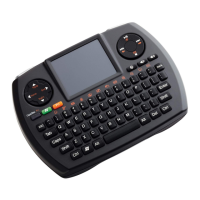
Do you have a question about the SMK-Link VP6364 and is the answer not in the manual?
Equipment tested and found to comply with FCC Part 15 limits for Class B digital devices, providing protection against harmful interference.
Declares compliance with Directive 1999/5/EC and acknowledges trademarks belong to their respective owners.
Details the process of removing battery covers, inserting AA batteries respecting polarity, and replacing covers.
Explains the behavior of the power-low indicator LED and when to replace batteries to avoid interruption.
Guides through plugging in the USB receiver, powering on the keyboard, and ensuring it's within the operational range.
Provides steps to reset the wireless connection by unplugging and replugging the dongle and pressing the ID button.
Advises on positioning index fingers below the mouse buttons to avoid accidental triggers during typing.
Explains how to perform scrolling using two thumbs on the touchpad while holding the keyboard with both hands.
Describes how to scroll using two fingers on the touchpad when holding the keyboard in one hand.
Addresses common issues like keyboard not working, erratic typing, or cursor movement, suggesting checks and resets.
Provides contact information for technical support through the SMK-LINK website.

 To Next Page
 General