Operations
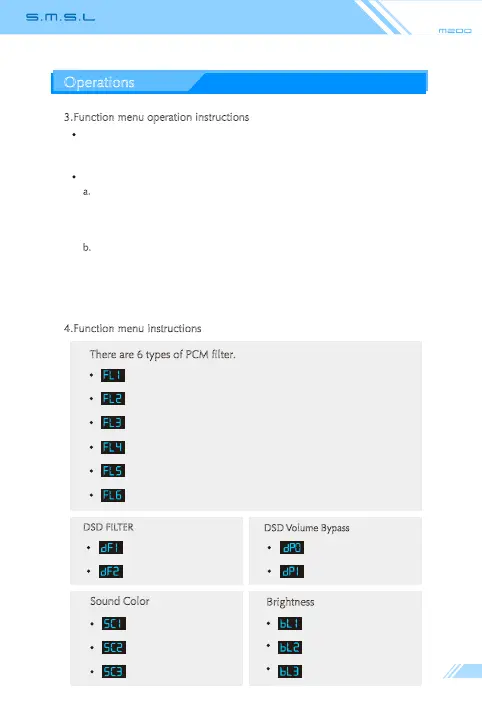
(Sharp Roll-off Filter )
(Slow Roll-off Filter)
(Short Delay sharp Roll-off Filter)
(Short Delay Slow Roll-off Filter)
(Super Slow Roll-off Filter)
(Low Dispersion Shot Delay Filter)
3.Function menu operation instructions
There are 6 types of PCM filter.
Use the "MENU / OK" key on the remote control and the knobs and buttons on the
unit to enter the PCM filter, sound color, and display brightness adjustment.
Operation example (Sound color 2):
a.
Remote control operation: Press the "MENU /OK" key on the remote control to
enter the menu → press the "MENU / OK" key three times to enter the sound color
options menu→press the "Volume + / Up" key, select "SC2"→ finally press the "Exit
menu" key to exit menu.
b.
Use the keys and knobs on the item: Short press the "Power / Function" key twice
(double-click) to enter the menu → short press the "Power / Function" key three times
to enter the sound color menu → turn the knob to select "SC2" →finally press the
"Power / Function" key twice (double-click) to exit menu.
4.Function menu instructions
Sound Color
Brightness
Sound Color 1
Sound Color 2
Sound Color 3
Brightness 1
Brightness 2
Brightness 3
DSD Volume Bypass
Normal Path
Volume Bypass
DSD FILTER
DSD FILTER 1
DSD FILTER 2



 To Next Page