50
+
*
*
10
4-10
6
>
*
5-8
Operation
5.4.3 Reading positions for various Alu
types
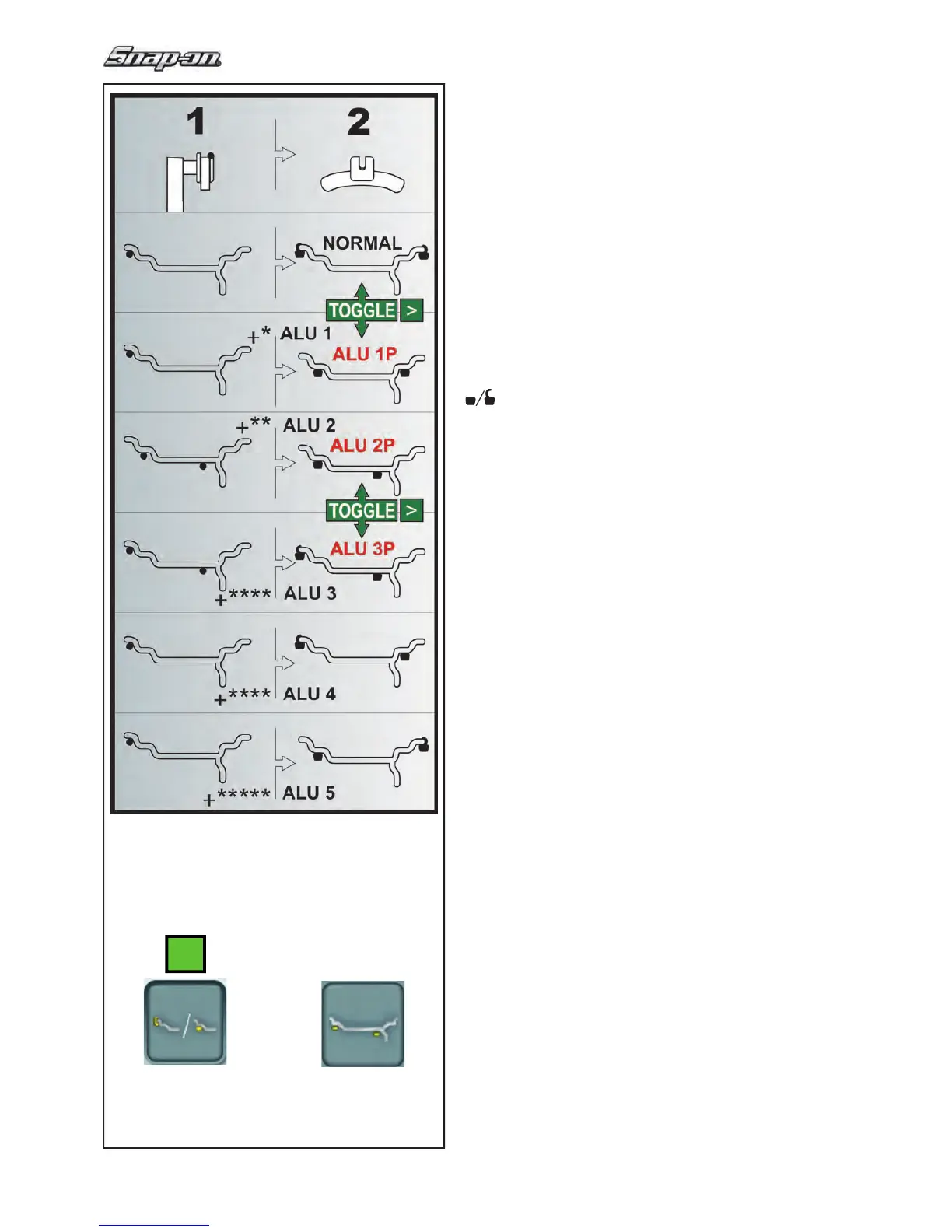
Fig. 5-8 shows the corrected
reading positions of the
gauge head (1), depending on the required weight
application positions (2); adhesive weights and clip-
on weights.
Note:
The AluP modes are included in the Easyalu
function. It is possible to switch between the ALU P
modes available, but not between ALU P and ALU
not P.
> Select the menu key Easy Alu Toggle to recall the
required ALU P weight positions.
Fig. 5-8
— = Point of application of gauge arm (1)
= Given weight position (2)
Normal Normal weight and clip-on weight positions
on the rim fl ange - this mode is presented
immediately by the Easyalu function.
Alu 1 Adhesive weights applied symmetrically to the
rim fl anges with NOMINAL weight positioning.
Function not included in Easyalu mode. After
reading, to set the mode press once on the
key “
*
“ (6, Fig.4-10), or “>“ (10, Fig.4-10).
Alu 1P Adhesive weights - Adhesive weights on bead
seats; the planes are precisely read
Alu 2 Adhesive weights - Adhesive weight on rim
fl ange, adhesive weight hidden in rim disc with
NOMINAL positioning.Function not included in
Easyalu mode. After reading, to set the mode
press twice on the
*
key (10, Fig.4-10).
Alu 2P Adhesive weights - Adhesive weight on rim
fl ange, adhesive weight hidden in rim disc; the
compensation planes for the adhesive weights
are read precisely using internal calibration.
Alu 3 Clip-on weight on left rim fl ange, adhesive
weight hidden in rim disc. Function not
included in Easyalu mode. Weight positioning
is NOMINAL. After reading, to set the mode
press 3 times on the
*
key (10, Fig.4-10).
Alu 3P Clip-on weight on left rim fl ange, adhesive
weight hidden
in rim disc; the compensation
planes for the adhesive weight is read
precisely using internal calibration.
Alu 4 Balance clip fi tted on left rim fl ange, adhesive
weight attached to right bead seat. After
reading, to set the mode press 4 times on the
*
key (10, Fig.4-10)
Alu 5
Balance clip fi tted on right rim fl ange, adhesive
weight attached to left bead seat. After
reading, to set the mode press 5 times on the
*
key (10, Fig.4-10)


 To Next Page
 Loading...