EasyManua.ls Logo

Soberlink sl2 - Client Toolbar Overview; Client Management Options

Soberlink sl2
11 pages
Print Icon
To Next Page IconTo Next Page
To Previous Page IconTo Previous Page
Loading...
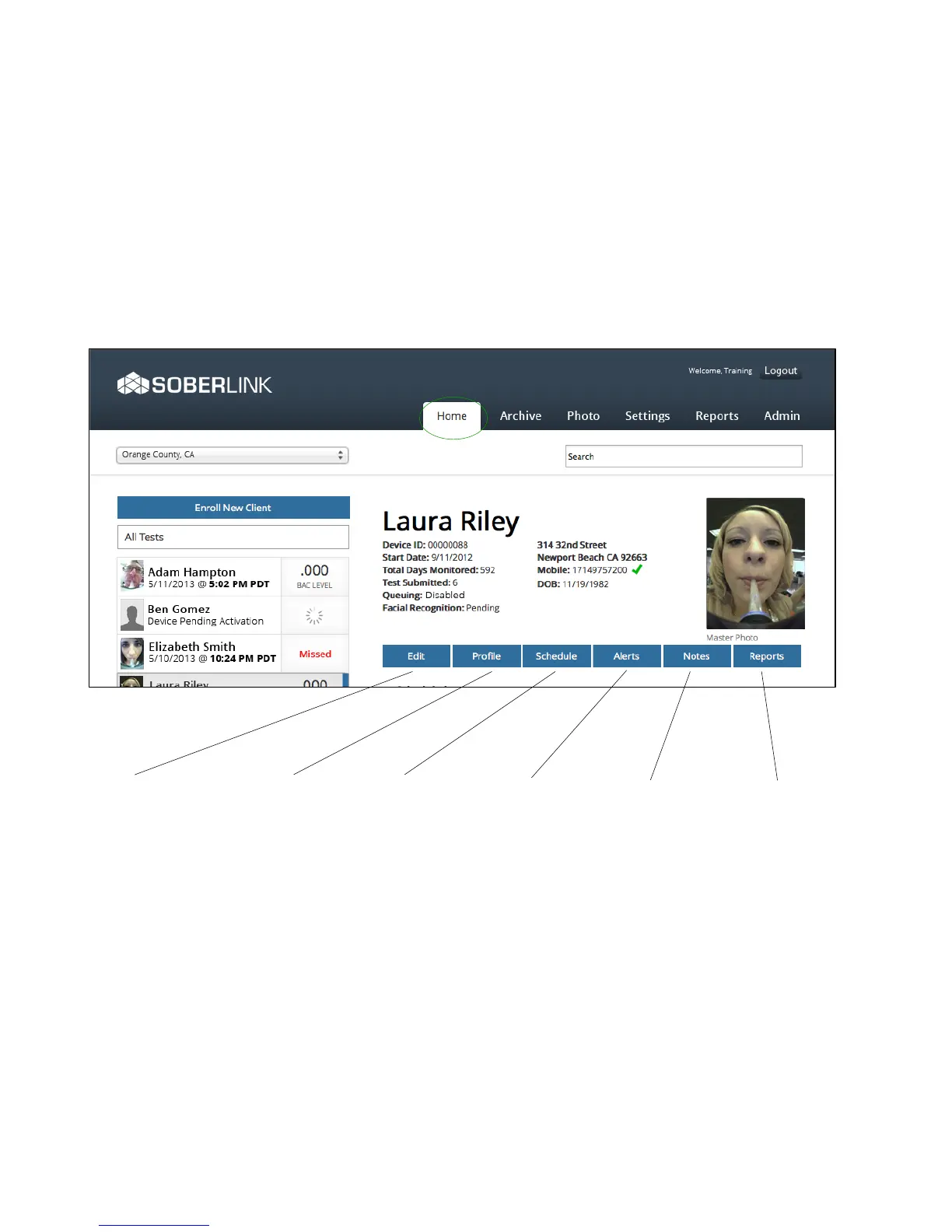
Client Options
Edit Client Name and/
or Time Zone
Device
Edit Device ID and/or
Security PIN
Administration
Stop Monitoring Client
or Delete Client
Schedule Tests
Create client’s
test schedule
Text Reminders
Enable client text
reminders
Violation Alerts
Assign a contact
to be alerted via
text/email upon
client violation
Client Notes
Add general notes
regarding client
Test Notes
View all test notes
Reporting Options
Pull various reports
based on date
range, client, folder,
or contact
Personal Info
Edit client’s profile
including address
and personal
details.
><#-7(&;66<?)*&
@&
A62-&8)1-&
The Home Page displays all clients currently being monitored and allows for the addition
of new clients. Each test can be clicked on to open a Test Detail page where the Master
Photo can be set.

Other manuals for Soberlink sl2

Related product manuals