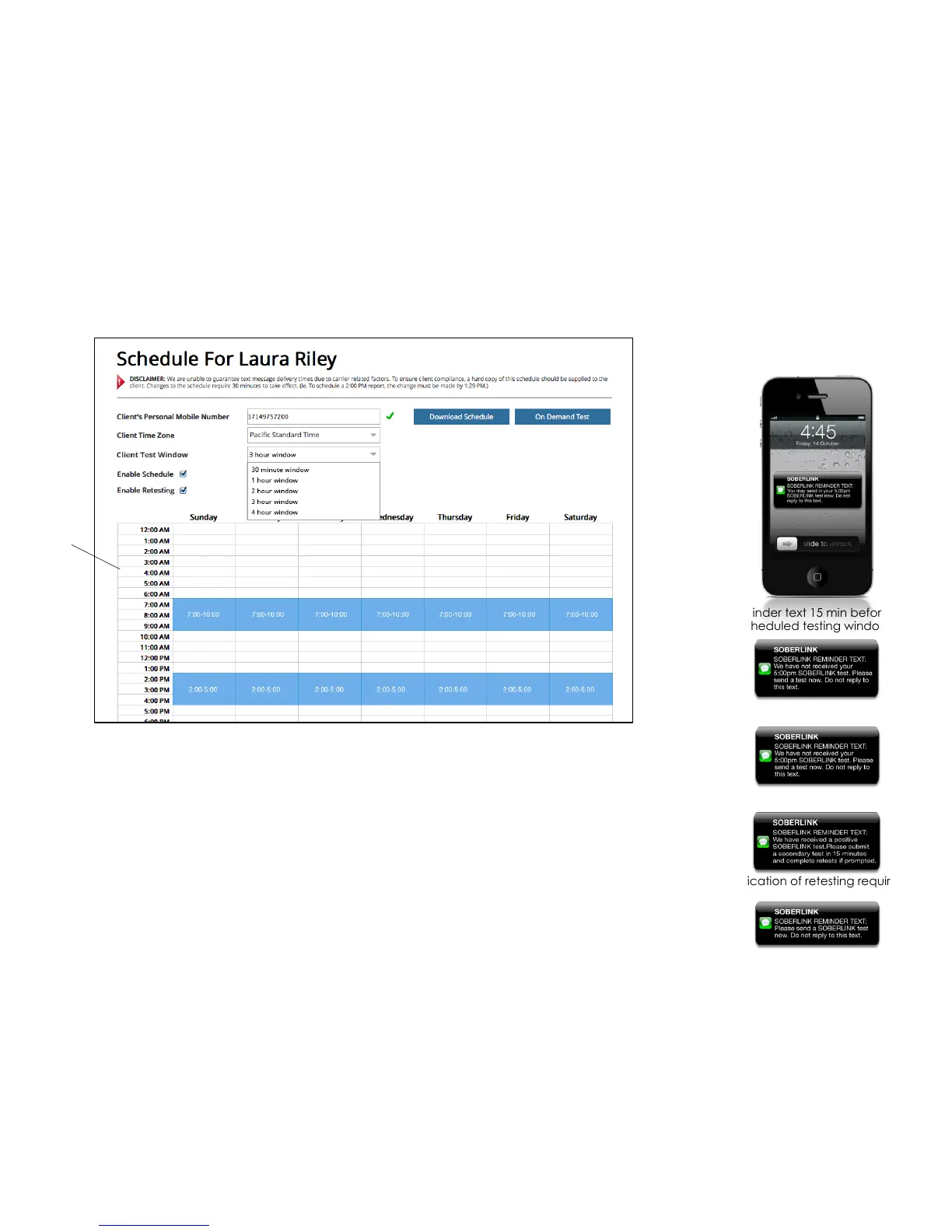
Reminder text 15 min before the
scheduled testing window
Reminder text
Notification of retesting requirement
• Enable Schedule will send text reminders to the client’s mobile number at the scheduled test times (shown at
right). Upon first entry of a cell number, the client will receive an opt-in text message and must reply with
“SUBSCRIBE”.
• Enable Retesting will prompt client to retest every 30 min if a test of .02 or higher is submitted (until BAC is below .
02 or 3 hours has elapsed). Lower BAC threshold available upon request.
• Variable Testing Windows allow the testing window to be set for 30 minute, 1 hour, 2 hour, 3 hour or 4 hour
durations. To set the test variable window select the preferred duration from the dropdown. Once a testing
window is set, the duration will apply to all tests for that particular client. The schedule will not allow double
booking of tests.
• The On Demand Test button will immediately initiate a test window with reminders. The On Demand Test will
always be scheduled as a 30 minute testing window. It is not affected by the selected variable testing window.
Missed notification
When retest is required
><#-7(&;66<?)*&B&'$C-,"<-&D"E67&
A62-&F&'-<-$(-,&><#-7(&F&'$C-,"<-&
G&
Click the
hour to
schedule
or remove
tests for
the week
Note: Changes to the portal require 30 min to take effect
3"(62)(-,&;-H(&I-99)1-9&
&'-7(&(6&J9-*&


 To Next Page