9
Function (08) Change system password:
The reader’s password is being set at
5678
initially by manufacturer. In order to enter
into system setting mode for the first time, user must key in the initial system password –
5
678
. User may change the system password after entering into system setting mode.
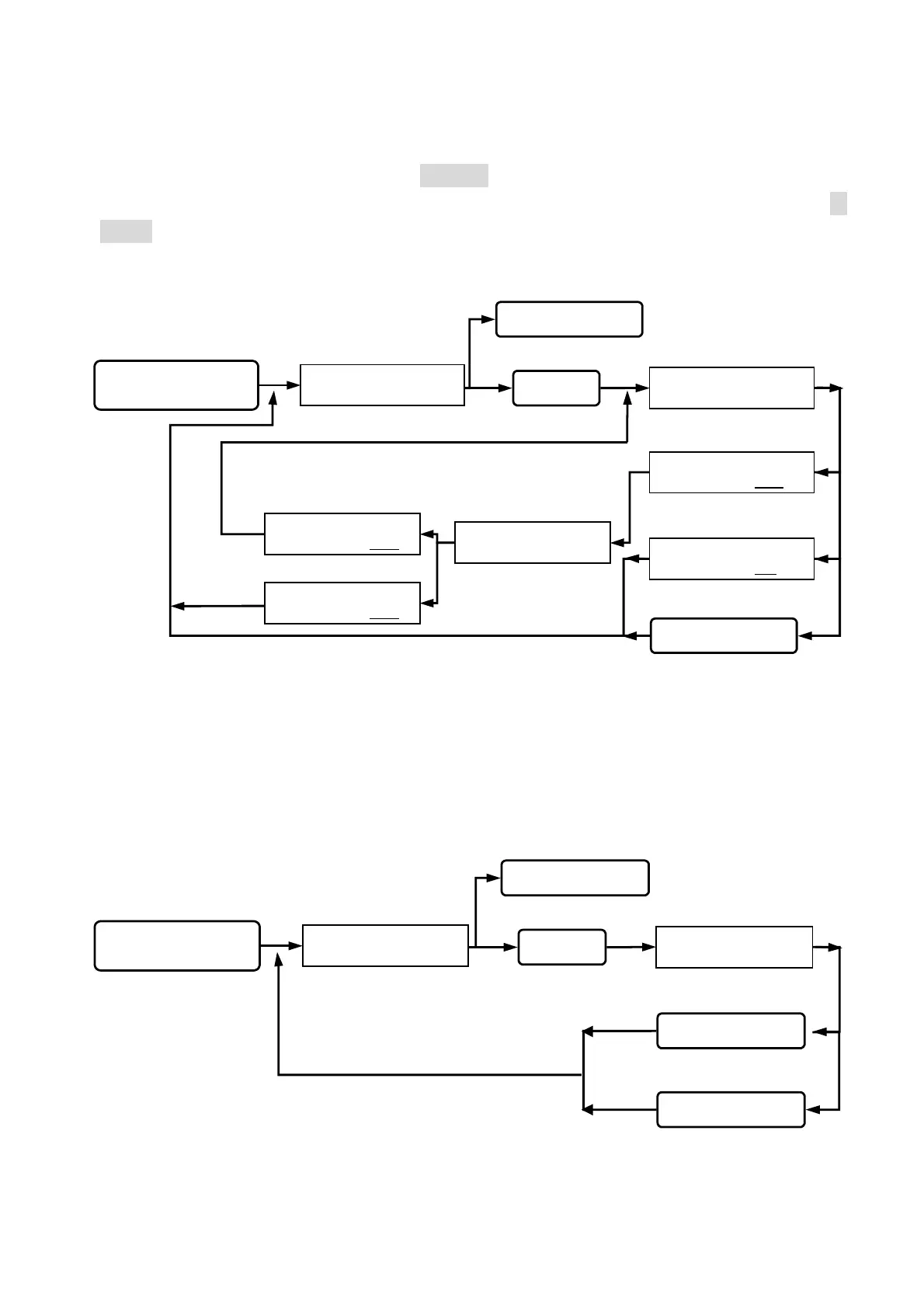
Function (09) Reset to release anti-duress alarm:
User sets to release the anti-duress alarm.
Beep sound on consecutively,
error input. (first and last 4-
digit password different)
Queuing new system
password input.
Input successfully (4 digits).
Error input.
INPUT NEW SYSTEM
PASSWORD : 1234
INPUT NEW SYSTEM
PASSWORD : 12#
_
INPUT NEW SYSTEM
PASSWORD : _ _ _ _
Key in 08
Esc system function selection.
Key in
#
or
*
Key in the #or *
Re-enter new system
password for confirmation.
CONFIRM SYSTEM
PASSWORD : 1234
CONFIRM SYSTEM
PASSWORD : 0000
Input successfully. (same password)
Esc system function selection.
Go into function 08.
SYSTEM FUNCTIONS
SELECTION : _ _
status light on, display
function selection.
Key in
#
system password
#
Go into system function setup.
CONFIRM SYSTEM
PASSWORD : _ _ _ _
Queuing for anti duress
alarm released or not.
Setting successfully, anti-
duress alarm is released.
DURESS RELEASED
YES => “ # “
Key in 09
Key in
#
or
*
Press other keys
Key in the
#
Esc system function selection.
Go into function 09.
back to system function selection.
SYSTEM FUNCTIONS
SELECTION : _ _
status light on, display
function selection.
Key in
#
system password
#
Go into system function setup.


 To Next Page
 Loading...