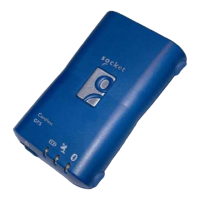
Hardware Features
Power Switch
Power ON Power OFF
Power Jack
The power jack lets you connect to either a DC (included) or AC power
charger to recharge the internal battery. You can either use the included DC
adapter or an iPAQ-compatible AC adapter. Please note that the adapter rating
is 5V, 1A, positive pole center.
External Antenna Port
If you have an external antenna with a male MCX connector (available
separately), you can use it instead of the Bluetooth GPS Receiver’s internal
antenna. Simply plug your external antenna into the antenna port.
Bluetooth Status LED (Blue
)
Blinking — Bluetooth radio is on and ready to transmit.
GPS Status LED (Green)
Blinking — GPS position is fixed.
Steady light — GPS position not fixed.
Battery Status LED (Red/Yellow)
None — Running on battery power, and battery has adequate power
supply.
Red — Running on battery power, which is critically low. Charge
immediately.
Yellow — Connected to power charger. Battery is only partially full.
LED off — Connected to power charger. Battery is fully charged.
To register your product online, visit: www.socketcom.com/prodreg/



 To Next Page