4.Keyless Start
After unlocking the vehicle via Intelligent
Remote Control, press the “POWER”
button, power on, press again, power off.
*Only applicable to certain models*
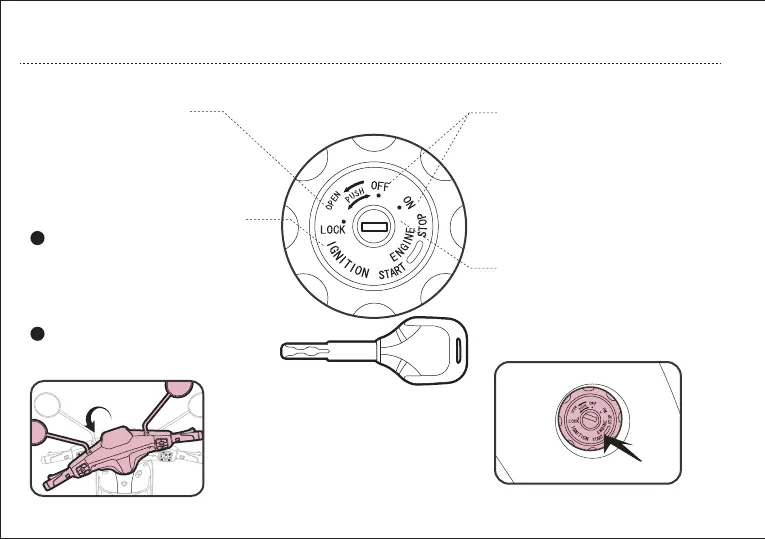
3. Start the vehicle with
Mechanical Key
2. Steering Wheel Lock
1. Open the Battery
Compartment/Storage Box
After unlocking the vehicle via Intelligent
Remote Control, insert the key and turn
the key to “ON” position, power on; turn
the key to “OFF” position, power off.
After parking the vehicle, turn the
handlebar to extreme left position.
Insert the key to the steering wheel
lock, press down the key and turn
counterclockwise to lock the steering wheel.
Insert the key to the steering wheel lock,
press down the key and turn clockwise to
unlock the steering wheel.
Insert the key and turn the key
clockwise to unlock the battery
compartment/storage box.
2
1
19
OPERATION GUIDE


 To Next Page