DESCRIPTION OF COMPONENTS AND PARTS
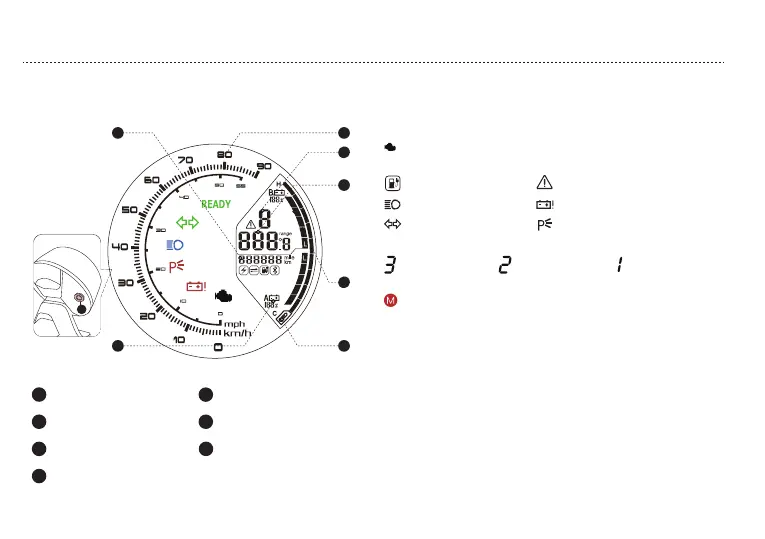
b.SCHEMATIC DIAGRAM OF THE SPEEDOMETER
1
2
3
4
Speed display
Cruising range/
Ambient temperature
Total mileage
Controller temperature
7
Gear display
5
6
Battery indicator
Battery percentage display
BUTTON FUNCTION DESCRIPTION
High beam indicator
Winker indicator
Battery error
Parking indicator
Indication P shows in parking mode
Start indicator The vehicle can be started when
READY is displayed
READY
Charging Error
Sport mode Cruise mode ECO mode
1
5
4
2
3
6
7
10
Display switching-cruising range/ambient temperature In normal
mode, short press the key switch to switch strongly and save the
state.
Turn on the instrument backlight manually (text version backlight +
LCD backlight) In normal mode, press the button to force the
instrument backlight and headlights to be turned on
Display unit switching (KM and Mile, km/h and mph) In normal
mode, long press the key switch to switch the unit and save the
state
TIPS:Short press and press the button for less than 2 seconds, then
release the button;
Press the button for less than 8 seconds and longer than 2
seconds, then release the button. Long press the button for more
than 8 seconds, then release the button
OBD Indicating OBD checking error codes
See page 24 FAQ & TROUBLESHOOTING



 To Next Page