7
M
3
5
VEHICLE & PARTS
INSTRUMENT
BUTTON FUNCTIONS
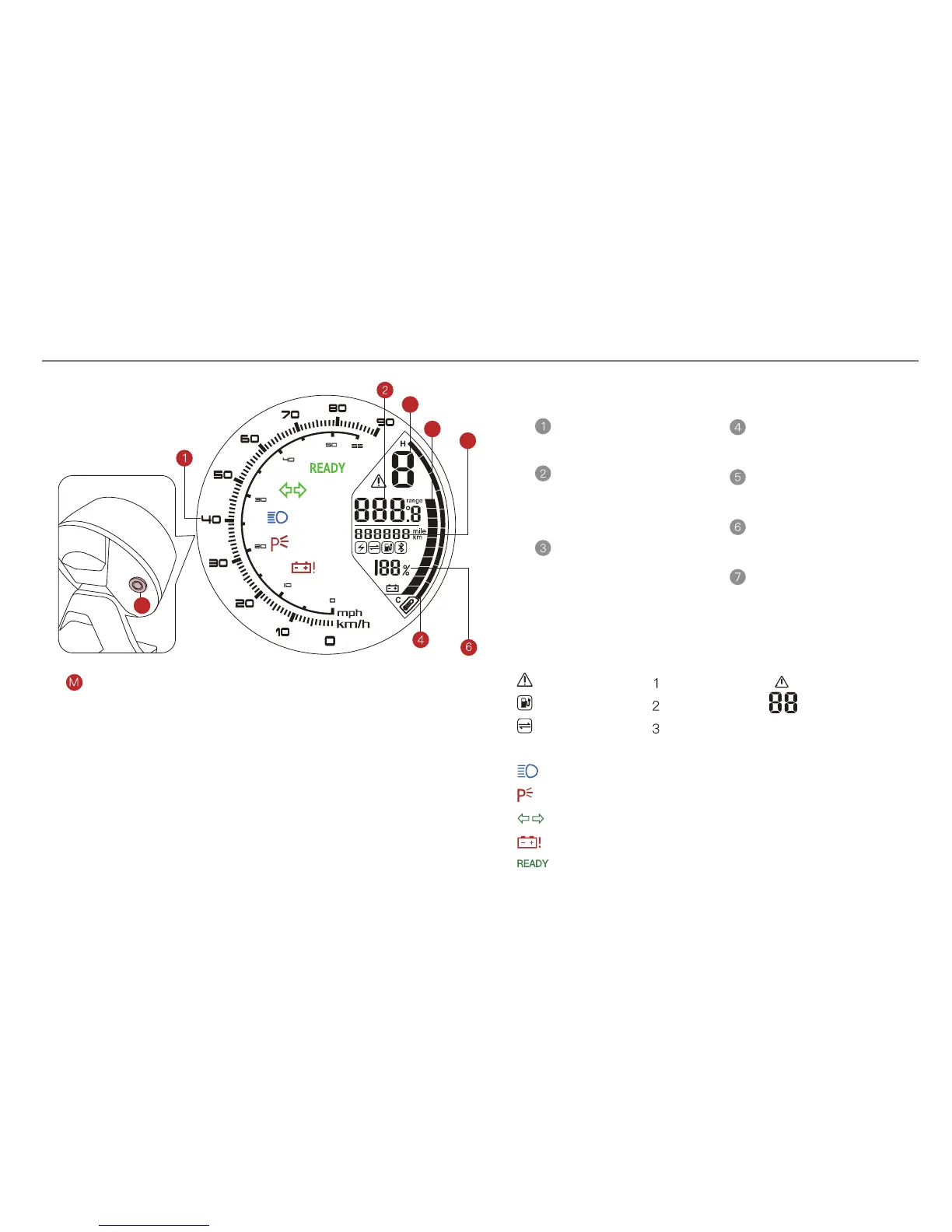
Change Indications ------ Range/Temperature
Speed Indication
Range/Temperature
In normal mode, Press it less than 2 seconds, change indications,
and keep the status.
Indicate current trip
range or temperature.
Can switch.
Total Range
Indicate total range.
Show current speed
Controller Temperature
SOC in Bars
Indicate real-time
battery capacity
SOC in %
Indicate real-time
battery capacity
Indicate real-time
temperature of controller
Mode
Indicate real-time riding
model
Manually start the back light of Instrument (Back light for Letters
+ LCD back light)
In normal mode, Press it longer than 2 seconds but shorter than 8
seconds, start the back light for instrument and head light.
Change between KM/Mile and KM/P & MPH
In normal mode, press it longer than 8 seconds, then release.
Errors
Charging
Data Connecting
:ECO Mode
:NORMAL Mode
:SPORT Mode
HIGH BEAM ON
MOTORCYCLE IN PARKING POSITION
TURNING LIGHT ON
BATTERY ERROR
MOTORCYCLE IS READY TO RIDE
Indication of Error
Code Details in
Error List.


 To Next Page