EasyManua.ls Logo

SoFlow SO ONE PRO - SOFLOW App Integration

SoFlow SO ONE PRO
52 pages
Print Icon
To Next Page IconTo Next Page
To Previous Page IconTo Previous Page
Loading...
copyright by www.soflow.com 11/52
2.5. SOFLOW APP
You can connect to your Bluetooth-enabled SOFLOW
ONE Pro using the app for iOS and Android devices. This
enables you to use your smartphone as a dashboard that
displays speed, battery level and predicted range, among
other metrics.

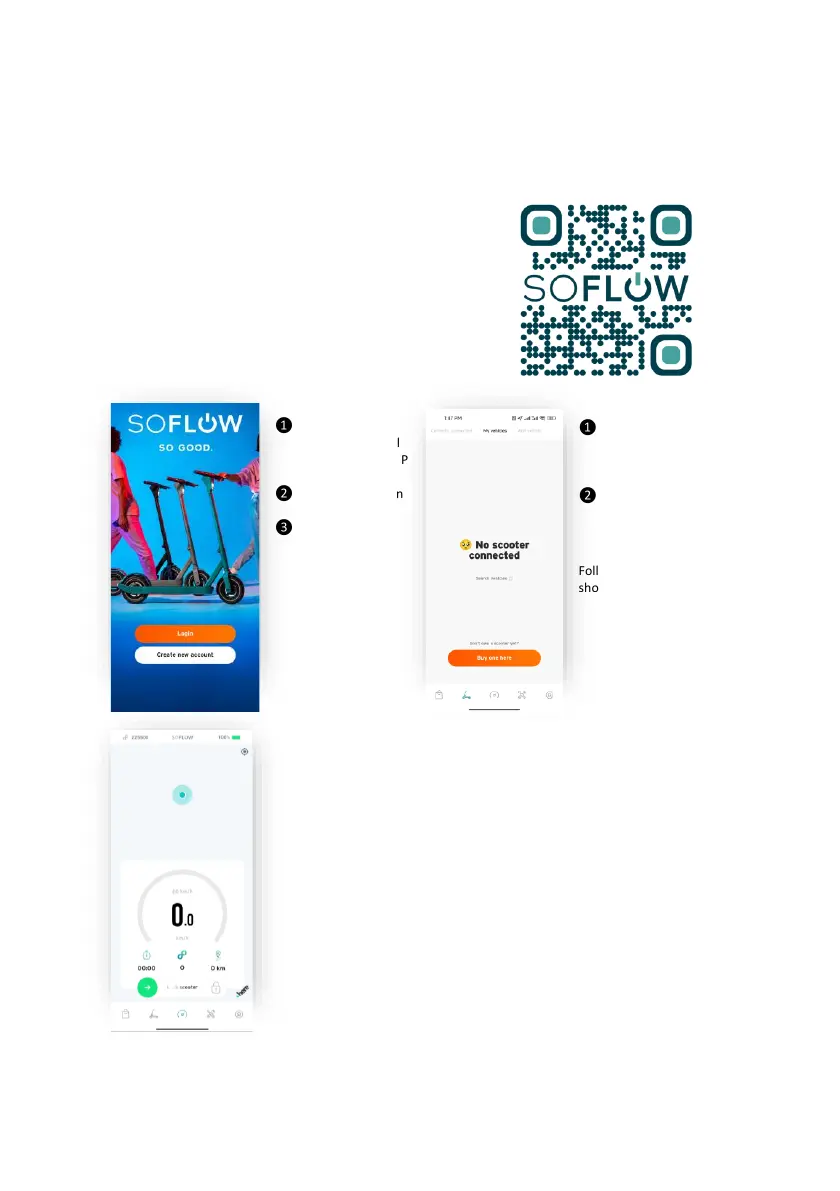
Choose the
scooter menu bar
below
Search vehicles
and your scooter
should appear
Follow the instructions
shown on the APP.
Scan the QR
code and install
the SOFLOW APP
Register / Log-in
Power on your
Scooter and
connect
Once successfully
connceted you can
see the dashboard
and other useful
information.
The scooter can be
also locked by swiping
the lock function.

Table of Contents

Related product manuals