21
4.2 Display
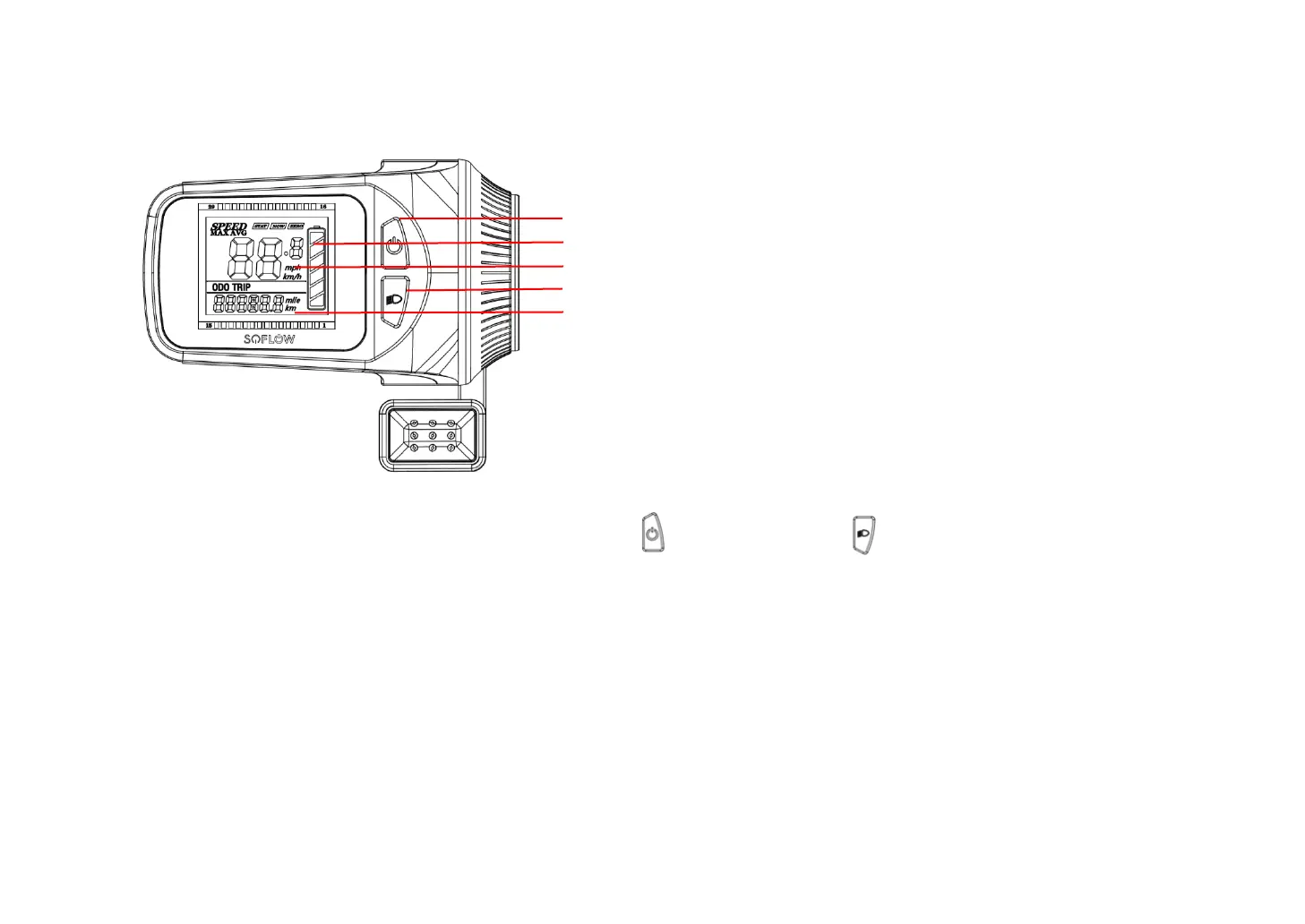
You’ll find the following information on the display on the handle bar:
4.3 Key functions
On the display of your SO6, you will find the power button and the light button . To start the scooter, press and hold
the power button for 2 seconds. Pressing and holding the power button again for 2 seconds will turn the scooter off. Press
the power button shortly, to switch between the modes.
The front- and rear lights are switched on by default whenever you start your SO6. To turn them off, simply press and hold
the light button for 2 seconds. Pressing and holding the button again for 2 seconds will switch them back on.
Press and hold the power button and the light button at the same time, for 2 seconds, to enter setting mode. Switch
between brightness of the display (PO1), kmh/mph (PO2) and auto-switch off setting (PO3) by pressing the power button.
The factor on each setting mode can be changed by pressing the light button.
Power button
Battery power (5 bars = full charge)
Current speed
Light button
Total mileage / trip distance / voltage / time of travel


 To Next Page