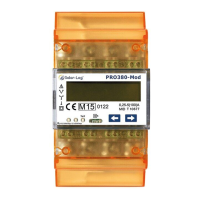
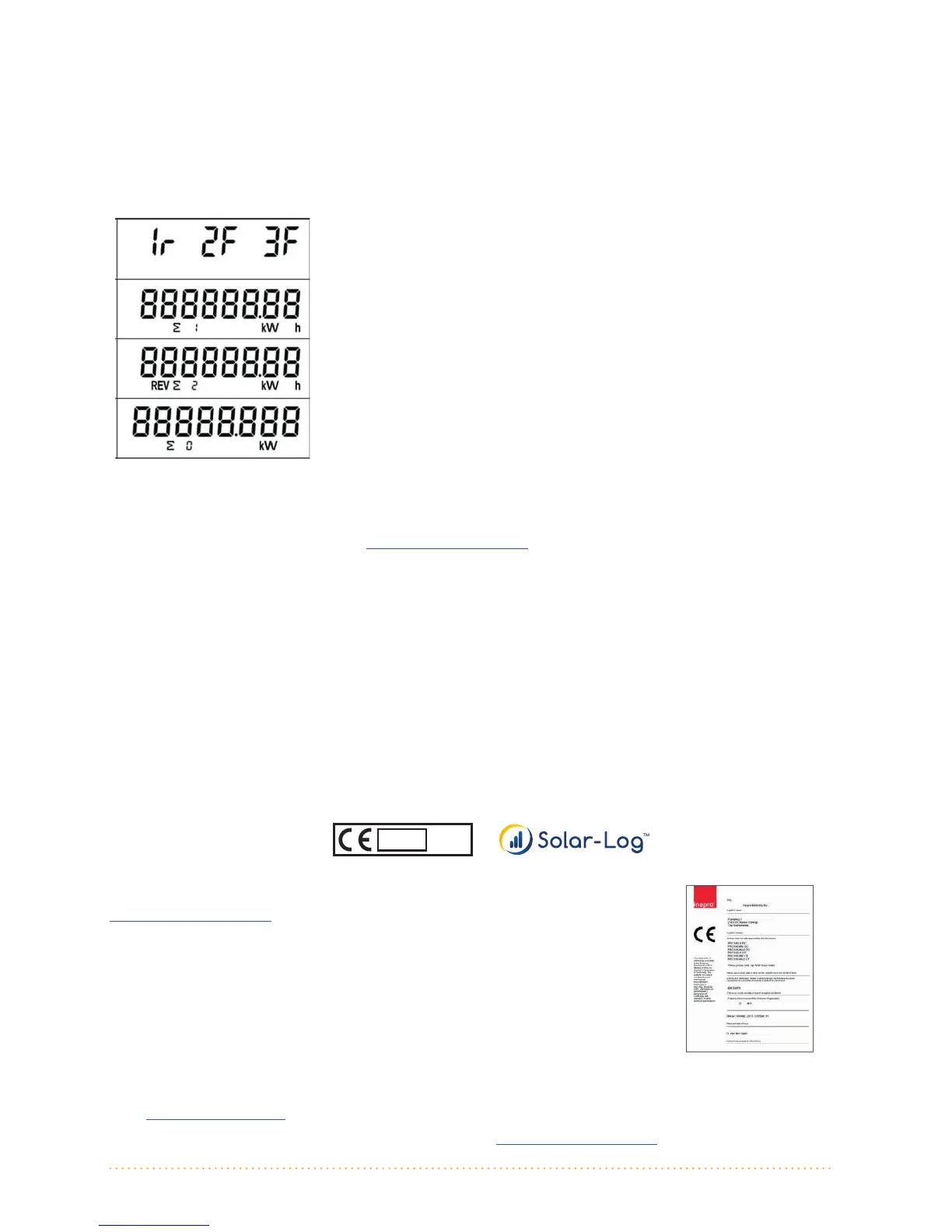
All display values of the meter
Change the meter from the automatically rotating display to the manual display by pressing the keys. Pressing
on the keys here allows all of the available display values to be accessed in sequence. If no keys are pressed
after a short time, the meter reverts back to the automatic display mode.
The following values are displayed successively in the automatically rotating display:
Energy ow direction display per phase 1 2 3
R = Reverse, F = Forward
Active energy (forward) in KWh (OBIS: 1.8.0)
Accumulating
Active energy (reverse) in KWh (OBIS: 2.8.0)
Accumulating
Current output (total)
For a complete overview of all of the display values available in the manual mode, please refer to the technical
descriptions in the download section at www.kdk-dornscheidt.de. (German).
Changing the Modbus address with the sensor buttons on the meter
1. Scroll through the menu by pressing on the left arrow key until "addr 001" is displayed.
2. Press both arrow keys for ve seconds to change the address – the display blinks once when the modica-
tion mode is active.
3. Increase the address value with the right arrow key until the desired address is displayed.
4. Press both arrow keys again for ve seconds to deactivate the modication mode.
5. Deactivation of the modication mode is conrmed with the blinking of the display.
6. If the conrmation blinking does not appear, the device is still in modication mode – try it again.
7. Check the set address by navigating to the section as the gure below 1)
Example of the MID label
The declaration of conformity and certication (EN 50470) you will nd current on:
www.kdk-dornscheidt.de
For questions about the Solar-Log™ or on how to congure the meter in the Solar-Log™, please contact our support
team: support@solar-log.com, or: +49 7428 94 18 660
For questions about the meter, please contact the manufacturer: info@kdk-dornscheidt.com, or: +49 2244 919940
M 15
0122
Solare Datensysteme GmbH • www.solar-log.com • Subject to change without notice. | EN | 11.2016 | Version 1.1
V1.1
TechnischeDaten:
Nennspannung: 230/400VAC
Strom:0,255(100)A
Frequenz:50Hz
Messgröße:Wirkverbrauch,Rücklaufsperre
Genauigkeitsklasse: B
Eigenverbrauch: <10VA<2W
Breite:4TE(70mm)
ImpulsausgangLED: 10.000Imp/kWh,2,5ms
S0–Impulsausgang: 1.000Imp/kWh,25ms
Arbeitstemperatur: 25°Cbis+55°C
Max.rel.Lufeuchte: 75%imMiel,kurzzeig95%
RegistrierteHarmonische: 0,05–0,25kHz
LED:rotblinkend:Bezug>4W,Impulsrate=Verbrauch
Display:6+2Digits(999999,11kWh)
MaximalerLeiterquerschni: Hauptklemmen: max.35mm²
Zusatzklemmen: max.2,5mm²
BaudrateModBus: 9600baud
Anschlussschema:
Zählertyp: PRO380,100A
NachSchaltungstyp1000(DIN43856)
Input„L1,L2,L3 “ ZuleitungseingangPhaseL1,L2,L3
Output„L1,L2,L3“ ZuleitungsabgangPhaseL1,L2,L3
Klemme„N“NeutralleiteranschlussN
Klemmen18,19 S 0Impulsausgang„Bezug“(Kl.18=„+“)
Klemmen20,21 S 0Impulsausgang„Lieferung“(Kl.20=„+“)
Klemme22,23 ModBus–AnschlussKlemme22>A,23>B
Klemme24,25 externeTarifumschaltung(230VAC)
KlemmleistensteckerSolarLog PRO380
KlemmeKlemme
1> 22(A)
4> 23(B)
V1.1
AlleAnzeigewertedesZählers:
DurchDrückenderTastenwechseltderZählervonderautomaschrollierendenAnzeige
indiemanuelleAnzeige.Hierkönnenmiel sTastendruckalleverfügbarenAnzeigewerte
derReihenachaufgerufenwerden.Wird
keinegedrückt,kehrtderZählernachkurzerZeit
wiederindenautomaschenModuszurück.
InderautomaschrollierendenAnzeigewerdennacheinanderdiefolgenden
Werteangezeigt:
FüreinevollständigeÜbersichtallerverfügbarenAnzeigewerteimmanuellen
ModusbeachtenSiebiedieausführlichetechnischeBeschreibungalsDown
loadaufwww.kdkdornscheidt.de.
ÄnderungderModbusAdressemitHilfederSensortastenamZähler:
1. MitderlinkenPfeiltastedurchdasMenübläern,bis„addr001“
angezeigtwird
2. ZurÄnderungderAdressebeide Pfeiltastenfür5secdrücken–Anzeige
blinkt1xauf,wennÄnderungsmod u sakvist.
3. MitderrechtenPfeiltasteAdresswerterhöhen,bisg e wünschteAdresse
angezeigtwird
4. ZumVerlassendesÄnderungsmodusnochmalsbeidePfeiltastenfür5sec
drücken
5. VerlassendesÄnderungsmoduswirddurchblinkendesDisplaysbestägt
6. SolltedieseBestägungnichterfolgenistGerätimmernochimÄnde
rungsmodus–Bestägungnochmalsversuchen
7. KontrolledereingestelltenAdressedurchannavigierenwie1)
EnergierichtungsanzeigeproPhase123
r=Lieferung(Reverse)F=Bezug(Forward)
WirkenergieBezuginKWh(OBIS:1.8.0)
Saldierend
WirkenergieLieferunginKWh(OBIS:2.8.0)
Saldierend
Momentan‐Leistung(Gesamt)


 To Previous Page
 Loading...