SMART GRID ENERGY
2
© 2013 Copyright CACHELAN cachelan.com contactus@cachelan.com All rights reserved SolarVu
®
Installation Guide for AE 500NX Inverter
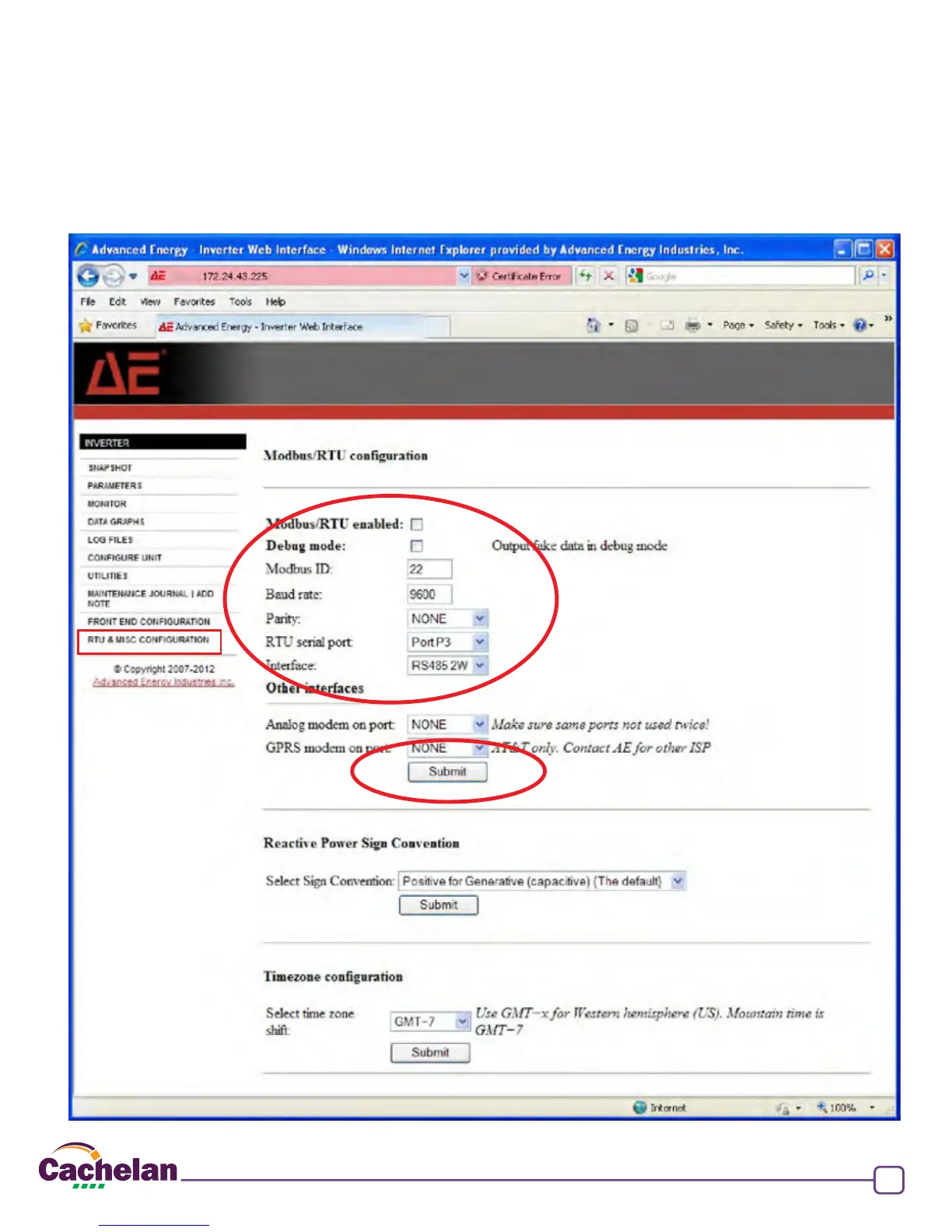
Fig 3 Congure inverter with default ModBus RS485 settings
Congure Inverter with ModBus Settings
After installing the communication wiring, the inverter must be congured with ModBus communication settings to match the K135 gateway
for successful communication to occur. If the inverter ships with its default settings as shown in g 3, which have been programmed into
the K135 gateway, it should begin communicating with SolarVu once a connection is made with no changes required. To check, consult
the AE500 manual section 5 for login using the internal web browser which requires a user name and password provided with the inverter.
Use these default settings
Save when done
Web browser login
URL <https://[unitIPaddress] supplied with inverter
User Name uadmin
Password: 7soman33
Default Communication Settings


 To Next Page