SMART GRID ENERGY
3
© 2013 Copyright CACHELAN cachelan.com contactus@cachelan.com All rights reserved SolarVu
®
Installation Guide for AE 500NX Inverter
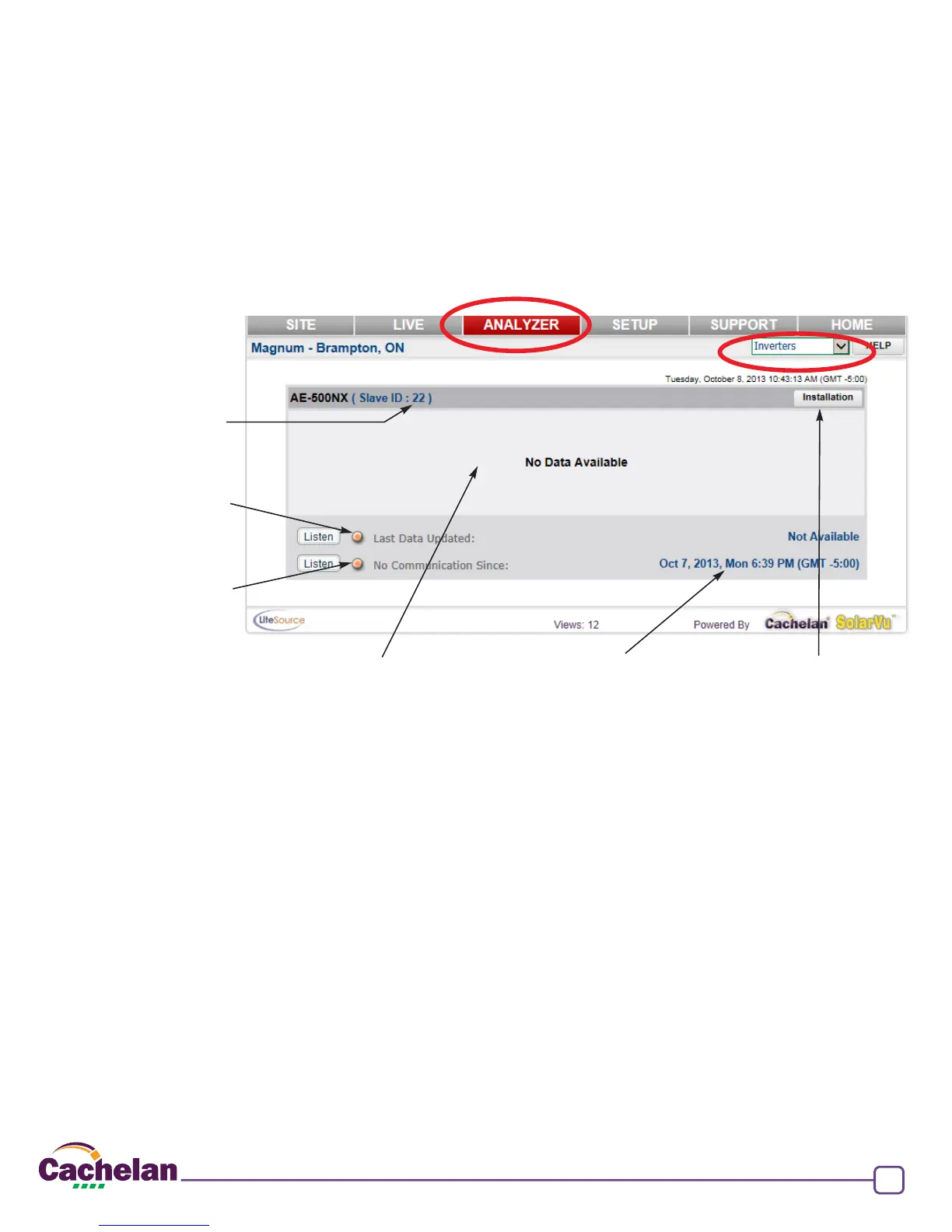
Fig 4 SolarVu Analyzer - Inverter status screen
Last communication time
from K135 Gateway to SolarVu
over internet
Download instructions
Inverter
ModBus slave address
Default = 22
Green = K135 Gateway
communicating with inverter
Data appears here when available
Green = K135 Gateway
internet connection successful
Inverter Status
Once the inverter is connected to the SolarVu K135 gateway, powered on and set up for communications with an internet connection,
data will be sent to the SolarVu server. From a browser, log in to the SolarVu energy portal (URL shown on the K135 gateway label and
conguration sheet) and select ANALYZER --> Inverters. The lower indicator goes green when there is a valid internet connection. Once
the internet connection is made, the upper light will go green if the K135 is able to communicate with the inverter. Ensure the internet is
working rst. Check network settings if the No Communications Since internet indicator does not come on within a few minutes. With the
internet connection working, if the inverter Last Data Updated indicator does not go green, consult the inverter manual section 5 and verify
the communications settings are correct.


 To Next Page