CONSOLEMAS
• i
#68.5/16"x 5/8"
Hex Head Bolt (8 pcs)
#76.5/16"x 18ram x 1.ST
Flat Washer (6 pcs)
#82.5/16"x 1.ST
Split Washer (2 pcs)
#83.5/16"x 19ram x 1.ST
Curved Washer (2 pcs)
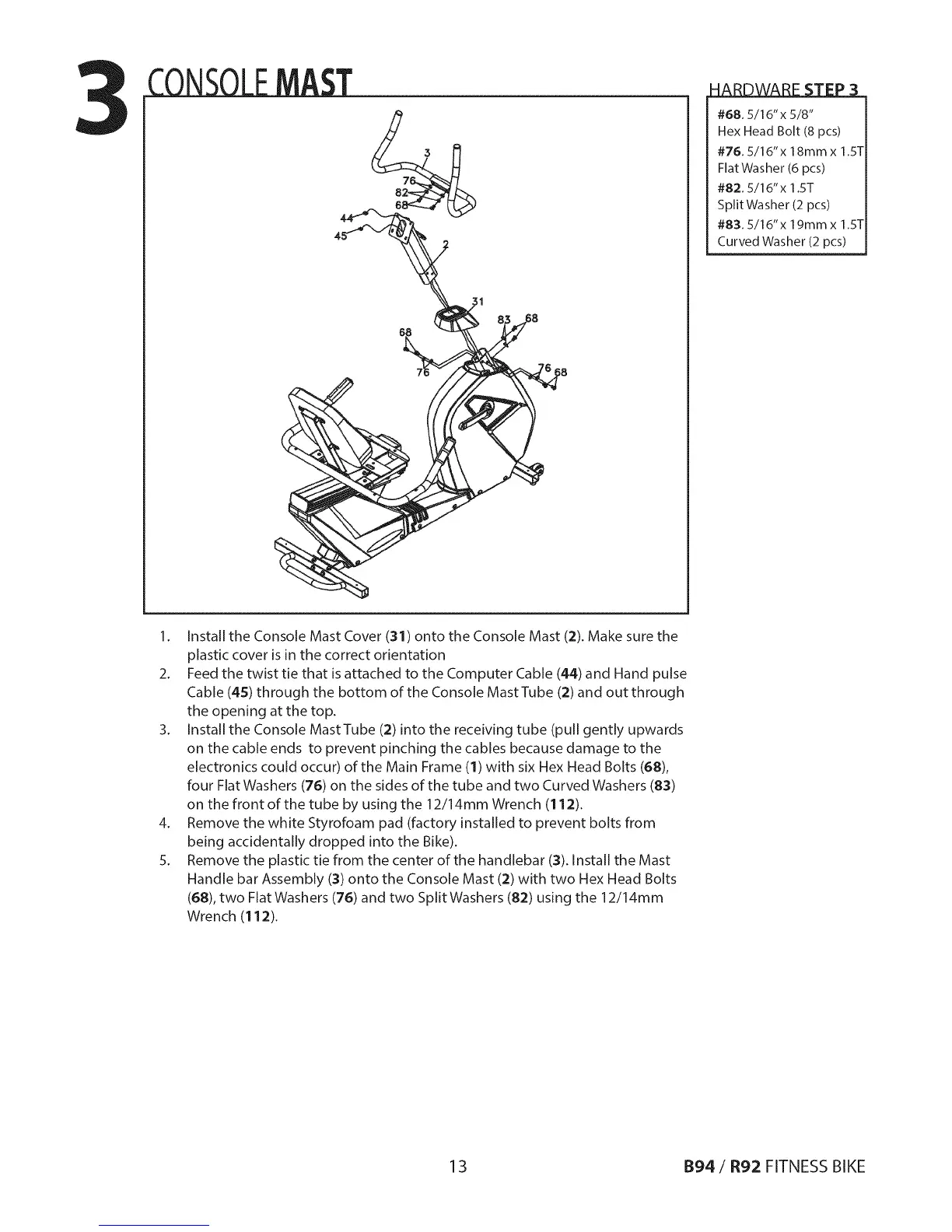
1. Install the Console Mast Cover (31) onto the Console Mast (2). Make sure the
plastic cover is in the correct orientation
2. Feed the twist tie that is attached to the Computer Cable (44) and Hand pulse
Cable (45) through the bottom of the Console Mast Tube (2) and out through
the opening at the top.
3. Install the Console MastTube (2) into the receiving tube (pull gently upwards
on the cable ends to prevent pinching the cables because damage to the
electronics could occur) of the Main Frame (1) with six Hex Head Bolts (68),
four Flat Washers (76) on the sides of the tube and two Curved Washers (83)
on the front of the tube by using the 12/14mm Wrench (11:2).
4. Remove the white Styrofoam pad (factory installed to prevent bolts from
being accidentally dropped into the Bike).
5. Remove the plastic tie from the center of the handlebar (:3).Install the Mast
Handle bar Assembly (3) onto the Console Mast (:2)with two Hex Head Bolts
(68), two Flat Washers (76) and two Split Washers (82) using the 12/14mm
Wrench (112).
13 B94/R92 FITNESS BIKE



 To Next Page