113
132 2 / ....
13g
139 5
i!_i_' i
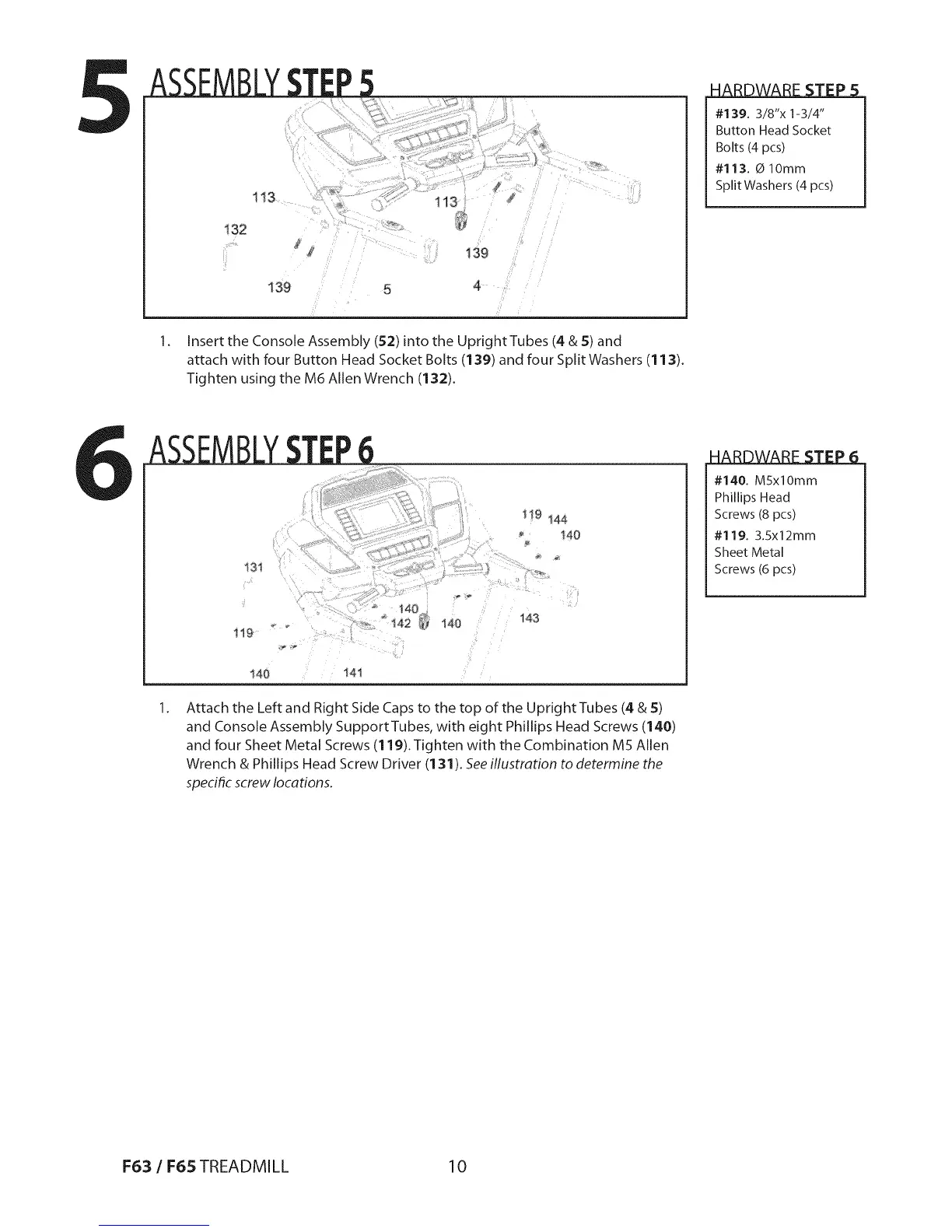
Insert the Console Assembly (52) into the Upright Tubes (4 & 5) and
attach with four Button Head Socket Bolts (139) and four Split Washers (113).
Tighten using the M6 Allen Wrench (132).
• i
#139. 3/8"x 1-3/4"
Button Head Socket
Bolts (4 pcs)
#113. _ lOmm
Split Washers (4 pcs)
1!9 144
140
!40 i41
143
Attach the Left and Right Side Caps to the top of the Upright Tubes (4 & 5)
and Console Assembly SupportTubes, with eight Phillips Head Screws (140)
and four Sheet Metal Screws (119). Tighten with the Combination M5 Allen
Wrench & Phillips Head Screw Driver (131). See iflustration to determine the
specific screw locations.
| i
#140. MSxlOmm
Phillips Head
Screws (8 pcs)
#119. 3.Sx12mm
Sheet Metal
Screws (6 pcs)
1=6:3/ 1=65TREADMILL 10


 To Next Page