15
1
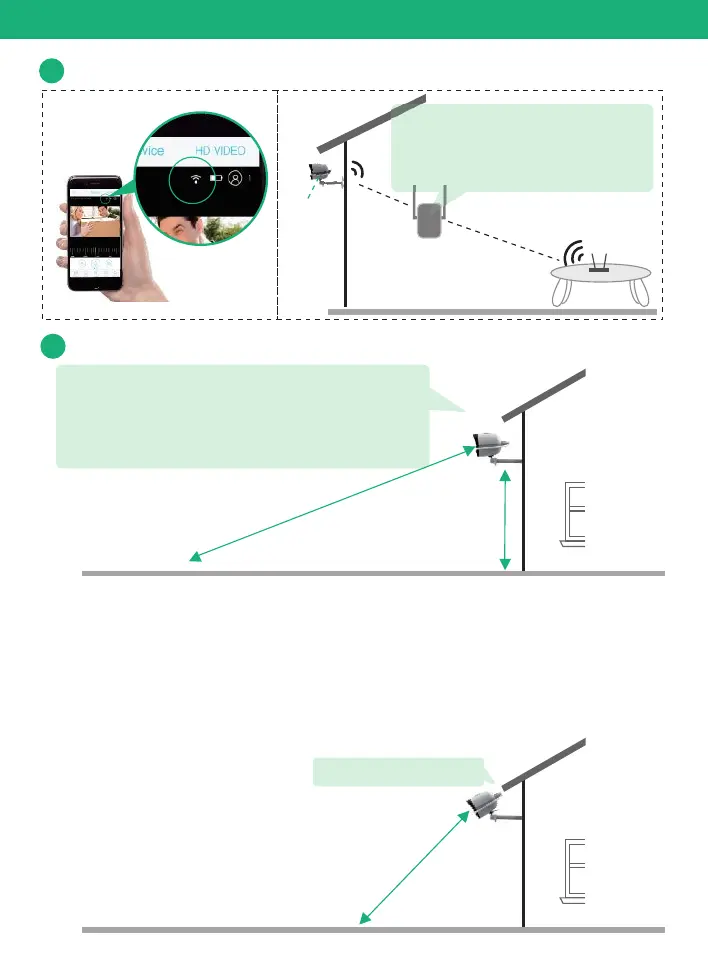
Check your camera signal strength
Camera
Check in App
WiFi extender
Router
Physical Installation
If not satisfied with video smoothness,
and signal strength in App is not strong,
we would suggest adding wifi extender
between the Router and the camera.
2
Recommended height to install the camera
We suggest installing the camera about 8ft.
You may adjust the camera angle physically
according to the live view in your mobile.
to focus your motion area to get the more
accurate motion triggered events.
15 fee
t
8 f
e
e
t
If your camera get numerous motion alerts unexpected
1) Please adjust your camera installation angle a bit down to
focus the motion area.
2) Please change your PIR sensitivity to Low to reduce the PIR
sensitivity.
3) Do not install the camera with nearby bushes,shrubs,
grasses and tree leaves coming into the PIR range.
PIR Se
ns
i
t
i
v
ity ( H
igh
)
8 f
eet
P
IR S
e
nsitiv
it
y ( Lo
w
)
Adjust camera angle


 To Next Page