51
“Timer” button
Using this button you can set the operating time off the fan. You
can set a duration of between 0.5 and 7.5 hours. Each press of the
button increases the time. On the top right of the display, you can see
how many hours have been set, by the sum of the green lit numbers.
After the 7.5 hour setting, pressing the button again turns off all of
the green lights – the timer is switched off again and the fan must be
manually switched off.
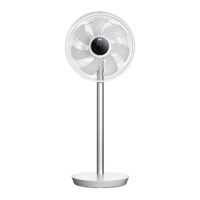
Note: You can tilt the motor housing up or down to set the direction of the air
stream.
Up and down To adjust the motor housing
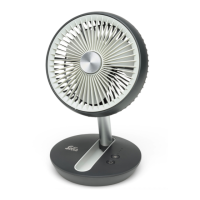
“Timer” button
Oscillation button “Swing”
Speed button “Wind”
“On / Off” button


 To Next Page