
 Need help?
Do you have a question about the Sollatek AVS30 and is the answer not in the manual?
Step-by-step guide for wiring and connecting the AVS30 to mains and appliance.
Key information on fuse, mounting, and supply requirements for the AVS30.
Diagram and explanation of AVS30 input and output terminal connections.
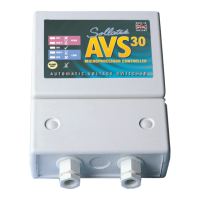
The Sollatek AVS30 Appliance Guard, also known as the AVS30 micro, is a single-phase Automatic Voltage Switcher designed to protect connected equipment from mains power fluctuations. Rated at 30 Amps, this device automatically switches off the equipment when the mains voltage falls outside pre-set acceptable limits. Once the mains power returns to normal, the AVS30 automatically reconnects the equipment after a delay, ensuring the stability of the mains supply. This new version of the AVS30 incorporates a built-in microprocessor, which enhances its functionality with advanced features.
A critical protection feature of the AVS30 addresses the common issue of loss of neutral. In such an event, the single-phase voltage can rise to a three-phase level, potentially exposing equipment to over 400V instead of the standard 230V, which can be catastrophic. The AVS30 is designed to protect against temporary overvoltage conditions, specifically up to 400V (TOV400), safeguarding your appliances from severe damage.
The device features a clear and intuitive display system with five LEDs, arranged in a symmetrical traffic light design, to accurately indicate the status of the AVS30 and the mains supply. A red LED indicates high incoming voltage, signaling that the load is off. A yellow LED indicates that the AVS30 is in a wait state after a high voltage transition, with the load remaining off. A green LED signifies that the mains are normal and the load is on. Another yellow LED indicates a wait state after a low voltage transition, with the load off. Finally, a red LED indicates low incoming voltage, also with the load off. This visual feedback system allows users to quickly understand the operational status and potential issues with the mains supply.
The microprocessor control in the AVS30 introduces several advanced functions, enhancing its versatility and user experience. These include a variable time delay, allowing users to adjust the reconnection delay to suit their specific needs. The device also offers variable low voltage disconnect and high voltage disconnect levels, providing flexibility in setting the protection thresholds. A variable blind time feature determines the response time to undervoltage disconnects, meaning the AVS30 can ignore brief undervoltage conditions. An intelligent time delay further optimizes the reconnection process. All these advanced features can be configured during installation, allowing for tailored protection based on the specific environment and equipment requirements.
For user convenience, the AVS30 includes a reset button on the front panel. Pressing this button will eliminate the current delay time, allowing for immediate reconnection of the load if the mains supply is stable. This is particularly useful when you need to bypass the wait time after a power fluctuation. The five LEDs continue to provide real-time indication of the mains supply status, ensuring transparency in operation.
When operating the AVS30, it is crucial to ensure that the connected load does not exceed the device's 30 Amps rating. The standard voltage limits for the AVS30 are set for a window of 190-260 volts, providing a wide range of protection. The device must be properly wired to both the mains supply and the equipment it is protecting, following the provided wiring diagram for correct installation.
Upon initial power-on, the AVS30 will typically have no output for approximately three minutes while it monitors the mains supply to ensure stability. This "wait time" is a built-in safety measure. However, this wait time can be bypassed by pressing the reset button on the front panel. If a different wait time is desired, it can be adjusted using the potentiometer marked "WAIT." Settings are available in increments up to 10 minutes. Additionally, the WAIT dial can be set to "MAN" (Manual). In manual mode, the AVS30 will not automatically reconnect the mains; reconnection will only occur when the Reset button is pressed. During this manual wait period, the yellow LED indicates that the mains are within acceptable limits, and once the green LED illuminates, the load is connected.
The AVS30 also allows for setting a different blind time if a specific undervoltage disconnect limit is required. The undervoltage blind time means that the AVS30 will ignore any undervoltage conditions that occur within this set period. The device will only switch off if the undervoltage condition persists longer than the blind time, preventing unnecessary disconnections due to momentary dips in voltage. For optimal use, it is recommended to keep the AVS30 switched on continuously and to switch the appliance itself on and off. This practice prevents the activation of the time delay every time the appliance is powered on, ensuring a smoother user experience.
Maintenance features are also integrated into the design. In the upper compartment of the AVS30, a fuse is present (refer to the diagram for location). This fuse is not for the load but serves as a device protection fuse. If the fuse gets damaged, it needs to be replaced with a 0.5A Anti Surge fuse. To access the upper compartment, it is essential to ensure that the AVS30 is NOT CONNECTED TO THE MAINS. The screws must be removed from the back panel. The AVS30 is designed for secure mounting on a wall. This involves placing it over one screw at the top and then using two mounting holes in the terminal compartment to secure it. The supply to the AVS30 must be fitted with a 30A HBC fuse or less, ensuring proper electrical protection for the device itself.
To access the connection terminals, the bottom cover must first be removed. This involves removing the two white caps and then undoing the two screws. Once the bottom cover is off, the two cable glands need to be removed and then re-inserted in such a way that the cable gland is external. The main supply cables should then be inserted through the cable glands of the AVS30 and connected to the connector terminals, following the connection terminals layout diagram. The appliance should then be connected through the cord grip bush and connected to the connector terminals. Finally, the cord grip bushes and the front cover need to be tightened with two screws and screw caps. It is crucial to ensure that all connection terminals are tightened securely to prevent loose connections and potential hazards.
 General
| Model | AVS30 |
|---|---|
| Max Load Current | 30A |
| Frequency | 50/60Hz |
| Cooling | Natural convection |
| Output Voltage | 220V - 240V |
| Protection Type | Over/Under Voltage |
| Over-voltage disconnect | 260V ±5V |
| Under-voltage disconnect | 170V |

 To Next Page