Need help?
Do you have a question about the SoluM SLG-EP101S and is the answer not in the manual?
Safe usage guidelines for RF devices around other electronics and in hazardous environments.
Preventing damage from moisture, temperature extremes, magnetism, and physical impact during storage and operation.
Gateway communication, dimensions, weight, enclosure material, and power requirements.
Radio frequency bands, antenna types, gain, and operating temperature for the Gateway.
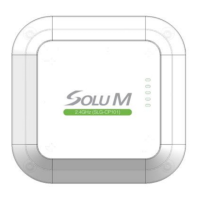
Visual overview of the Gateway's external appearance, showing top, bottom, and side views.
Step-by-step guide for physically mounting the Gateway using plates, brackets, and screws.
Explanation of LED indicators (Network, SIL, TML) and their operational status for troubleshooting.
Process of mapping product information, MAC addresses, and barcodes using a PDA and scanner.
 General
| Model | SLG-EP101S |
|---|---|
| Category | Gateway |
| Connectivity | Ethernet, Wireless |
| Weight | 150 g |
| Wireless Standard | IEEE 802.11 b/g/n |
| Frequency Band | 2.4 GHz |
| Antenna | Internal |
| Ethernet Ports | 1 |


 To Next Page