Copyright © 2013 Somfy SAS. All rights reserved.
Chronis io
11
EN
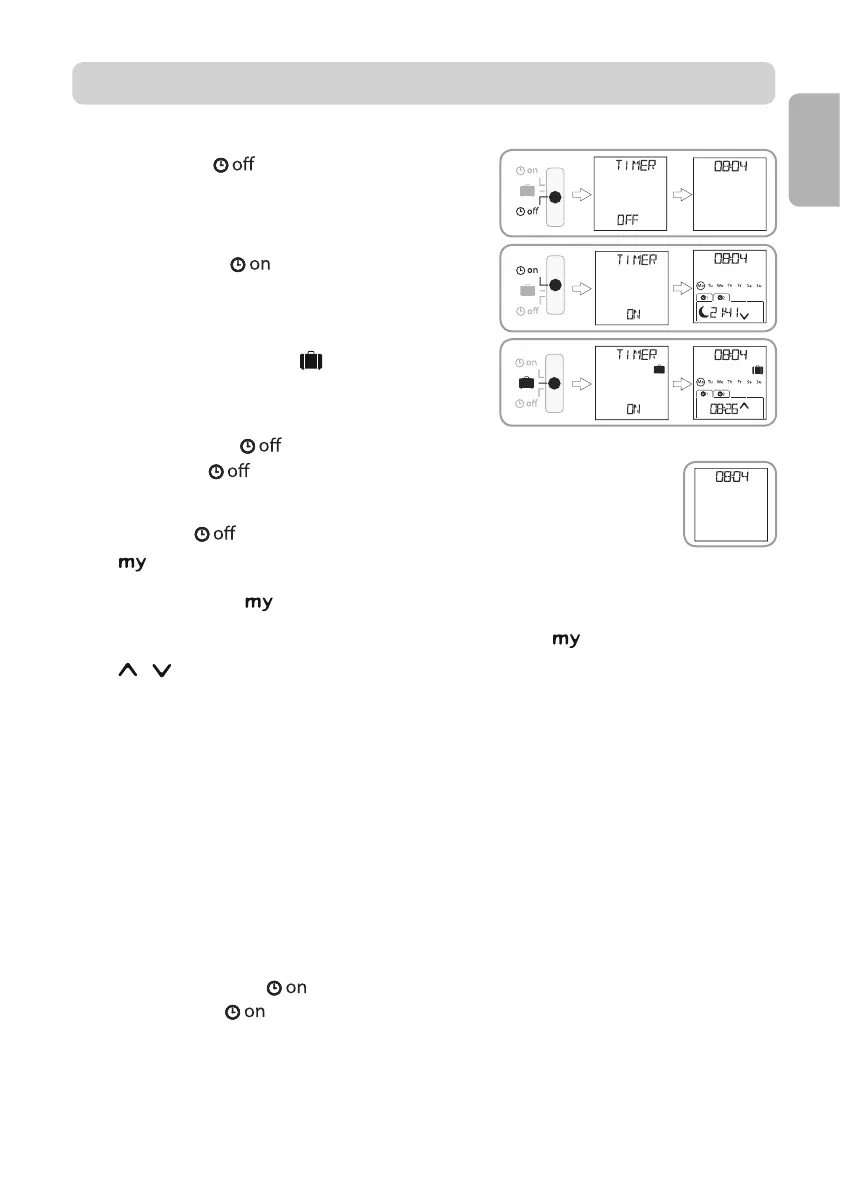
To change mode, move the mode selection cursor:
Manual mode
Automatic mode
Simulated presence mode
7.1. Manual mode
The manual mode
of the Chronis io is used to:
send occasional orders to the associated end-product or end-products.
deactivate automatic order programming.
In manual mode
the current time is permanently displayed.
7.1.1. button
- When the favourite position has been programmed and the end-product or end-products are
: the end-product or end-products move to the corresponding favourite
positions (my).
- When the end-product or end-products are moving, you can press
7.1.2. / buttons
""):
- In "
MODE STD : 1":
Brief press or long press: raise, switch on, open / lower, switch off, close.
- In "
MODE DIM : 2":
Brief press: fully switch on / switch off the lighting or the heating.
Long press (> 0.5 s): increase / reduce the lighting or the heating.
- In "
MODE TILT1 : 3":
Brief press: tilt the slats of exterior venetian blinds or roller shutters with tiltable slats.
Long press (> 0.5 s): Fully raise / lower exterior venetian blinds or roller shutters with adjustable
slats.
- In "
MODE TILT2 : 4":
Brief press: raise / lower the interior venetian blinds.
Long press: tilt slats of interior venetian blinds.
7.2. Automatic mode
The automatic mode of the Chronis io is used to:
send occasional orders to the associated end-product or end-products.
automatically control the associated end-product or end-products by means of automatic orders
programmed according to the days of the week.
- Program the automatic orders for each day of the week (see section "Programming the days of
the week").
7. OPERATION


 To Next Page
 Loading...